
How to Use Jasper AI in 2026: Step-by-Step Guide for Teams
By SM Mehedi Hasan
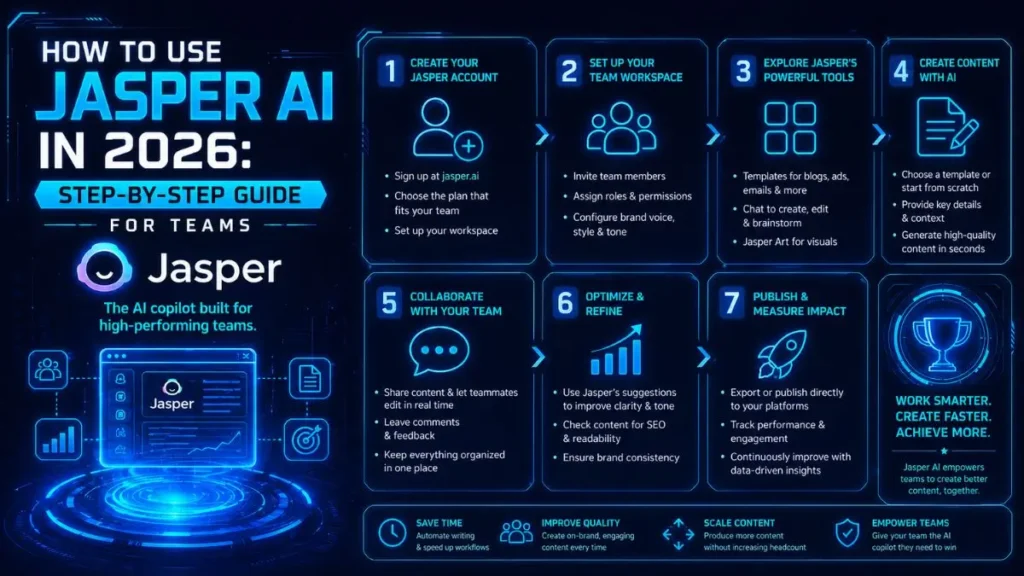
Jasper AI is an enterprise-level content platform built to help teams create blog posts, ad copy, and social content at scale using AI.
You train it on your brand voice, plug in real-time keywords, and rely on its multi-model routing system to generate strong drafts in minutes instead of hours.
If you’re managing a content calendar with limited time or a small team, you already know the pressure. Deadlines pile up. Writers get stretched thin.
Jasper has become one of the most practical ways to maintain consistent output without sacrificing quality. I’ve worked with it since 2023, and what stands out now is how much more structured and team-ready it feels.
It’s no longer about typing a quick prompt and hoping the draft is usable. The 2026 version is clearly built for teams that need speed, alignment, and repeatable quality.
This guide walks you through exactly how I use Jasper to produce content that performs — from initial setup to final SEO checks — so you can confidently decide if it fits your workflow.
Table Of Contents
ToggleWhy Jasper Remains My Go-To Content Engine in 2026
There are plenty of AI writing tools on the market. In practice, most of them work fine for quick one-off drafts. But Jasper stands out because it’s built for scale.
It’s not designed for casual hobby blogging. It’s made for marketing teams, agencies, and growing companies that need to publish dozens of pieces every week while keeping tone and messaging consistent.
What really separates it is customization. You can upload your style guide, define your brand tone, and connect it directly to your SEO process.
That changes everything. The output doesn’t sound like generic AI content. It sounds like your internal team wrote it.
One thing I personally liked during testing is how quickly the tone improves after brand training. For example, when drafting SaaS landing page copy, the second draft already sounded more aligned than robotic.
So if you’re in this situation: less rewriting, more publishing.
The Shift from Simple Prompting to Brand-Aware Workflows
Early AI tools were basically smart autocomplete systems. You’d generate something decent, then spend 20–30 minutes rewriting it so it actually matched your voice. Jasper in 2026 reduces most of that friction.
Once you train it on your brand voice and upload reference documents, it starts adapting automatically. It picks up your preferred sentence rhythm, tone style, and even the types of examples you usually give.
A small but important point: after uploading three strong sample blog posts, the AI stopped overusing generic phrases and began structuring arguments more closely aligned with our internal style.
The result? Drafts feel familiar from the first paragraph. And when you’re publishing at volume, familiarity equals efficiency.
Consistency becomes your competitive edge as readers start to recognize your voice across channels.
Setting Up Your Workspace for Success
Before you generate a single article, spend time setting up your workspace correctly. This step determines how much editing you’ll need later.
Think of it like setting up templates before launching an email campaign. A small investment upfront saves hours downstream.
Your goal here is simple: make Jasper understand how you think, write, and structure content.
Training the AI on Your Unique Brand Voice and Style Guide
Jasper allows you to upload documents that define your brand voice. Don’t skip this.
Here’s what I recommend including:
- Your company style guide
- 2–3 sample blog posts that represent your strongest writing
- Tone guidelines (formal, conversational, technical, analytical, etc.)
- Industry-specific terminology or phrases you consistently use
The clearer your input, the stronger your output.
When I tested this with a B2B tech brand, uploading just two detailed case studies immediately improved terminology accuracy. Instead of explaining basic concepts, the AI began writing at the appropriate level of expertise.
Why this step matters:
You’re teaching the system how to sound like you. Without this, you’ll always be editing for tone.
Pro Tip
A quick hack I found during testing is to upload one “gold standard” blog post and tell Jasper:
“Match the tone, pacing, and structure of this document.”
It dramatically improves first-draft alignment.
Common Pitfalls During Brand Training
- Uploading generic content instead of your best-performing pieces
- Skipping terminology documents for niche industries
- Expecting perfect results without refining examples
If you rush this step, the content will feel average. If you take 30–45 minutes to train properly, the payoff is noticeable.
Integrating Real-Time Market Data and SEO Keywords
Jasper’s 2026 update includes direct integrations with tools like Surfer SEO and Clearscope. That means you can pull keyword data, search intent analysis, and competitor insights directly into your content workflow.
Instead of writing first and optimizing later, you optimize as you draft.
I use this to ensure every blog post is aligned before the first paragraph is finalized.
The AI weaves in target keywords naturally, so you don’t end up stuffing phrases awkwardly.
For example, when targeting a competitive SaaS keyword, I’ll import Surfer’s content score recommendations and let Jasper build around those terms from the beginning.
What this step accomplishes:
You reduce rewrite cycles. SEO alignment happens during creation, not after publication.
Pro Tip
To save time here, import competitor headings first. Then prompt Jasper to identify missing subtopics. It speeds up gap analysis significantly.
Step-by-Step: Crafting a High-Value Blog Post in Minutes
Here’s my actual workflow for producing a 1,500-word blog post using Jasper. The key is treating it like a system, not a random prompt session.
Each step builds logically on the previous one.
1. Research the topic
I start by analyzing the top 10 ranking articles for my target keyword. I’m looking for gaps — sections that feel shallow, questions that aren’t fully answered, or outdated data.
Jasper helps by summarizing competitor content and highlighting common themes. After using it regularly, this speeds up research dramatically, especially when entering a new niche.
Outcome: You walk away with a clear angle, not just a keyword.
2. Generate a structured outline
Next, I feed Jasper my keyword, target audience, and intended angle. It produces a structured outline with H2 and H3 headings.
I never publish this blindly. I review for logical flow, remove fluff, and reorganize sections if needed.
Outcome: A clear roadmap that prevents rambling and keeps the article focused.
3. Draft the introduction
I ask Jasper to write the introduction based on the approved outline. I’m specific: conversational tone, avoid clichés, hook the reader in the first two sentences.
When I tried giving vague instructions, the intro felt generic. Specific constraints produce sharper results.
Outcome: A compelling opening that sets expectations clearly.
4. Expand each section
Now I move section by section. For each heading, I prompt Jasper to write 150–200 words.
I read each section before moving forward. If something feels off, I adjust immediately instead of waiting until the end.
This keeps the tone consistent and prevents large-scale rewrites later.
Outcome: Controlled drafting instead of chaotic bulk generation.
5. Refine and edit
Once the draft is complete, I run it through Jasper’s refinement tools. It checks readability, tightens weak phrasing, and suggests clarity improvements.
One thing I noticed during testing is that the refinement tool works best after structural edits are done. If you run it too early, you’ll end up re-editing.
I also manually review for brand alignment and factual accuracy.
Outcome: Cleaner, sharper content that sounds intentional.
6. Final SEO check
Finally, I use the integrated SEO tools to confirm keyword placement, meta description alignment, and readability scores.
If something feels forced, I adjust manually.
Automation is helpful, but final judgment should still be human.
Outcome: An optimized, publication-ready draft.
Total time: 20–30 minutes for a draft that’s ready for publishing or light final review.
Advanced Features I Actually Use Daily
Jasper comes packed with features. Put simply, you don’t need all of them to see results. Most teams get 80% of the value from a small set of core tools.
These are the ones I consistently rely on — not because they sound impressive, but because they actually improve workflow and output quality.
In My Experience: Leveraging Multi-Model Routing for Better Accuracy
Multi-model routing is one of Jasper’s smartest upgrades. Instead of running every request through the same AI engine, it automatically chooses the most suitable model for the task.
That sounds technical, but here’s what it means in practice:
- Writing a technical comparison article? It routes to a model optimized for factual structure and depth.
- Drafting short social captions? It switches to a model better at punchy, engagement-driven language.
When I tested this in early 2026, the difference was noticeable. Especially on complex topics. The drafts had fewer factual inconsistencies, a tighter structure, and a more natural flow.
What stood out during testing was how much less I needed to fact-check minor claims. Not zero oversight — you still need that — but significantly fewer “Where did that come from?” moments.
Why this matters:
Accuracy reduces editing time. Fewer corrections mean faster publishing cycles.
Pro Tip
A quick hack I found during testing is to clearly define the content type in your prompt (e.g., “technical breakdown for B2B buyers” vs. “engaging LinkedIn post”). The routing system performs better when the intent is explicit.
Common Pitfalls with Multi-Model Routing
- Writing vague prompts and expecting the system to guess context
- Switching tone mid-article without clarifying format
- Assuming it removes the need for fact-checking
Multi-model routing improves precision — it doesn’t replace editorial review.
Automated Campaign Generation Across Multiple Channels
Jasper’s campaign mode is where things get interesting for teams.
Instead of generating one asset at a time, you define the campaign goal first.
Then Jasper creates aligned content across multiple channels — blog posts, email sequences, social captions, even ad copy — all built around the same messaging framework.
The process is simple:
- Define the objective (product launch, webinar, feature update, etc.).
- Set the target audience and tone.
- Let Jasper generate cross-channel assets.
- Review and refine before publishing.
I use this mostly for product launches. Before this feature, I’d write the blog post first, then adapt it manually into emails and social posts. That took hours and usually introduced slight tone inconsistencies.
Now I generate the full campaign structure in one go, then fine-tune each asset.
For example, during a SaaS feature release, I built the blog, three LinkedIn posts, and an email sequence in a single session — then spent time polishing instead of drafting from scratch.
What this step accomplishes:
Message alignment. Your audience hears the same core narrative everywhere.
Pro Tip
To save time here, finalize your positioning statement before generating assets.
If the core message changes mid-campaign, you’ll have to regenerate everything.
Pros and Cons: The Honest Reality of Using Jasper AI
No tool is perfect. If you’re evaluating Jasper seriously — especially from an investment standpoint — you need a balanced view.
Pros:
- Deep brand customization — Once trained, the AI genuinely feels like an extension of your team. The tone alignment improves significantly after setup.
- Fast output for high-volume content needs — If you’re producing 10+ pieces weekly, the time savings add up quickly.
- Strong SEO integration — Real-time keyword alignment reduces post-draft optimization work.
- Multi-channel campaign generation — This alone can save several hours per launch cycle.
- Consistent updates — The platform evolves frequently, which keeps it competitive in a fast-moving AI space.
Cons:
- Pricing can be steep — For solo creators or small startups, the cost may feel heavy compared to lighter tools.
- Initial setup requires time — Brand training isn’t optional. You need to invest a few hours upfront to see real quality improvements.
- Prompt quality still matters — If your instructions are vague, output can require significant editing. AI amplifies clarity — it doesn’t fix unclear thinking.
- English-first optimization — From what I’ve seen, English content performs strongest. Other languages are usable but not equally refined.
Common Mistakes New Users Make
- Jumping straight into content generation without configuring brand voice
- Treating it like a one-click article machine
- Evaluating output quality before completing setup
If you skip the foundation, you’ll think the tool is average. If you configure it properly, the results are very different.
Final Verdict: Who Should Invest in Jasper This Year?
Jasper makes the most sense for content teams producing at least 10+ pieces per week. At that volume, speed and consistency aren’t optional — they’re operational requirements.
If you’re publishing occasionally or running a solo blog, the cost may not fully justify the investment. There are more affordable tools that handle basic drafting just fine.
But if you’re managing a structured content calendar, coordinating multiple writers, or scaling an agency operation, Jasper starts to feel less like a writing assistant and more like infrastructure.
From what I’ve seen in real-world workflows, the real value shows up when teams stop thinking in single articles and start thinking in systems. Jasper supports repeatable production. It standardizes tone.
It reduces editing cycles. That’s where the ROI compounds.
It’s not just a writing tool — it’s a content production system.
My recommendation is simple: use the free trial strategically. Don’t just generate random posts.
Upload your brand materials, configure tone properly, and test a full workflow — outline to SEO check. If the brand voice training clicks for your use case, you’ll notice the difference quickly.
Frequently Asked Questions
Yes — if you’re producing high-volume content and care about brand consistency. The time savings alone can justify the cost for teams publishing weekly. For casual users or occasional bloggers, it’s probably more than you need.
The key question isn’t “Is it good?” It’s “Will I use it enough to justify the investment?”
No.
It accelerates writers. It doesn’t replace them.
Jasper handles drafting, structure, and initial optimization well. But strategy, nuance, fact validation, and brand storytelling still require human oversight. The strongest results happen when skilled writers use it as a multiplier.
Think of it as giving your team leverage — not automation in place of expertise.
Yes — especially if you upload reference materials and train the AI on your terminology.
When I tested it with SaaS and B2B tech content, the output quality improved significantly after uploading product documentation and case studies. Without that context, it stayed surface-level. With it, the depth increased noticeably.
The result should look like this: industry-accurate terminology, fewer simplified explanations, and content that matches your audience’s knowledge level.
Plan for 2–3 focused hours.
That includes:
- Uploading brand voice documents
- Configuring tone preferences
- Testing outputs
- Refining example prompts
If you rush this step, you’ll spend more time editing later. If you invest upfront, your future drafts become dramatically smoother.
What this means for you: setup time directly impacts long-term efficiency.
Expecting perfect output without proper configuration.
Jasper is powerful, but it responds to the quality of your setup. If you skip brand training, don’t define the audience clearly, or write vague prompts, the content will feel generic.
The tool rewards clarity.
Treat it like a system you configure — not a magic button — and you’ll get far better results.

Is an SEO Specialist and AI Tools Researcher with over 4 years of hands-on experience in search engine optimization. As the founder of Smart AI Helper Pro, he tests and reviews AI writing, SEO, and marketing tools to help creators and business owners grow faster with practical, research-backed strategies.
