
10 Best AI Tools for YouTubers 2026 (Script to Viral Video)
By SM Mehedi Hasan
This post contains affiliate links. If you make a purchase, I may earn a commission at no extra cost to you.
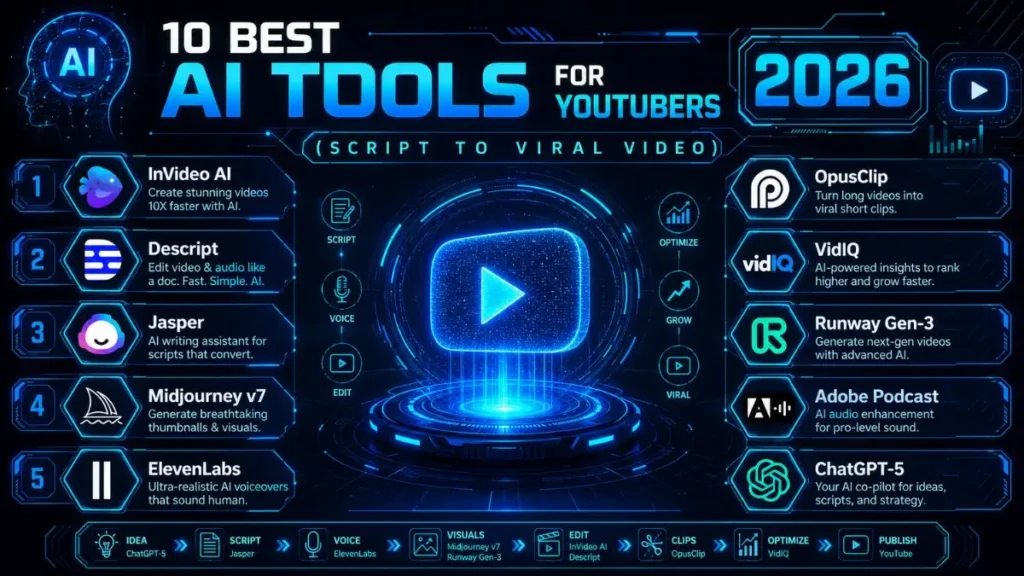
The best AI tool for YouTubers in 2026 is InVideo AI—it can generate a publish-ready video from a simple text prompt in just a few minutes.
The catch? Its native voice options still lag behind specialized tools like ElevenLabs. So, most serious creators don’t stick to one AI tool—they combine two or three for a smoother workflow.
🏆 Best Overall: InVideo AI
💰 Best Value: VidIQ
⚡ Best for Voiceovers: ElevenLabs
However, choosing the best AI tool depends on your channel’s unique needs. For instance, a faceless automation channel demands different features than a channel built on talking-head videos.
To help you make the right choice, I tested these tools across genuine YouTube workflows: writing scripts, editing videos, creating thumbnails, and tracking video performance.
From this hands-on experience, I narrowed the list to ten tools that make a real difference for creators in 2026—whether you’re running a solo channel or managing a faceless operation.
Table Of Contents
ToggleQuick Comparison: Price vs. Primary Use Case
| Tool Name | Starting Price | Exclusive Deal / Offer |
|---|---|---|
| InVideo AI | $25/month | 10 mins AI video/week (Free) |
| Descript | $24/month | 1 hr transcription/mo (Free) |
| Jasper | $39/month | 7-Day Trial + 10K Credits |
| Midjourney | $10/month | 3.3 hr Fast GPU time/mo |
| ElevenLabs | $5/month | 10,000 characters free/mo |
| OpusClip | $19/month | 90 mins video upload/mo |
| VidIQ | $10/month | Free Browser Extension |
| Runway Gen-3 | $15/month | 125 credits (Free Trial) |
| Adobe Podcast | Free | Enhance Speech (Free) |
| ChatGPT | $20/month | Access to GPT-5 & Plus |
How to choose-
If you’re just starting out and working with a tight budget, choose VidIQ for strengthening your content strategy and Adobe Podcast to enhance your audio quality.
Both offer strong free plans, so you can immediately use them to improve your work without spending a dime. Next, as your needs expand, consider exploring their premium options or complementary tools to further elevate your workflow.
On the other hand, for faceless automation channels, combining InVideo AI and ElevenLabs delivers efficiency. One manages rapid video creation, while the other provides high-quality narration—making this pairing especially effective at scale.
Alternatively, creators focused on premium quality often find greater value in a different stack. Descript, Runway Gen-3, and Jasper work well together when you prioritize stronger scripting, precise editing, and cinematic visuals.
Why Trust These Recommendations?
This list isn’t pulled from a random roundup of sponsored tools. Each platform here was tested hands-on, from writing scripts and editing footage to designing thumbnails and tracking video performance.
One thing that stood out during testing was how differently these tools perform depending on the type of content you create. Some tools look impressive in demos but become slow or limiting once you’re publishing consistently.
As a result, the verdicts below focus on real-world use rather than vendor marketing claims. You’ll see honest pros, realistic drawbacks, and a clear answer on whether each tool actually deserves a spot in your creator stack.
1. InVideo AI — Best for Rapid Video Generation from Text
InVideo AI can turn a simple text prompt into a fully edited video.
Voiceover, B-roll footage, captions, and background music are generated automatically.
In 2026, it became one of the most widely used tools for faceless YouTube channels that need to publish consistently without managing a camera setup or production team.
Something worth mentioning: the speed is what really stands out.
You can go from a simple video idea to a near-complete draft in minutes. For example, entering a prompt like “Top 5 AI tools for freelancers” can instantly generate a structured video with scenes already arranged.
Key Features
- Text-to-video generation with scene-by-scene control
- Built-in AI voiceover supporting 50+ languages
- Automatic caption generation and brand kit integration
- Direct export in YouTube-ready formats
Who It’s Best For
This tool works best for:
- Solo creators running faceless automation channels
- Educators producing explainer content.
- Marketers who need to publish multiple videos per week without hiring a production team
Pros
- The fastest time from idea to finished video is currently available.
- Large template library covering multiple content niches
- Simple interface that doesn’t require editing experience
Cons
- Built-in voices are good, but still behind ElevenLabs in realism.
- B-roll clips can sometimes repeat across similar topics.
- Limited detailed control over transitions and pacing
💰 InVideo AI
Starting: $25/mo (Plus Plan) or $20/mo (Annual).
- Current Deal: 10 mins AI video/week (Free with watermark).
- 👉 Create Video with InVideo
Expert Verdict
For faceless YouTube channel strategies, InVideo AI is incredibly difficult to beat. It’s not meant to replace high-budget productions or complex editing software. But when your goal is consistent publishing volume, this tool dramatically reduces production time.
After using it regularly, creators who post multiple videos per week benefit the most. It removes the slowest part of video production—scene and visual assembly—so you can focus more on ideas and content strategy.
2. Descript — Best for Text-Based Editing and Overdubbing
Descript approaches video editing in a completely different way. Instead of working on a traditional timeline, it treats your video like a document. You edit the transcript, and the video automatically updates to match.
It also includes an overdub feature that lets you clone your own voice. That means you can fix mispronunciations or change a line without recording the entire segment again.
For example, if you accidentally say “2025” instead of “2026” in a video, you can simply edit the text—and the corrected audio is generated instantly.
Key Features
- Transcript-based editing for video and podcasts
- AI voice cloning for seamless overdubs
- Built-in screen recording with automatic editing tools
- Automatic removal of filler words like “um” and “uh.”
Who It’s Best For
This tool is particularly useful for:
- Talking-head YouTubers
- Online educators recording tutorials
- Podcasters are producing video versions of their episodes.
Anyone who records themselves regularly will appreciate how much time this saves during editing.
Pros
- Eliminates the need for traditional timeline editing
- The overdub feature reduces the need for re-recording.
Clean interface designed for collaboration
Cons
- Rendering can slow down on longer video files.
- Voice clone accuracy depends heavily on audio quality.
- Less useful for creators who don’t appear on camera
💰 Descript
- Starting: $15/mo (Creator) or $30/mo (Pro).
- Current Deal: 1 hr transcription/mo free for starters.
- 👉 Edit Audio/Video with Descript
Expert Verdict
For on-camera creators, Descript can dramatically reduce editing time.
One thing I noticed when using it is how quickly you can clean up rough recordings.
Instead of scrubbing through a timeline searching for mistakes, you simply edit the transcript.
That alone can cut editing time in half for many YouTubers, which easily justifies the subscription cost.
3. Jasper — Best for High-Converting Scripts and SEO Titles
Jasper has grown far beyond its early reputation as a blog-writing assistant.
By 2026, it will have become one of the more capable AI tools for YouTubers who want scripts that capture attention immediately and titles that perform well in search results.
What this means for creators is simple: instead of staring at a blank page, trying to structure a video, you can start with frameworks designed to hook viewers in the first 30 seconds.
One thing that stood out during testing is how naturally the platform structures openings. For example, if you’re writing a video about “Top AI tools for freelancers,” Jasper will often suggest a hook that immediately sets up curiosity or a problem viewers want solved.
Key Features
- YouTube-focused script templates built around proven hook frameworks
- SEO title and description generator integrated with Surfer SEO
- Brand voice training so your content maintains a consistent tone.
- Long-form editor designed for full YouTube episode scripts
Who It’s Best For
This tool is particularly valuable for:
- Content strategists managing multiple channels.
- Faceless channel operators producing scripted content
- Creators who struggle with scripting or want a stronger storytelling structure to improve viewer retention
Pros
- Scripts follow proven storytelling structures right out of the box.
- Integration with Surfer SEO helps titles perform better in search.
- Brand voice training keeps output consistent across a team.
Cons
- Higher pricing compared to basic AI writing tools.
- Generated text still needs editing to remove occasional AI-style phrasing.
- Focuses purely on writing—no visual generation features
💰 Jasper (Pro)
- Starting: $69/mo (Monthly) or $59/mo (Annual).
- Current Deal: 7-Day Free Trial (Test AI marketing agents).
Expert Verdict
For creators who treat YouTube as a search-driven platform, Jasper can be extremely valuable.
From consistent daily use, the title generation alone can make a noticeable difference. Stronger titles often translate into better click-through rates, and that’s one of the easiest ways to improve overall channel performance.
4. Midjourney v7 — Best for Custom High-Engagement Thumbnails
Thumbnails play a huge role in whether someone clicks on your video or scrolls past it.
Midjourney v7 has become one of the most powerful AI image generation tools available in 2026, capable of producing cinematic visuals that would normally require expensive design work or custom photography.
In practice, this means creators can generate original thumbnail art rather than relying on stock images.
A quick example: if you’re making a video about “AI tools replacing jobs,” Midjourney can generate dramatic cinematic visuals—something that would normally take hours in Photoshop.
Key Features
- Photorealistic image generation from detailed prompts
- Style consistency across an entire thumbnail series
- High-resolution exports suitable for thumbnail A/B testing
- Reference image support for character or brand consistency
Who It’s Best For
This tool is ideal for:
- Creators who rely heavily on custom thumbnail designs
- Entertainment or storytelling channels
- Faceless channels that cannot use the creator’s face in thumbnails
Pros
- Image quality now rivals or surpasses most stock photo libraries
- Highly flexible across styles—photorealistic, illustrated, cinematic
- Significantly faster generation compared to earlier versions
Cons
- Consistent results require some prompt experimentation.
- Commercial licensing rules can sometimes be unclear.
- No direct integration with YouTube or common design tools
💰 Midjourney v7
- Starting: $10/mo (Basic Plan) or $8/mo (Annual).
- Current Deal: 3.3 hr Fast GPU time/mo included in Basic.
- 👉 Generate Art with Midjourney
Expert Verdict
For faceless channels, Midjourney is extremely powerful. On-camera creators may see it as optional at first.
But once you start experimenting with custom thumbnails and tracking performance, the improvement in click-through rate can be surprisingly noticeable. That’s often the point where creators realize how much thumbnails influence growth.
5. ElevenLabs — Leading Tool for Hyper-Realistic AI Voiceovers
ElevenLabs continues to set the standard for AI-generated voiceovers in 2026. The voices sound remarkably natural, with realistic pacing, subtle emotional tone, and support for multiple languages.
For viewers listening to narration, the difference between these voices and most built-in AI voices is immediately noticeable. What stood out during testing is how well the platform handles tone changes.
For example, you can adjust pacing or emotional intensity sentence by sentence, which makes narration feel far more human.
Key Features
- Library of 3,000+ voices covering different accents, ages, and tones
- Voice cloning from 1–3 minutes of audio
- Emotion and pacing control for individual lines
- API access for automated video production workflows
Who It’s Best For
This tool works particularly well for:
- Faceless YouTube channel operators
- Course creators are producing narrated lessons.
- Creators are building automated content pipelines that require consistent narration.
Pros
- Most natural-sounding AI voices are currently available.
- Ability to clone your own voice for scalable content production
- Emotion controls help narration feel more engaging.
Cons
- Costs increase quickly for high-volume production.
- Voice cloning requires a clean recording sample for the best results.
- The free plan is limited and usually not enough for consistent publishing.
💰 ElevenLabs
- Starting: $5/mo (Starter Plan).
- 👉 Clone Voice with ElevenLabs
Expert Verdict
For any channel that relies on narration, ElevenLabs is one of the most valuable tools available.
Something worth mentioning: once you compare these voices to typical built-in AI narration, the quality difference becomes obvious. That improvement alone can make videos feel far more professional to viewers.
6. OpusClip — Best for Repurposing Long-Form Content into Shorts
OpusClip analyzes your long-form videos and automatically identifies the most engaging segments—typically 30-90 seconds. It then converts those moments into ready-to-post short clips, complete with captions and a virality score.
For creators trying to stay active across multiple platforms like YouTube Shorts, TikTok, and Instagram Reels, this can dramatically simplify the workflow.
One thing I noticed while testing it is how quickly it can turn a single long video into several short clips. For example, a 15-minute tutorial might yield five or six short segments already formatted for vertical platforms.
Key Features
- AI clip selection based on engagement prediction scores
- Auto-generated captions with animated text styling
- Reframing tool that converts horizontal 16:9 content into a vertical format
- Batch processing is designed for high-volume channels.
Who It’s Best For
This tool works especially well for:
- Long-form YouTubers who want to extend their reach into short-form platforms
- Creators publishing podcasts or interviews
- Channels producing educational or commentary-style content
Instead of manually scrubbing through videos to find highlight moments, the tool automatically surfaces those clips.
Pros
- Can save 3–5 hours of manual editing per video
- Virality scoring helps identify which clips are worth posting first.
- Caption generation quality is consistently strong.
Cons
- AI clip selection sometimes misses genuinely strong moments.
- Less manual control compared to traditional editing software
- Subscription costs can add up if you’re already paying for several creator tools.
💰 OpusClip
- Starting: $15/mo (Starter) or $29/mo (Pro).
- Current Deal: 90 min free Pro trial (No credit card required).
Expert Verdict
For creators with an active short-form distribution strategy, OpusClip delivers significant time savings.
From what I’ve seen in real workflows, the biggest benefit is speed. Instead of manually cutting clips from a long video, you can quickly review the AI suggestions and select the best ones to publish.
7. VidIQ — Best for Real-Time Trend Prediction and Keyword Research
VidIQ acts as the analytics layer for your YouTube channel. It helps creators understand what people are searching for and which topics are gaining traction.
In 2026, its AI-powered trend alerts and keyword scoring system make it easier to identify content ideas before they become saturated.
What stood out during testing is how early some of these alerts appear. For example, if a topic begins gaining search momentum, VidIQ often surfaces it several days before it becomes widely competitive.
Key Features
- Real-time trend alerts based on search velocity
- Keyword research with competition and opportunity scoring
- AI-generated title and description suggestions
- Channel audit tool with growth recommendations
Who It’s Best For
This tool is valuable for nearly every type of creator:
- Beginners learning how YouTube search works
- Growing channels looking to improve topic selection.
- Established creators who rely on data-driven publishing decisions
Instead of guessing what to post next, the platform helps you prioritize ideas with measurable demand.
Pros
- The free plan provides meaningful functionality.
- Trend alerts can reveal promising topics early.
- Direct integration inside the YouTube interface
Cons
- Many advanced analytics features require a paid plan.
- Data accuracy can vary for extremely niche topics.
- The interface may feel overwhelming for creators new to analytics.
💰 VidIQ
- Starting: $7.50/mo (Pro Plan) or $5/mo (Annual).
- Current Deal: Free Browser Extension with basic SEO metrics.
- 👉 Grow YouTube with VidIQ
Expert Verdict
VidIQ remains one of the most essential tools for YouTube growth. One thing I noticed: creators who consistently check keyword scores and trend alerts tend to choose stronger video topics over time.
That alone can significantly improve channel performance. Starting with the free plan is usually enough for beginners. Once you’re publishing regularly, upgrading unlocks deeper insights that can guide your content strategy.
8. Runway Gen-3 — Best for Cinematic AI B-Roll and Visual Effects
Runway Gen-3 generates short cinematic video clips from text prompts or reference images.
For creators who rely on storytelling or documentary-style visuals, this tool functions almost like a lightweight visual effects studio—without requiring expensive production equipment or advanced editing software.
One thing I personally noticed while experimenting with it is how effective it can be for generating atmospheric B-roll. For instance, a prompt like “futuristic city skyline at night with flying drones” can produce a usable cinematic clip within minutes.
Key Features
- Text-to-video and image-to-video generation
- Motion control and camera angle customization
- AI-powered background removal and scene compositing
- Character consistency across multiple generated clips
Who It’s Best For
This tool is particularly useful for:
- Documentary-style YouTube channels
- Travel and history creators
- Sci-fi or storytelling-focused content producers
These types of channels often require large amounts of B-roll footage, which can otherwise be expensive or difficult to obtain.
Pros
- Visual quality often rivals real footage for many use cases.
- Camera control features allow detailed creative direction.
- Frequent model updates improve results over time.
Cons
- Video generation takes longer than image generation tools.
- Each generated clip is typically limited to around 10 seconds.
- Requires creative experimentation to achieve the best results
💰 Runway Gen-3
- Starting: $15/mo (Standard Plan).
- Current Deal: 125 one-time credits for free testing.
- 👉 Generate Video with Runway
Expert Verdict
For cinematic or documentary-style channels, Runway Gen-3 can be incredibly powerful.
For straightforward talking-head content, however, it’s more of a supplementary tool. Many creators use it selectively—for example, generating short intro sequences, transitions, or visual storytelling moments.
9. Adobe Podcast — Best for Studio-Quality Audio Cleanup
Adobe Podcast uses AI to clean up audio recordings by removing background noise, echo, and room reverb.
In practice, the difference can be dramatic. You can upload a recording captured on a basic laptop microphone, and the processed version often sounds closer to what you’d expect from a studio setup.
One thing that stood out during testing is how forgiving the tool is with poor recordings. For example, if you recorded a voiceover in a room with noticeable echo, the enhancement process can significantly smooth it out without requiring any additional editing.
Key Features
- AI-powered background noise and echo removal
- Mic check tool for real-time recording feedback
- Fully web-based—no software installation required
- Core enhancement features available on the free plan
Who It’s Best For
This tool works especially well for:
- Creators recording videos from home
- Podcasters working from a home office
- Anyone without access to a sound-treated recording environment
Even simple setups—like recording narration with a USB mic—can benefit noticeably from the enhancement process.
Pros
- Free plan includes everything most solo creators need
- Works on previously recorded audio—no need to re-record
- Results remain impressively consistent, even with lower-quality source audio.
Cons
- Audio editing capabilities are limited beyond enhancement.
- Not a replacement for a full digital audio workstation (DAW)
- Processing time can increase for longer recordings.
💰 Adobe Podcast
- Starting: $9.99/mo (Full access).
- Current Deal: Free Enhance Speech (Daily upload limits apply).
- 👉 Clean Audio with Adobe Podcast
Expert Verdict
For creators recording outside a professional studio, Adobe Podcast can make an immediate difference.
Worth pointing out: audio quality often has a bigger impact on viewer retention than many creators expect. Cleaning up background noise and echo can instantly make a video feel more polished—even if the recording setup is simple.
10. ChatGPT-5 — Best for Strategic Channel Planning and Audience Personas
ChatGPT has become one of the most versatile AI tools available in 2026.
For YouTubers, its biggest strength isn’t video production—it’s strategic planning. The tool can help creators build content calendars, define audience personas, generate hooks, and evaluate video ideas before production even begins.
From what I’ve seen in real workflows, this planning stage is where many creators save the most time. Instead of guessing which ideas might perform well, you can quickly explore variations and refine concepts before recording anything.
For example, you could ask it to generate several different opening hooks for the same video topic and then test which one feels the most compelling.
Key Features
- Deep research capabilities and multi-step planning
- Detailed audience persona creation with psychographic insights
- Hook writing and A/B title testing
- Integration with other tools through custom GPT workflows and APIs
Who It’s Best For
This tool is especially useful for:
- Creators managing multiple YouTube channels.
- Content agencies planning large publishing schedules
- Strategists who want an AI assistant for ideation and content planning
Instead of replacing production tools, it functions more like a strategic partner in the creative process.
Pros
- Versatile enough to replace several niche planning tools
- Strong reasoning abilities for evaluating content ideas
- Custom GPT workflows allow tailored automation.
Cons
- Generated text still requires editing to remove generic phrasing.
- Does not generate video, audio, or images directly
- Occasionally produces confident answers on niche topics that should be verified.
💰 ChatGPT-5 Plus
- Starting: $20/mo (No price increase in 2026).
- Current Deal: Access to GPT-5 & Sora (Free tier has tighter limits).
Expert Verdict
For long-term channel strategy, ChatGPT is incredibly valuable.
The way I see it, this tool works best as a content director, not a production engine. It helps shape ideas, structure scripts, and refine audience targeting before the production tools even come into play.
How to Build an AI-First YouTube Workflow
The most successful creators in 2026 aren’t using ten different tools. Instead, they typically build a streamlined stack of three to five tools that work together smoothly.
Below is a practical starting point based on common channel types.
Faceless Automation Channel
- Strategy: ChatGPT
- Scripts: Jasper
- Production: InVideo AI or ElevenLabs
- Optimization: VidIQ
- Shorts Repurposing: OpusClip
On-Camera Creator
- Topic research: VidIQ
- Script development: Jasper
- Editing workflow: Descript
- Audio enhancement: Adobe Podcast
- Thumbnail design: Midjourney
Cinematic or Documentary Channel
- Planning: ChatGPT
- Visual B-roll: Runway Gen-3
- Narration: ElevenLabs
- Audio cleanup: Adobe Podcast
- Publishing optimization: VidIQ
The order matters more than many creators realize.
Start by validating your idea and script, then move on to production tools. Many workflow problems happen when creators jump straight into editing or video generation before confirming that the concept is strong.
Choosing the Right Stack for Your Niche
There isn’t a universal AI toolkit that works perfectly for every YouTuber.
The right setup depends on several factors:
- Your publishing frequency
- Available budget
- Content format
- How much of the production process do you want to automate
For beginners, starting with VidIQ and Adobe Podcast is often the simplest path. Both tools provide strong free plans and immediately improve discoverability and audio quality.
Once you’re publishing consistently, you can expand your workflow by adding tools like InVideo AI or Descript, depending on your production style. As your channel grows, tools such as ElevenLabs and Jasper can further streamline scripting and narration.
The real goal isn’t total automation. It’s removing the repetitive parts of production that consume time without adding creative value. That’s where these tools consistently deliver the most meaningful return.
Frequently Asked Questions
Generally, yes.
InVideo AI requires almost no editing experience. You can generate an entire video from a prompt.
Descript becomes more valuable once you’re recording your own footage and want a faster editing workflow.
Detection systems have improved, but direct AI output is rarely the final version creators publish.
Editing scripts, adding commentary, and adjusting visuals significantly reduces the chances of content being flagged as purely AI-generated.
A practical starting point is:
- VidIQ for keyword research and topic ideas
- Adobe Podcast for audio cleanup
Both tools provide free tiers that cover the essential needs of most new creators.
Yes, it’s entirely possible.
A typical faceless setup using ChatGPT, InVideo AI, ElevenLabs, and VidIQ can cover scripting, production, narration, and optimization from start to finish.
