
Top 15 SEO Tools for 2026: Which Deliver Real ROI?
By SM Mehedi Hasan
This post contains affiliate links. If you make a purchase, I may earn a commission at no extra cost to you.
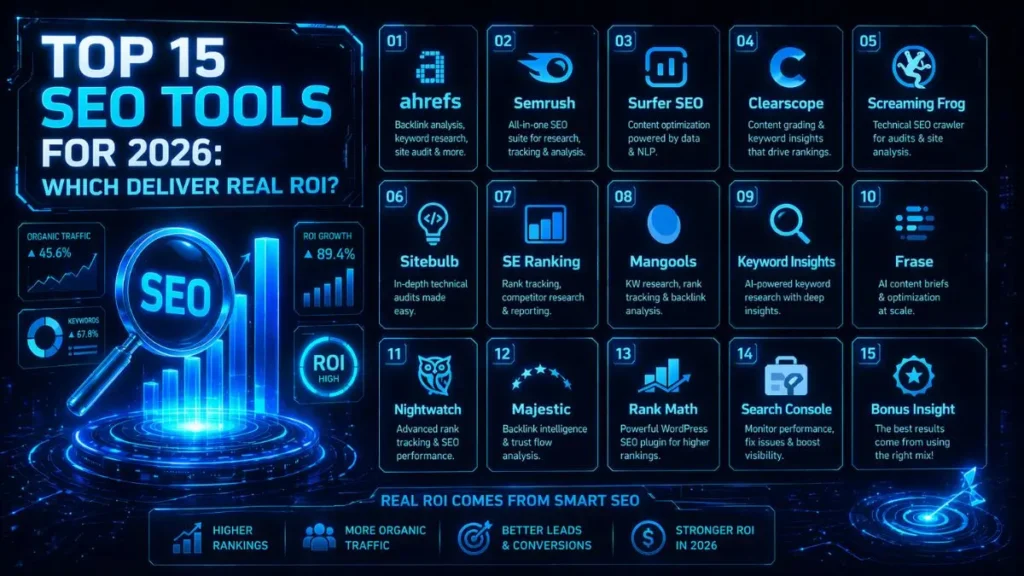
Based on my testing of the top 15 SEO tools for 2026, Ahrefs still stands out as the strongest choice for deep backlink analysis and competitor research, while Surfer SEO clearly leads in AI-driven content optimization.
Now, if you’re working with a tighter budget but still want strong results, combining SE Ranking with Screaming Frog is one of the smartest ROI-focused setups you can build right now.
I’ve spent the last five years building, ranking, and monetizing content sites, and one thing is very clear — the SEO landscape has changed a lot.
If this applies to your workflow, Finding the top SEO tools in 2026 requires evaluating how well a tool fits your specific workflow, the level of automation it provides, and whether it directly supports your profit goals—not just the number of features. Clarifying your priorities helps you make informed tool choices.
Honestly, that many traditional SEO tools are now bloated and overpriced. I’ve personally tested dozens of platforms to figure out which ones genuinely save time and deliver results — not just look good on a feature list.
The goal here is straightforward:
👉 Help you confidently choose the right tools based on real-world performance, not marketing hype.
Table Of Contents
ToggleHere is the master list of the tools we will cover, along with their pricing and current offers:
| Tool Name | Starting Price | Exclusive Deal / Offer |
|---|---|---|
| Ahrefs | $99/mo | 2 months free |
| Semrush | $129.95/mo | 7-day free trial |
| Surfer SEO | $89/mo | Money-back guarantee |
| Clearscope | $170/mo | Request Demo |
| Screaming Frog | $259/year | Free version available |
| Sitebulb | $13.50/mo | 14-day free trial |
| SE Ranking | $55/mo | 20% off annual |
| Mangools | $29/mo | 10-day free trial |
| Keyword Insights | $58/mo | $1 trial for 4 days |
| Frase | $14.99/mo | 5-day trial for $1 |
| Nightwatch | $39/mo | 14-day free trial |
| Majestic | $49.99/mo | View Plans |
| Rank Math | $59/year | Free WordPress version |
| Search Console | Free | 100% Free |
When choosing from this list, prioritize tools specifically designed to automate manual tasks, as these will deliver the greatest ROI in 2026.
A quick rule I follow:
👉 Use one powerful all-in-one tool for core SEO tasks, then pair it with smaller, specialized AI tools to scale content faster.
Why SEO Tool ROI Matters in 2026
Search algorithms are evolving faster than ever, and things like AI Overviews and zero-click searches are changing how traffic works.
To be direct, your SEO strategy now needs to be far more precise and intent-driven.
Older tools that just dump thousands of keywords?
👉 They’re becoming less useful because they don’t give you context or search intent clarity.
In 2026, a good SEO tool should feel more like an assistant than a database.
If you’re still exporting CSV files and building pivot tables just to find opportunities, you’re losing time — and time is money in SEO.
What actually delivers ROI now:
- Predictive insights
- AI-powered recommendations
- Streamlined workflows from research → content → optimization
The Best All-In-One SEO Powerhouses
01. Ahrefs
Ahrefs is one of the most trusted SEO platforms, thanks to its massive backlink database and highly accurate keyword data. Even in 2026, it remains the go-to tool for reverse-engineering competitors and uncovering what’s already working in your niche.
Key Features:
Industry-leading site explorer, comprehensive keyword explorer, detailed site audits, and competitive content gap analysis.
I noticed that, Ahrefs helped me find a low-competition content gap that generated $2,000 in affiliate revenue in one month. Its backlink data also refreshes faster than most competitors’, supporting active link building.
👉 Quick example: Finding overlooked keywords your competitors rank for but haven’t fully optimized.
Who It’s Best For:
Serious niche site builders, large agencies, and in-house enterprise teams.
Pros and Cons:
The data accuracy is hard to beat, and the interface is clean and easy to navigate.
The catch is, the credit-based pricing model can feel limiting if you’re doing heavy research daily.
💰 Ahrefs (Lite) Starting:
- $99/mo (Annual) or $129/mo (Monthly).
- Current Deal: 2 Months Free on annual plans — includes site audits and keyword research.
The Expert Verdict:
👉 If your strategy depends heavily on competitor research and link building, Ahrefs is still the strongest choice.
If you just need basic tracking, SE Ranking is more cost-effective.
02. Semrush
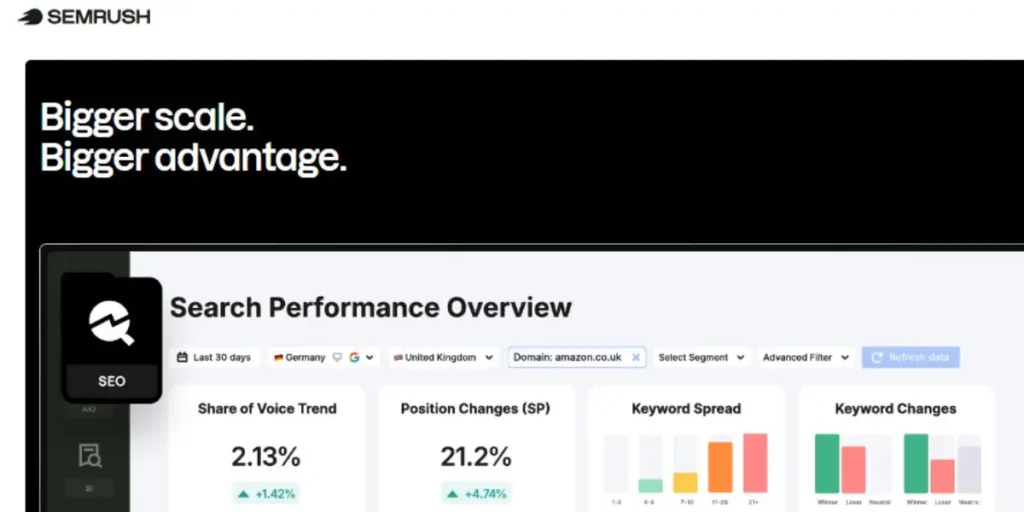
Semrush is more than just an SEO tool — it’s a full digital marketing suite that covers SEO, PPC, and even social media. What makes it stand out is its focus on actionable data and AI-driven insights to speed up everyday marketing tasks.
Key Features:
Keyword magic tool, detailed position tracking, on-page SEO checker, and extensive PPC research tools.
Something worth mentioning: When I take over a site, Semrush is my first tool for quickly identifying toxic backlinks and site health issues.
👉 Quick example: Cleaning up harmful backlinks after a Google update.
Who It’s Best For:
Digital marketing agencies handling multi-channel campaigns.
Pros and Cons:
It offers a much broader feature set than Ahrefs, especially for PPC and social media. But at the same time, the interface can feel overwhelming if you’re just starting out.
💰 Semrush (Pro)
- Starting:$117.33/mo (Annual) or $139.95/mo (Monthly).
- Current Deal: 14-Day Free Trial — full access to 50+ SEO and competitor analysis tools.
The Expert Verdict:
If you run SEO, PPC, and social, Semrush is the best choice. But if your focus is purely SEO and backlinks, Ahrefs still has the edge in data depth.
AI-Driven Content Optimization Tools
03. Surfer SEO

Surfer SEO takes a very practical approach — it looks at the top-ranking pages for your keyword and shows you exactly how your content should be structured to compete.
It uses natural language processing to ensure your content includes the right entities and topical signals that Google expects.
Key Features:
Content editor with real-time scoring, automated brief generation, and an AI writing assistant for optimized outlines.
What I noticed during testing: Running drafts through Surfer SEO consistently improved rankings, thanks to precise entity suggestions.
👉 Quick example: Optimizing a blog post to include missing terms competitors already cover.
Who It’s Best For:
Content managers, affiliate marketers, and freelance SEO writers.
Pros and Cons:
It makes on-page optimization much more structured and predictable.
One thing to keep in mind — chasing a perfect score of 100 can sometimes make content feel slightly unnatural if overdone.
💰 Surfer SEO (Essential)
- Starting: $79/mo (Annual) or $99/mo (Monthly).
- Current Deal: 7-Day Money-Back Guarantee — includes AI-optimized content editor and audit tools.
The Expert Verdict:
👉 If your goal is to scale content quickly without sacrificing SEO quality, Surfer SEO is one of the best tools available.
Compared to Clearscope, it’s more automation-focused, while Clearscope leans more toward natural writing quality.
04. Clearscope
Clearscope is a premium content optimization platform built to make sure your content matches search intent as closely as possible.
It relies heavily on IBM Watson and Google’s natural language processing, which is why its recommendations tend to feel more natural than those of many other tools.
Key Features:
Highly intuitive text editor, comprehensive grading scale, and excellent integrations with Google Docs and WordPress.
One thing I found interesting was, For high-budget projects, Clearscope produced recommendations that felt natural and avoided keyword stuffing.
👉 Quick example: Optimizing long-form blog content without breaking readability.
Who It’s Best For:
Enterprise content teams and boutique agencies that prioritize content quality over volume.
Pros and Cons:
The interface is clean, distraction-free, and very writer-friendly, which makes adoption easy across teams.
The downside is obvious — the pricing is quite high, especially if you’re running multiple projects.
💰 SE Ranking (Core)
- Starting: $103.20/mo (Annual) or $129/mo (Monthly).
- Current Deal: 14-Day Free Trial — track up to 2,000 keywords with no credit card required.
The Expert Verdict:
👉 If your priority is natural, high-quality writing, Clearscope is better than Surfer SEO.
But if you need automation and scalability at a lower cost, Surfer SEO is the more practical choice.
👉 For niche site owners, it’s a luxury. For enterprise teams, it’s almost essential.
05. Frase
Frase combines AI writing with deep SERP research, making it a powerful tool for quickly building content briefs. Instead of manually researching competitors, it pulls headings, stats, and common questions directly from search results.
Key Features:
Automated content briefs, AI writer, content scoring, and custom template creation.
One thing to keep in mind: Frase reduced my time creating content briefs by around 80%, which is a huge win if you’re managing multiple articles. The custom templates also make it easy to standardize writing instructions.
👉 Quick example: Automatically pulling “People Also Ask” questions into a blog outline.
Who It’s Best For:
Solo bloggers and small agencies looking for a budget-friendly alternative to Surfer SEO.
Pros and Cons:
It’s extremely affordable for what it offers, especially for brief creation and research.
One thing to keep in mind — the AI writer needs proper guidance, or it can produce repetitive outputs.
💰 Frase (Solo)
- Starting: $14.99/mo (Monthly).
- Current Deal: 5-Day Trial for $1 — perfect for testing AI-driven content optimization.
The Expert Verdict:
👉 If you’re comparing Frase vs Surfer SEO, go with Frase for affordability and speed.
Choose Surfer for more precise optimization and scoring.
Frase is among the top tools for fast, scalable content on a budget.
Technical SEO and Site Audit Essentials
06. Screaming Frog
Screaming Frog SEO Spider is a desktop-based crawler that scans your entire site to uncover technical issues like broken links, missing metadata, and crawl errors.
Even in 2026, it’s still considered the most powerful tool for deep technical SEO audits.
Key Features:
Deep website crawling, JavaScript rendering, redirect chain mapping, and custom XPath extraction.
What I noticed during testing: Before redesigns, Screaming Frog uncovers issues that cloud-based tools often miss, like orphan pages and redirect chains.
👉 Quick example: Finding hidden redirect loops before a site migration.
Who It’s Best For:
Technical SEO specialists and developers working on large or complex websites.
Pros and Cons:
It offers unmatched depth and control, plus a solid free version to get started.
The trade-off is that it has a steep learning curve and depends on your computer’s performance for large sites.
💰 Screaming Frog (SEO Spider)
- Starting: $149/year (Paid License).
- Current Deal: Free Version Available — crawl up to 500 URLs with basic auditing features.
The Expert Verdict:
👉 If you care about technical SEO at a serious level, Screaming Frog is non-negotiable.
Compared to Sitebulb, it’s more powerful — but less beginner-friendly.
07. Sitebulb
Sitebulb is also a desktop crawler, but it focuses on turning complex technical data into visual, easy-to-understand reports. Instead of just showing raw data, it prioritizes issues and explains what actually needs fixing first.
Key Features:
Visual data mapping, prioritized hints, JavaScript crawling, and clean PDF report generation.
After testing this, Sitebulb makes technical SEO much easier to explain to clients. The visual reports simplify what would normally require long explanations.
👉 Quick example: Showing a client a visual map of broken internal linking.
Who It’s Best For:
SEO consultants and agencies that need to present technical insights to non-technical clients.
Pros and Cons:
The reporting is visually impressive and easy to digest, which is a huge advantage for client work.
Like Screaming Frog, it still relies on local machine resources for large crawls.
💰 Sitebulb (Lite)
- Starting: $18/mo (Lite) or $42/mo (Pro).
- Current Deal: 14-Day Free Trial — comprehensive desktop and cloud-based website auditing tool.
The Expert Verdict:
👉 If you’re choosing between Screaming Frog and Sitebulb:
- Go with Screaming Frog for raw power and deep analysis.
- Go with Sitebulb for reporting, visuals, and client communication.
👉 Ideally, advanced users benefit from using both together.
Specialized Tools for Niche Performance
08. SE Ranking
SE Ranking is a budget-friendly all-in-one SEO tool that covers rank tracking, audits, and competitor analysis. It’s often seen as a cost-effective alternative to tools like Ahrefs and Semrush.
Key Features:
100% accurate keyword rank tracker, website audit, backlink monitor, and white-label reporting.
In day-to-day use, After moving several smaller sites to SE Ranking, the rank-tracking accuracy held up surprisingly well against premium tools while significantly reducing costs.
👉 Quick example: Tracking rankings across multiple niche sites without high monthly costs.
Who It’s Best For:
Bootstrapped site builders and small business owners who need solid performance without overspending.
Pros and Cons:
It delivers excellent value for money with flexible pricing.
The trade-off is that its backlink database isn’t as deep as Ahrefs.
💰 SE Ranking (Essential)
- Starting: $65/mo (Monthly) or approx. $52/mo (Annual).
- Current Deal: 14-Day Free Trial — track up to 2,000 keywords with no credit card required.
The Expert Verdict:
👉 If budget is your biggest concern, SE Ranking beats most tools in ROI.
👉 But for advanced backlink analysis, Ahrefs is still the better choice.
09. Mangools (KWFinder)
Mangools is known for being one of the most beginner-friendly SEO toolkits, with KWFinder as its standout feature. It’s especially popular for its clean interface and reliable keyword difficulty scores.
Key Features:
KWFinder, SERPChecker, LinkMiner, and SERPWatcher for simple rank tracking.
A quick observation: Whenever I need to quickly find low-competition keywords, KWFinder is usually my first stop. The difficulty score is easy to trust, even for newer sites.
👉 Quick example: Finding easy-to-rank keywords for a brand-new blog.
Who It’s Best For:
Beginners, bloggers, and local business owners handling their own SEO.
Pros and Cons:
The interface is extremely intuitive, making SEO feel less overwhelming.
On the flip side, advanced users may find it lacking in deeper features compared to Ahrefs or Semrush.
💰 Mangools / KWFinder (Basic)
- Starting: $19/mo (Annual) or $29/mo (Monthly).
- Current Deal: 10-Day Free Trial — no credit card needed to test KWFinder and backlink tools.
The Expert Verdict:
👉 If you’re just starting out, Mangools is far easier to use than tools like Semrush.
👉 But as you scale, you may outgrow it and need more advanced platforms.
👉 Overall, it’s one of the best entry-level SEO tools available right now.
10. Pitchbox
Pitchbox is built specifically for influencer outreach and scalable link building. It takes what is usually a time-consuming process — finding contacts, sending emails, following up — and automates almost everything.
Key Features:
Automated prospecting, advanced email sequencing, performance reporting, and CRM integrations.
What I noticed during testing: When scaling white-hat link-building campaigns, manual outreach quickly becomes a bottleneck. Pitchbox solves that by automating follow-ups, which significantly increases response and placement rates.
👉 Quick example: Automatically sending follow-up emails to bloggers who didn’t reply the first time.
Who It’s Best For:
Link-building agencies and large in-house teams are managing high-volume outreach campaigns.
Pros and Cons:
It offers one of the most advanced outreach automation systems available, especially for managing pipelines at scale.
The downside is clear — the pricing is geared toward enterprises, not solo users.
💰 Pitchbox
Starting: Custom Pricing (Enterprise Outreach).
Current Deal: Free Demo & Strategy Call — leading platform for link building and influencer outreach.
The Expert Verdict:
👉 If outreach is your main growth strategy, Pitchbox is hard to replace.
👉 But if you’re a solo blogger, manual outreach or simpler tools will be more cost-effective.
11. Keyword Insights
Keyword Insights focuses on one critical problem: organizing massive keyword lists into clear, actionable content strategies. Instead of guessing which keywords to group, it uses AI to cluster keywords based on search intent.
Key Features:
Keyword clustering, search intent classification, and AI-driven content briefs.
Something that caught my attention was, I uploaded a messy list of thousands of keywords, and the tool turned it into clean, structured topic clusters. This completely removed guesswork and eliminated keyword cannibalization issues.
👉 Quick example: Turning thousands of keywords into organized blog topic clusters.
Who It’s Best For:
Content strategists and niche site builders are managing large-scale content operations.
Pros and Cons:
It saves a huge amount of time compared to manual spreadsheet work.
Just keep in mind — you still need another tool like Ahrefs or Semrush to gather the raw keyword data first.
💰 Keyword Insights (Basic)
- Starting: $58/mo (Monthly).
- Current Deal: $7.99 Pay As You Go — try keyword clustering and AI briefs without a subscription.
The Expert Verdict:
👉 If you’re building content at scale, Keyword Insights is far more efficient than manual clustering.
👉 Compared to traditional keyword tools, it focuses on structure rather than discovery — and that’s its biggest strength.
12. Nightwatch
Nightwatch is a specialized rank tracking tool designed for extremely precise local and global tracking. What makes it different is its ability to track rankings down to specific zip codes or neighborhoods.
Key Features:
Localized rank tracking, YouTube tracking, automated reporting, and Google Looker Studio integration.
After using it regularly, For local SEO, tracking rankings at the city level often isn’t enough. Nightwatch allows you to prove visibility in very specific areas, which is crucial for local businesses.
👉 Quick example: Tracking rankings for a plumber across different neighborhoods in the same city.
Who It’s Best For:
Local SEO agencies and businesses with multiple physical locations.
Pros and Cons:
The location accuracy is extremely detailed, making reporting much more convincing.
However, it doesn’t offer strong backlink or competitor research features.
💰 Nightwatch (Starter)
- Starting: $32/mo (Annual) or $39/mo (Monthly).
- Current Deal: 14-Day Free Trial — specialized in high-accuracy localized rank tracking.
The Expert Verdict:
👉 If your focus is local SEO tracking, Nightwatch is more precise than most all-in-one tools.
👉 But for a full SEO toolkit, you’ll still need something like Ahrefs or Semrush alongside it.
13. Majestic
Majestic is a more traditional SEO tool that focuses almost entirely on backlink analysis. It introduced metrics like Trust Flow and Citation Flow, which are still widely used to evaluate link quality.
Key Features:
Site Explorer, Link Context mapping, Trust Flow metrics, and the historic index.
A quick observation: When analyzing expired domains or backlink profiles, Majestic’s Trust Flow metric remains one of the hardest to manipulate, making it very reliable for spotting spam.
👉 Quick example: Checking whether a domain has a clean or toxic backlink profile before buying it.
Who It’s Best For:
Domain investors, link builders, and SEO professionals focused specifically on backlink quality.
Pros and Cons:
It provides unique and detailed link data you won’t always find elsewhere.
The drawback is obvious — the interface feels outdated compared to modern tools like Ahrefs.
💰 Majestic (Lite)
- Starting: $49.99/mo (Monthly) or $41.67/mo (Annual).
- Current Deal: 7-Day Money-Back Guarantee — access industry-standard Trust Flow and backlink data.
The Expert Verdict:
👉 For pure backlink analysis, Majestic still holds value alongside Ahrefs.
👉 But as an all-in-one tool, it falls behind more modern platforms.
14. Rank Math
Rank Math is a WordPress plugin that helps you optimize content directly inside your website editor. It replaces several separate plugins by combining features such as schema, redirects, and SEO scoring into a single tool.
Key Features:
Built-in schema generator, 404 monitor, redirection manager, and AI content optimization modules.
What I noticed when using it: After switching from Yoast, the WordPress dashboard felt faster and more streamlined. The automated schema setup also made it much easier to get rich snippets without manual coding.
👉 Quick example: Automatically adding schema markup to blog posts for better search visibility.
Who It’s Best For:
Anyone running a website on WordPress.
Pros and Cons:
The free version is surprisingly powerful, and setup is very beginner-friendly.
One thing to watch out for — too many features can clutter the editor if not configured properly.
💰 Rank Math (Pro)
- Starting: $71.88/year (Spring Sale Price).
- Current Deal: Spring Sale: 31% Off — includes track tracking and 7,500 Content AI credits.
The Expert Verdict:
👉 Compared to Yoast, Rank Math offers more features and better value.
👉 For most WordPress users in 2026, it’s the better overall choice.
15. Google Search Console
Google Search Console (GSC) is Google’s own free tool that shows you exactly how your site performs in search results. It provides the most accurate data available for clicks, impressions, and indexing.
Key Features:
Performance tracking, index coverage reports, core web vitals data, and manual action alerts.
Based on my experience, You simply can’t run SEO without it. I regularly use the performance report to find “striking distance” keywords — pages ranking on page two that can be pushed to page one with small optimizations.
👉 Quick example: Improving a page ranking #12 to reach the top 5 results.
Who It’s Best For:
Every website owner — no exceptions.
Pros and Cons:
The data comes directly from Google, so it’s completely accurate.
The limitation is that data exports are restricted unless you use the API.
💰 Google Search Console
- Starting: $0 (100% Free).
- Current Deal: Free Forever — official tool to monitor indexing and site performance.
The Expert Verdict:
👉 This is not optional — it’s mandatory.
👉 No paid tool can replace the accuracy of Google Search Console for your own site data.
The Final Verdict: Which Tool Should You Buy?
Your ideal SEO stack really comes down to your budget and what you’re trying to achieve. There’s no one-size-fits-all setup — but there is a smart way to choose.
If budget isn’t a concern and you want a powerful, streamlined workflow,
👉 Ahrefs + Surfer SEO is easily one of the most complete combinations you can use.
This setup covers almost everything:
- Ahrefs handles in-depth keyword research, backlink analysis, and competitor analysis.
- Surfer SEO handles on-page optimization and content structure.
👉 Together, they realistically cover around 90–95% of your SEO workflow, especially for content and link building.
If you’re working with a smaller budget or managing multiple niche sites, the smarter move is:
👉 SE Ranking + Frase
Here’s why this combo works so well:
- SE Ranking gives you reliable tracking and core SEO features at a lower cost.
- Frase helps you create optimized content quickly without spending hours on research.
👉 You get strong performance at a fraction of the price, which makes this setup ideal for bootstrapped projects.
No matter which direction you choose, there are two tools you should install from day one:
- Google Search Console → for 100% accurate performance data directly from Google.
- Rank Math → for on-page optimization and technical SEO inside WordPress
👉 These are non-negotiable basics, regardless of your budget.
For someone writing daily,
In 2026, the “best” SEO tool isn’t the one with the most features —
👉 It’s the one you actually use consistently to save time and automate your workflow.
Frequently Asked Questions
👉 Ahrefs is still considered the most accurate for backlink data and competitor traffic estimates.
But here’s the important distinction:
👉 For your own website’s real performance data (clicks, impressions, rankings), nothing beats Google Search Console.
So ideally, you don’t choose one over the other —
You use both together.
👉 Yes — but only if you actually use their full capabilities.
Semrush shines when you’re:
- Running SEO + PPC + content + social together
- Managing multiple campaigns or clients
But if you only need:
- Basic keyword research
- Rank tracking
👉 Then the reality is: you’ll overpay and hurt your ROI.
In that case, smarter alternatives are:
- SE Ranking → better for budget tracking + core SEO
- Mangools → better for simplicity and beginner-friendly keyword research
👉 No — and realistically, it won’t anytime soon.
Tools like:
- Surfer SEO
- Frase
are excellent for:
- Scaling content
- Optimizing structure
- Speeding up workflows
But here’s the key limitation:
👉 They don’t understand strategy, branding, or long-term positioning the way a human does.
What this means in practice:
- AI helps you move faster.
- But humans decide what’s worth doing in the first place.
👉 The best results always come from combining AI efficiency with human decision-making.
👉 Ahrefs is still considered the most accurate for backlink data and competitor traffic estimates.
But here’s the important distinction:
👉 For your own website’s real performance data (clicks, impressions, rankings), nothing beats Google Search Console.
So ideally, you don’t choose one over the other —
You use both together.
