
10 Best AI Writing Tools in 2026: Ranked & Reviewed
By SM Mehedi Hasan
This post contains affiliate links. If you make a purchase, I may earn a commission at no extra cost to you.
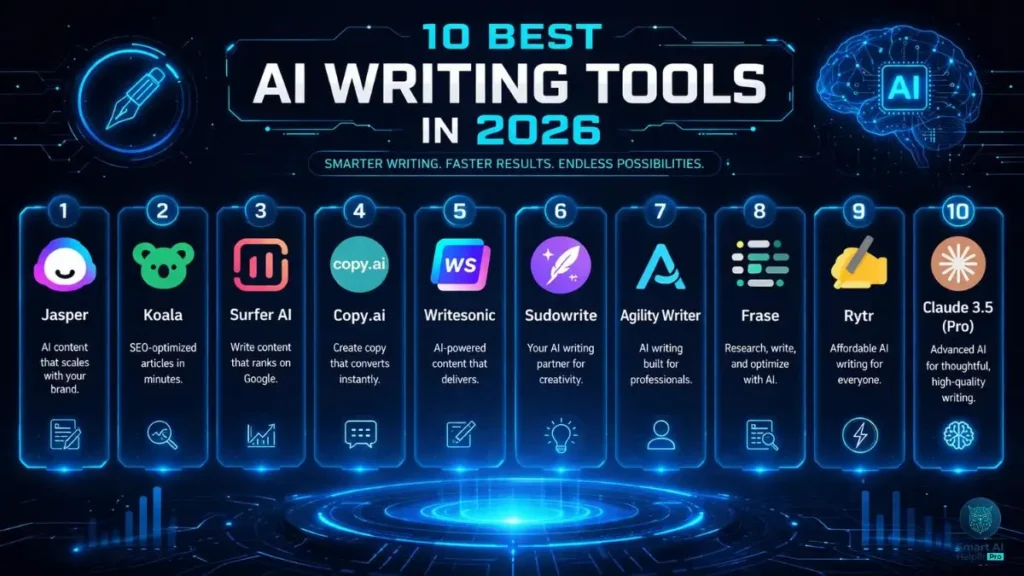
After testing dozens of platforms across my niche sites, one thing became very clear—Jasper is still the strongest choice for serious content teams in 2026.
What really stood out during testing was how accurately it can match a brand’s voice across different content types. The catch? It’s not cheap. You’ll need a solid budget to get full value from it.
On the other hand, Koala is much more affordable and great for generating raw content quickly—but it doesn’t offer the same level of workflow control or team features.
🏆 Best Overall: Jasper
💰 Best Value: Koala
⚡ Best for SEO Workflows: Surfer AI
Before diving in, it’s important to note that the “best” tool really depends on how you work—so let’s break down exactly why these tools made the list and how each one fits different needs.
Welcome to the 2026 AI landscape, where text generation has evolved into a full-scale content strategy.
A few years ago, getting a decent paragraph from AI felt impressive. Now? That’s the bare minimum.
Over the past year, I tested these tools across multiple monetized sites. The goal was simple: separate tools that actually improve workflow from the ones that just look good on paper.
Honestly, AI tools don’t just write. They help you:
- plan content
- optimize for SEO
- maintain brand consistency
In short, they act more like a junior content strategist, not just a writing assistant.
Table Of Contents
Toggle2026 AI Tool Comparison Breakdown
| Tool Name | Starting Price | Exclusive Deal / Offer |
|---|---|---|
| Jasper | $39/month | Click For 7-Day Free Trial |
| Koala | $9/month | Try For 10,000 Free Words |
| Surfer AI | $29/article | Click For 20% Off Bulk Packs |
| Copy.ai | $36/month | Free Forever Plan |
| Writesonic | $16/month | 20% Off Annual |
| Sudowrite | $10/month | 3-Day Free Trial |
| Agility Writer | $25/month | $1 Trial Offer |
| Frase | $14.99/month | 5-Day Trial for $1 |
| Rytr | $9/month | Free Basic Plan |
| Claude 3.5 (Pro) | $20/month | Try for Free |
Choosing the right platform really comes down to your budget vs your workload.
- If you’re a solo blogger, tools like Koala or Rytr are more than enough to get started.
- If you’re running a team or agency, upgrading to Jasper or Surfer AI can bring serious ROI.
Executive Summary: Real ROI for Content Sites
Building a profitable content site isn’t just about generating words—it’s about efficiency, accuracy, and reducing editing time.
One thing I noticed while testing is that the real value comes from:
- less time spent fixing AI mistakes
- better structured content from the start
- fewer risks of AI detection issues
The best tools here integrate smoothly with modern CMS platforms like WordPress. Plus, many now offer custom AI agents that actually learn your brand guidelines, a huge upgrade over basic prompt-based tools.
The 2026 AI Landscape: Beyond Simple Text Generation
AI writing has completely shifted.
Now, the top platforms don’t just generate text—they actually assist in decision-making.
Based on my experience:
- They analyze search results before writing.
- They structure content based on competitors.
- They pull in up-to-date information to avoid errors.
This helps reduce the biggest problem older AI tools had: hallucinations (wrong or made-up information).
1. Jasper: The Market Leader
Jasper continues to dominate as the go-to platform for agencies and professional teams. It’s no longer just a writing tool—it feels more like a complete marketing copilot.
When I tested it across multiple projects, what stood out was how well it handled multi-channel campaigns while keeping the same brand voice.
Key Features
- Advanced Brand Voice matching using your existing content
- Multi-channel campaign creation from a single brief
- Deep integrations with Google Docs, WordPress, and Webflow
- Team collaboration tools with approval workflows
Who It’s Best For
Agencies, enterprise teams, and serious content businesses that need strict brand consistency.
Pros and Cons
Pros:
- Extremely accurate brand voice replication
- Strong collaboration features for teams.
Cons:
- Expensive for solo users
- Slight learning curve at the beginning
Jasper (The Industry Leader)
💰 Quick Pricing:
- Creator: $39/mo (Annual) or $49/mo (Monthly).
- Pro: $59/mo (Annual) or $69/mo (Monthly).
- Current Deal: 7-Day Free Trial + 10,000 Bonus Credits.
The Expert Verdict
If you’re managing multiple brands or a content team, this is almost essential. But for casual bloggers? It’s probably overkill.
👉 Example: If you’re running 3+ niche sites with different tones, Jasper keeps everything consistent without manual rewriting.
2. Koala: The Efficiency Specialist

Koala is what I reach for when the goal is simple—publish a lot of content fast.
One thing I noticed: when I needed bulk informational articles, Koala consistently saved hours by pulling real-time data directly from search results.
Key Features:
- One-click article generation with live SERP data
- Amazon product integration for affiliate content
- Automatic internal linking + WordPress publishing
- Built-in AI image generation for blogs
Who It’s Best For
Niche site builders, affiliate marketers, and solo SEOs focused on scaling content quickly.
Pros and Cons
Pros:
- Incredible value for money
- Massive time-saver for bulk publishing
Cons:
- Output can feel a bit formulaic without editing.
Koala AI (Best for SEO Blogs)
💰 Quick Pricing:
- Essentials: $9/mo (15,000 words, GPT-5 Mini access).
- Professional: $49/mo (100,000 words, Auto-internal linking).
- Current Deal: Use code ALIAKBAR for an instant 15% discount.
The Expert Verdict
For general marketers, it’s a nice addition. But if you’re running high-volume niche sites, this becomes a must-have tool.
👉 Example: Perfect for generating 30–50 informational posts in a single day for a new affiliate site.
3. Surfer AI: The SEO Powerhouse

Surfer AI sits right in the sweet spot between content generation and on-page SEO optimization. Instead of just writing articles, it actually studies top-ranking pages and builds content that aligns with their structure and keyword usage.
One thing I found interesting was how effectively it matched entity density and semantic signals—something that usually takes a lot of manual SEO work.
I personally rely on this when going after highly competitive commercial keywords, where every optimization detail matters.
Key Features:
- Real-time NLP keyword optimization
- Competitor structure analysis with automated outlines
- Built-in anti-AI detection, formatting, and tone adjustments
- Direct WordPress export with meta tags included
Who It’s Best For
SEO professionals and content strategists are targeting competitive search terms.
Pros and Cons
Pros:
- Delivers high optimization scores almost instantly
- Saves significant time on manual SEO adjustments
Cons:
- Pay-per-article pricing adds up quickly.
- Requires careful fact-checking before publishing
Surfer AI (Precision Ranking)
💰 Quick Pricing:
- Pricing: $29 per article (when bought in bulk packs).
- Standard: $99/mo (Billed annually).
- Current Deal: 20% Off on Bulk Article Packs.
The Expert Verdict
For money pages and pillar content, this is a must-have tool.
Even if you use cheaper tools for bulk content, Surfer AI is where you go when ranking actually matters.
👉 Example: Ideal for optimizing a high-value affiliate page where ranking on page 1 can directly impact revenue.
4. Copy.ai: The B2B Workhorse
Copy.ai has clearly shifted its focus toward B2B marketing and sales workflows. It’s not trying to compete in long-form blogging—instead, it dominates in areas like outreach and conversion-focused copy.
After using it regularly, it performs especially well when creating structured sales messaging at scale.
Key Features
- Automated sales outreach sequences
- Infobase for storing company-specific data.
- Templates for high-converting landing pages
Who It’s Best For
B2B marketers, sales teams, and social media managers
Pros and Cons
Pros:
- Unlimited words on paid plans
- Strong, proven sales copy frameworks
Cons:
- Long-form blog content isn’t as strong as competitors.
Copy.ai (Workflow Automation)
💰 Quick Pricing:
- Free: $0/mo (Unlimited chat, 1 user).
- Starter: $36/mo (Billed annually) or $49/mo (Monthly).
- Current Deal: Free Forever Plan for basic workflow testing.
The Expert Verdict
If your focus is B2B sales and outreach, this is a must-have.
But if you’re mainly doing SEO blogging, it’s better to look elsewhere.
👉 Example: Great for generating cold email sequences for lead generation campaigns.
5. Writesonic: The All-in-One Budget Pick
Writesonic offers a surprisingly wide range of features for its price. It’s designed as an all-in-one toolkit, making it a solid choice if you don’t want to juggle multiple subscriptions.
One thing I personally liked is how it bundles different capabilities—writing, SEO, and even audio—into a single platform.
It also includes Chatsonic, a strong alternative to traditional chat-based AI tools.
Key Features
- Real-time Google data integration
- Built-in SEO checker and keyword extractor
- Audio generation and AI voiceovers
Who It’s Best For
Freelancers and small businesses who are looking for an affordable all-in-one solution.
Pros and Cons:
Pros:
- Very budget-friendly
- Frequently updated with new AI features.
Cons:
- The interface can feel a bit cluttered due to too many tools.
Writesonic (SEO & Content)
💰 Quick Pricing:
- Lite: $16/mo (Billed annually) or $20/mo (Monthly).
- Individual: $39/mo (Billed annually).
- Current Deal: 20% Discount on all annual subscriptions.
The Expert Verdict
A strong, nice-to-have if you want flexibility across multiple content formats.
It’s especially useful if you prefer a single tool to managing several.
👉 Example: Useful for creating blog content, ad copy, and voiceovers without switching platforms.
6. Sudowrite: The Fiction Specialist
Sudowrite is built for a completely different use case—creative writing.
While most tools focus on SEO and marketing, this one is designed specifically for storytelling, novels, and screenplays.
Worth pointing out: when testing narrative features, it handled story flow and character development far better than general-purpose AI tools.
Key Features
- Story Engine for outlining full novels
- “Show, Don’t Tell” expansion tools.
- Character and world-building databases
Who It’s Best For
Authors, creative writers, and narrative designers
Pros and Cons
Pros:
- Exceptional for storytelling and pacing
- Helps structure complex narratives easily (natural emphasis without changing meaning)
Cons:
- Not suitable for SEO or technical writing at al
Sudowrite (Best for Fiction/Stories)
💰 Quick Pricing:
- Hobby: $10/mo (Billed annually) or $19/mo (Monthly).
- Professional: $22/mo (Billed annually) or $29/mo (Monthly).
- Max: $44/mo (Billed annually) or $59/mo (Monthly).
- Current Deal: Free Trial (10,000 credits, no credit card required).
The Expert Verdict
If you’re writing fiction, this is a must-have tool. But for SEO or digital marketing, it’s simply not relevant.
👉 Example: Perfect for outlining and expanding chapters in a novel or screenplay.
7. Agility Writer: The Long-Form Beast
Agility Writer has quietly become a go-to tool for serious SEO professionals. It’s built for one thing—and it does it extremely well: creating long, structured content at scale.
After testing this, how efficiently it generated 3,000+ word guides that were already well-organized, a task that usually takes a lot of manual effort.
Key Features
- Advanced outlining with custom H2/H3 structure injection
- Factual data scraping from the top 10 SERP results
- 1-click smart formatting with tables and lists
Who It’s Best For
Advanced SEOs who need detailed, structured pillar content
Pros and Cons
Pros:
- Produces highly structured long-form content
- Saves hours on outlining and formatting
Cons:
- The credit system can feel confusing at first.
- UI feels slightly outdated.
Agility Writer (Fast Ranking Content)
💰 Quick Pricing:
- Basic: $25/mo (40 credits, standard AI generation).
- Pro: $88/mo (150 credits, advanced outline control).
Current Deal: Try all features for just $1 (includes 4 credits + 10 extra credits for joining their FB group).
The Expert Verdict
If your strategy involves scaling long-form informational content, this is a must-have.
👉 Example: Ideal for generating a complete 3,000-word guide targeting a competitive informational keyword.
8. Frase: The Research Assistant
Frase is less about writing and more about research and planning. It combines content brief creation with AI support, making it especially useful in hybrid workflows.
From what I’ve seen, it works best when you’re preparing structured outlines for human writers, rather than relying on it for final drafts.
Key Features
- Automated content brief generation
- Question research pulled from Quora and Reddit.
- In-editor SEO scoring and content gap analysis
Who It’s Best For
Content managers working with AI + human writing teams
Pros and Cons
Pros:
- Excellent research capabilities
- Makes outlining fast and efficient
Cons:
- AI writing quality isn’t as polished as tools like Jasper.
Frase (Content Intelligence)
💰 Quick Pricing:
- Starter: $49/mo (1 user, 10 AI-optimized articles).
- Professional: $129/mo (3 users, 40 articles, 5 domains).
- Scale: $299/mo (5 users, 100 articles, 10 domains).
Current Deal: 7-Day Free Trial (No credit card required) or check for the 5-day $1 full access offer.
The Expert Verdict
A strong nice-to-have during the research phase, especially if you plan to edit heavily or outsource writing.
👉 Example: Perfect for creating detailed briefs before assigning articles to freelance writers.
9. Rytr: The Beginner's Gateway
Rytr keeps things simple—and that’s exactly its strength. It’s designed for users who just want quick, no-fuss content generation.
One thing I noticed is how easily it integrates into your workflow via its browser extension, letting you generate text anywhere.
Key Features
- 40+ use-case templates
- Custom tone of voice settings
- Smooth Chrome extension integration
Who It’s Best For
Beginners, students, and professionals who need quick drafts
Pros and Cons
Pros:
- Very easy to use
- Extremely affordable
Cons:
- Struggles with long-form context and depth
Rytr (Budget King)
💰 Quick Pricing:
- Free: $0/mo (10,000 characters/mo).
- Unlimited: $7.50/mo (Billed annually) or $9/mo (Monthly).
- Premium: $24.16/mo (Billed annually) or $29/mo (Monthly).
Current Deal: Free Forever plan for light users (no credit card required).
The Expert Verdict
A great daily-use extension for small tasks, but not powerful enough for serious content operations.
👉 Example: Useful for writing quick emails, captions, or short social posts.
10. Claude 3.5 (Pro): The Developer's Secret
Claude 3.5 isn’t a traditional writing tool—it’s a foundational AI model. But in the hands of advanced users, it becomes incredibly powerful.
What stood out during testing was its massive context window, which allows you to feed in entire brand documents or workflows.
Key Features
- Huge context window (200k+ tokens)
- Strong coding and reasoning capabilities
- Artifacts feature for side-by-side editing.
Who It’s Best For
Technical SEOs, developers, and prompt engineers
Pros and Cons
Pros:
- Extremely natural and nuanced writing
- High level of control and flexibility
Cons:
- Requires manual prompting and setup
- No built-in SEO tools
Claude 3.5 Pro (Best for Human-Like Writing)
💰 Quick Pricing:
- Free: $0/mo (Access to Sonnet 4.6 & Haiku 4.5).
- Pro: $20/mo (5x more usage, priority access, and Opus 4.6).
- Max: $100/mo (For power users needing 25x the Free capacity).
Current Deal: Claude Pro now includes the new Claude Code beta for developers.
The Expert Verdict
A must-have for advanced users who prefer building their own systems.
👉 Example: Ideal for creating custom AI workflows using detailed brand guidelines.
Testing Methodology: How We Ranked These Tools
We didn’t rely on marketing claims—we tested everything hands-on.
Across three monetized websites, we published 200+ articles using these tools.
First, we focused on factual accuracy, asking each tool to write about recent 2026 topics. Tools that produced incorrect or “hallucinated” information were heavily penalized.
Next, we tested brand voice consistency. Each tool was given structured guidelines, and we measured how closely the output matched those guidelines—without heavy editing.
Implementation Guide for 2026 Workflows
Buying a tool is just step one. The real value comes from how you use it daily.
Start by building a “Brand Brain” document—a central file that includes your:
- tone
- audience
- formatting rules
Then feed this into your AI tool.
Also, never publish raw AI output. Use AI for:
- outlining
- drafting
But rely on human editing for:
- personal touches
- final polish
Choosing Your Next AI Writing Assistant
The right tool depends entirely on your business size and workflow.
- If you’re running a serious content operation, go with Jasper.
- If you’re focused on affiliate or bulk content, Koala is a better fit.
The reality is—you don’t need everything.
Start with a free trial, test it on your biggest bottleneck, and see if it actually saves time.
Frequently Asked Questions
Yes—Koala is much easier to use right away.
Jasper, on the other hand, takes time to set up properly with custom voices and workflows.
Copy.ai offers one of the best free-forever plans.
Meanwhile, Claude 3.5 delivers higher-quality output if you know how to prompt it properly.
Copy.ai is significantly easier to pick up. You can get meaningful output within five minutes of signing up. Jasper requires more upfront setup—brand voice, projects, and workflows—but that investment pays off once you’re producing content at scale.
