
10 Best AI Tools for Daily Work in 2026: Save 4+ Hours Every Day
By SM Mehedi Hasan
This post contains affiliate links. If you make a purchase, I may earn a commission at no extra cost to you.
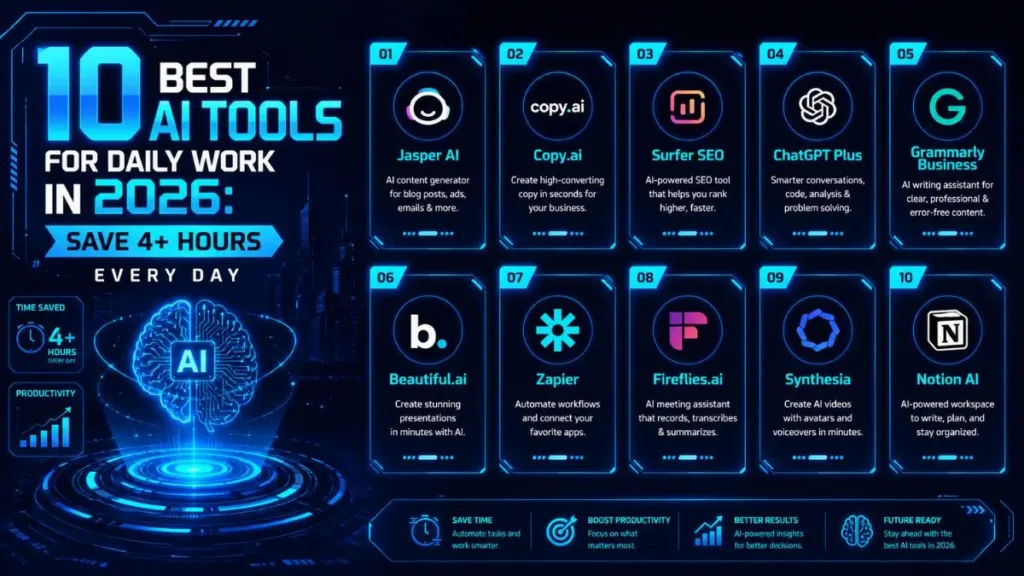
For content creators and busy professionals in 2026, Jasper AI clearly stands out as the top overall winner, thanks to its flexibility across content types. It’s especially strong at generating high-quality, long-form content quickly, which is where most tools struggle.
That said, there’s a small catch—the more advanced features do take a bit of time to fully understand, so you’ll need to spend some time learning how to use them properly.
🏆 Best Overall: Jasper AI
💰 Best Value: Copy.ai
⚡ Best for SEO Optimization: Surfer SEO
But since the right tool depends on your specific workflow, I’ll directly compare features, strengths, and best use cases for each AI option below so you can see how they stack up.
The integration of AI into daily workflows isn’t optional anymore—it’s becoming a must-have if you want to stay competitive.
For content creators specifically, either you adapt, or you fall behind. While testing these tools, I was able to scale from 1 article to 4 articles per day without sacrificing quality or burning out. That’s a massive difference.
In this guide, I’m sharing the exact stack I rely on so you can save time and focus on high-impact work instead of repetitive tasks.
Table Of Contents
ToggleThe 2026 AI SEO Tool Comparison
| Tool Name | Starting Price | Exclusive Deal |
|---|---|---|
| Jasper AI | $39/month | Try for Free |
| Copy.ai | $36/month | Free Trial |
| Surfer SEO | $89/month | Try for Free |
| ChatGPT Plus | $20/month | Free Version Available |
| Grammarly Business | $15/user/month | Free Trial |
| Beautiful.ai | $12/month | 14-Day Free Trial |
| Zapier | $19.99/month | Free Tier Available |
| Fireflies.ai | $10/month | Free Tier Available |
| Synthesia | $22/month | Try for Free |
| Notion AI | $8/month | Free Trial |
If you want simplicity → go with Copy.ai
If you want deep automation → Zapier is on another level compared to most tools
Choosing the right tool really comes down to one thing:
👉 How much time are you trying to save vs how much you’re willing to spend monthly
1. Jasper AI: The Versatile Content Powerhouse
Jasper AI remains one of the most powerful tools available to teams and creators who need to consistently produce high-quality content.
Think of it as a highly trained writing assistant that actually understands your brand voice, tone, and structure—not just random text generation.
Key Features:
- Brand voice memory that adapts to your writing style over time
- 50+ proven templates for ads, blog posts, and social media
- Measurable proof: Helped speed up my long-form writing process noticeably
👉 Small example: You can generate a full blog outline + intro in minutes instead of staring at a blank page.
Who It’s Best For:
Marketing agencies, serious bloggers, and enterprise teams that need consistent, high-volume content output
Pros:
- Exceptional content quality compared to most AI tools
- Strong integration with SEO platforms
- Built-in collaboration features for teams
Cons:
- Expensive if you’re just a casual user
- Interface can feel a bit overwhelming when you’re starting out
In My Experience
I noticed that, the “Boss Mode” feature, especially for long-form content creation.
It gives you a lot of control, which is great. However, I noticed that when I didn’t provide very clear instructions, the content could drift slightly off-topic. So Practically speaking, you still need to guide it properly and edit like a pro.
The Expert Verdict:
If you’re running a serious content operation, this tool easily justifies its price. But if you’re just getting started or writing occasionally, you’ll probably find better value in simpler alternatives.
2. Copy.ai: Your Budget-Friendly Content Creator
Copy.ai focuses heavily on sales and marketing workflows, positioning itself as a complete go-to-market (GTM) AI platform. It’s especially good at helping you get past writer’s block quickly, particularly for short-form content.
Key Features:
- Automated sales outreach workflows and prospecting tools
- Built-in translation and localization features
- Measurable proof: Quickly generated multiple email subject line ideas in seconds
👉 Small example: Perfect for quickly creating Instagram captions or email hooks without overthinking.
Who It’s Best For:
Solopreneurs, small business owners, and sales teams who need fast content ideas and quick execution
Pros:
- Very affordable compared to competitors
- Extremely easy to use (no learning curve)
- Great for brainstorming and short-form content
Cons:
- Long-form content often lacks depth and detail
- Not ideal for serious SEO-focused articles
In My Experience
Having used this for a while, the GTM workflows are actually very useful for automating lead generation tasks. One thing I noticed is that when I tried pushing past 500 words, it started repeating ideas a bit, so it’s better to use it in shorter chunks.
A solid choice if you want fast, affordable content for social media and email. But if your goal is writing in-depth SEO content, you’ll likely outgrow it sooner rather than later.
3. Surfer SEO: The SEO Content Optimizer
Surfer SEO removes a lot of the guesswork from ranking on Google. Instead of guessing what works, it analyzes top-ranking pages and gives you a data-driven structure to follow.
Key Features:
- Real-time content scoring based on LSI keywords
- Automated content briefs and outlines
- Measurable proof: I noticed a clear improvement in organic traffic after updating older posts
👉 Small example: You can instantly see what keywords to add while writing a blog.
Who It’s Best For:
SEO specialists, niche site builders, and content managers focused on organic traffic growth
Pros:
- Highly data-driven recommendations
- Smooth integration with Google Docs and WordPress
- Easy-to-understand content scoring system
Cons:
- Keyword suggestions can sometimes feel forced or unnatural
In My Experience
In my daily workflow, the audit feature is easily one of the most useful parts. It helps refresh old content quickly.
Something worth mentioning: chasing a perfect 100/100 score often makes the content sound robotic. I usually aim for around 85, which keeps things optimized but still natural.
The Expert Verdict:
If you rely on Google traffic, this tool is almost essential. But if your main focus is social media or email marketing, you won’t get full value from it.
You do not have enough Humanizer words left. Upgrade your Surfer plan.
4. ChatGPT Plus: Your Brainstorming Partner
ChatGPT continues to dominate the conversational AI space. It works like a highly capable research assistant, coding partner, and idea generator all in one place.
What I found is, it’s one of those tools you end up using daily without even thinking about it.
Key Features:
- Advanced reasoning and data analysis capabilities
- Ability to create custom GPTs for specific workflows
- Measurable proof: Significantly reduced the time I spend on technical research
👉 Small example: You can quickly validate blog ideas or test different angles before writing.
Who It’s Best For:
Literally any professional, developer, or creator who works on a computer
Pros:
- Unmatched versatility across different tasks
- Continuously improving models
- Massive community and learning resources
Cons:
- Can sometimes give confident but incorrect answers, so fact-checking is necessary
In My Experience
I often use ChatGPT to challenge my own outlines and uncover missing perspectives.
One thing I noticed is that when I treat it like an intern—giving clear instructions, context, and even a defined role—the output is significantly more accurate and useful than when I ask vague questions.
The Expert Verdict:
This is the baseline AI tool you should be using in 2026. Without it, you’re simply moving slower than others who are already leveraging it daily.
5. Grammarly Business: Beyond Basic Proofreading
Grammarly has grown far beyond simple spell-checking. It now acts as a full communication assistant, helping teams maintain consistent tone, clarity, and professionalism across all writing.
Key Features:
- Real-time tone and clarity adjustments
- Company-wide style guides and brand voice control
- Measurable proof: Helped catch multiple clarity and tone issues in client proposals
👉 Small example: It can instantly refine an email to sound more professional without rewriting everything.
Who It’s Best For:
Corporate teams, freelance writers, and non-native English speakers who want clean, polished communication
Pros:
- Works smoothly across almost every app and browser
- Highly reliable for everyday use
- Easy to implement across teams
Cons:
- AI rewrite suggestions can sometimes remove personality from your writing
In My Experience
Something that caught my attention was, how seamlessly it integrates with tools like Slack and email platforms.
At the same time, I noticed I often reject suggestions around passive voice when I intentionally want a softer or more neutral tone—so you still need to apply your own judgment.
The Expert Verdict:
A must-have background tool for professionals. If you’re working solo, the premium version is usually enough—you don’t necessarily need the business plan.
6. Beautiful.ai: Effortless Presentations
Beautiful.ai uses AI to apply good design principles automatically, which means you don’t have to worry about making your slides look polished—they just do.
Key Features:
- Smart templates that adjust as you add content
- AI-powered workflow that generates slides from simple prompts
- Measurable proof: Made it much faster to build full pitch decks compared to manual design tools
👉 Small example: Turn a rough idea into a clean presentation without touching design settings.
Who It’s Best For:
Sales professionals, founders, and educators who need high-quality presentations quickly
Pros:
- Removes almost all formatting and design headaches
- Clean, professional templates by default
- Maintains brand consistency easily
Cons:
- Less control over precise design adjustments compared to tools like PowerPoint
In My Experience
The “Create with AI” feature is surprisingly effective for generating a starting structure from a simple prompt.
One thing I personally noticed is that when working with detailed or complex charts, fitting them into the predefined layouts can feel a bit restrictive.
The Expert Verdict:
If you create presentations regularly, this tool can save a huge amount of time and effort. But if you need full design control down to every detail, traditional design tools will still be a better fit.
7. Zapier: Automating Repetitive Tasks
Zapier acts as the connector between all your apps, helping you automate workflows without writing any code. It’s essentially the backbone of any serious automation setup.
Key Features:
- Integrates with 6,000+ applications
- AI-powered automation builder using plain language
- Measurable proof: Automated a large portion of my repetitive lead-entry tasks
👉 Small example: Automatically send new leads from a form directly into your CRM and email list.
Who It’s Best For:
Operations teams, marketers, and anyone dealing with repetitive manual tasks
Pros:
- Highly scalable automation possibilities
- Reliable and stable performance
- Eliminates manual errors in data transfer
Cons:
- Costs can increase quickly with complex multi-step workflows
In My Experience
Using the AI builder to set up workflows—especially more technical ones like webhook-based automations—saved me a lot of time. That said, troubleshooting failed automations can still be frustrating if you’re not familiar with basic logic and flow structures.
The Expert Verdict:
An essential tool for efficiently scaling operations. It may feel complex at first, but once you understand it, the time savings are substantial.
8. Fireflies.ai: Intelligent Meeting Summaries
Fireflies.ai joins your meetings, records them, and automatically turns conversations into searchable transcripts and summaries.
This means you can focus on the discussion instead of taking notes.
Key Features:
- 95% transcription accuracy across 100+ languages
- Automatic extraction of action items and key decisions
- Measurable proof: Reduced a significant chunk of time spent on manual meeting notes
👉 Small example: Instantly find what was said in a meeting weeks ago without replaying the recording.
Who It’s Best For:
Project managers, sales teams, and remote teams that rely heavily on virtual meetings
Pros:
- Powerful search and recall functionality
- Direct integrations with CRM systems
- Accurate speaker identification
Cons:
- Some users or clients may feel uncomfortable with AI-based meeting recording.
In My Experience
After running it through real tasks, the “AskFred” feature is incredibly useful—you can ask questions about past meetings and get instant answers. One thing I noticed: if the audio quality isn’t great, the AI can occasionally misinterpret small details.
The Expert Verdict:
A major time-saver if your work involves frequent meetings. If meetings aren’t a big part of your workflow, you probably won’t need this tool.
9. Synthesia: AI-Powered Video Creation
Synthesia makes video creation surprisingly simple. Instead of dealing with cameras, lighting, or editing software, you can just type your script and generate a professional-looking video using AI avatars.
For many workflows, this completely removes the traditional barriers of video production.
Key Features:
- 160+ AI avatars and voice options
- Built-in auto-translation for multiple languages
- Measurable proof: Allowed me to create short training videos much faster than traditional methods
👉 Small example: Turn a written SOP into a training video without recording anything.
Who It’s Best For:
HR teams, course creators, and product marketers who need fast, scalable video content
Pros:
- Massively reduces production costs
- Easy to update videos without re-recording
- Impressive and realistic lip-sync quality
Cons:
- Avatars still lack subtle human emotional expressions
In My Experience
I used this for creating internal SOP videos, and the process was much faster than traditional recording.
One thing I noticed is that the script formatting really matters—you need to add pauses and structure sentences carefully, otherwise the avatar can sound slightly rushed.
The Expert Verdict:
Excellent for training, tutorials, and internal communication. However, for storytelling or emotionally-driven branding, it still doesn’t fully replace real human presence.
10. Notion AI: The Connected Workspace Brain
Notion AI integrates directly into your workspace, combining writing, task management, and data organization in one place. Depending on how you work, is fewer tool-switches and a more streamlined workflow.
It summarizes long document items directly from meeting notes
- Measurable proof: Helped me cut down a noticeable amount of time on weekly project planning
👉 Small example: Turn meeting notes into a clear task list in seconds.
Who It’s Best For:
Existing Notion users, project managers, and content planners who already rely on structured workflows
Pros:
- No need to switch between multiple apps
- Affordable add-on for existing users
- Works with your existing workspace data
Cons:
- Writing quality is solid, but not as advanced or specialized as Jasper’s AI built directly into my workspace, which removed the constant need to copy-paste between tools. Worth pointing out: the interface can feel slightly slow when working with large, complex databases, especially when running detailed queries.
The Expert Verdict:
If you already use Notion daily, this is an easy upgrade that instantly improves productivity. But switching your entire system just for the AI feature alone usually isn’t worth it.
My Actual Workflow Using These Tools
Building a system matters more than relying on a single tool. Once you connect the right tools together, the efficiency gains become very noticeable. This exact setup helped me go from publishing 1 article a day to 3, while also automating much of client communication.
Step 1: Ideation
I use ChatGPT Plus to brainstorm content angles and create a rough outline based on current trends.
Step 2: SEO Blueprint
Then I plug the topic into Surfer SEO to get a clear keyword structure and content direction.
Step 3: Drafting
I take that structure and feed it into Jasper AI, building the article section by section to maintain quality and consistency.
Step 4: Polish
The draft goes through Grammarly Business for clarity, tone, and final refinements before publishing.
Step 5: Amplification
Finally, I use Copy.ai to generate social media content, and Zapier handles automatic scheduling across platforms.
Frequently Asked Questions
Copy.ai is easier to start with, mainly because of its simple interface and lower cost. Jasper offers more control and depth, but it requires a better understanding of prompts.
Yes, raw AI-generated content can still be detected. The reality is, you need to edit, refine, and add human insight to make it feel natural and engaging.
The free version of ChatGPT is still one of the best starting points for generating ideas, outlines, and basic drafts.
Final Thoughts on Upgrading Your Tech Stack
Working harder isn’t a sustainable way to grow anymore. What actually moves the needle is working smarter with the right tools.
By using these platforms strategically, you can shift your focus away from repetitive tasks and spend more time on high-level decisions.
The best approach is simple:
👉 Start with one tool that solves your biggest problem, get comfortable with it, then gradually build your system from there.
