
How to Use AI Writing Tools in 2026: A Step-by-Step Guide for Human-Like Content
By SM Mehedi Hasan
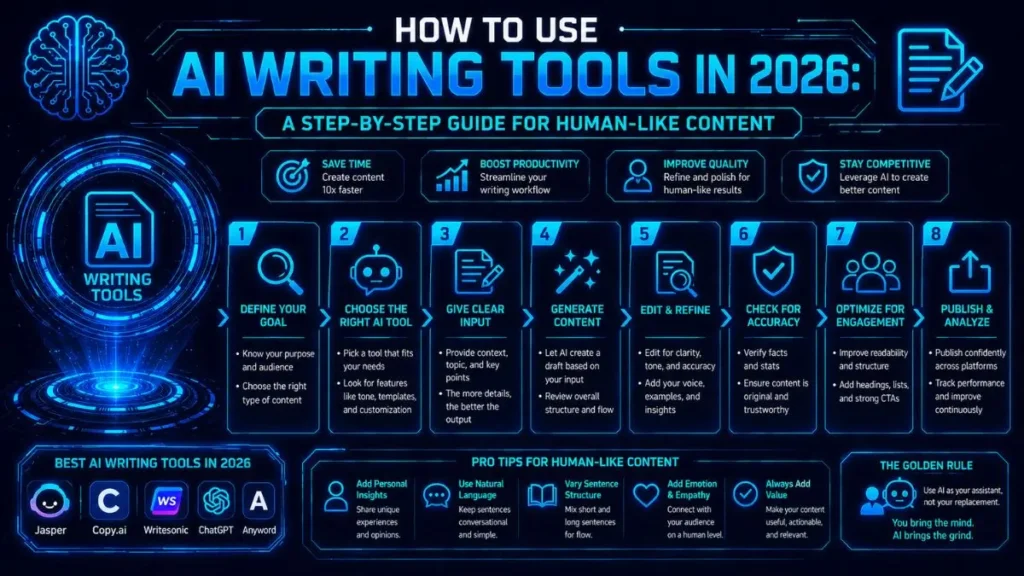
AI writing tools are powerful assistants—not replacements.
So if you’re in this situation: to create human-like content in 2026, you should use AI for ideation, drafting, and optimisation, while consistently layering in your own voice, insights, and critical thinking to keep the content authentic and relatable.
Table Of Contents
ToggleQuick Summary: The 2026 AI Content Workflow
- Planning: Use AI agents to scrape SERPs, identify intent gaps, and build dynamic outlines.
- Drafting: Deploy advanced prompting to generate modular first drafts that align with your brand voice.
- Editing (Human): Add personal insights, fact-check every claim, and remove robotic phrasing.
- Optimisation: Automate A/B testing and repurpose your content into social formats using workflow tools.
Outcome: Following this workflow transforms generic AI content into structured, human-first content that performs because you layer your insight, ensuring authenticity and value.
Introduction: The Evolving Landscape of AI Writing
Figuring out how to use AI writing tools in 2026 is completely different from just a few years ago.
We’re no longer dealing with basic text generators—we’re now working with intelligent AI agents that can manage entire content workflows from start to finish.
In day-to-day use, these tools can dramatically speed things up. But here’s the reality: raw AI output still doesn’t connect with readers unless a human is guiding the strategy behind it.
I spend a lot of time testing these tools specifically to see what actually works for ranking on Google and engaging real users.
The tech is powerful—but without human direction, it still falls short where it matters most: trust and connection.
My Journey with AI: From Scepticism to Strategic Partnership
When generative AI first took off, I ignored it. Most of the early outputs felt repetitive, generic, and honestly… a bit lifeless.
Then I realised something important: ignoring AI wasn’t a strategy—it was a risk.
So I changed my approach. Instead of expecting AI to write like an expert, I started using it like a junior assistant—handling research, structure, and formatting.
That shift made a huge difference.
Now, AI handles the heavy lifting, while I focus on strategy, clarity, and storytelling—the parts that actually make content valuable.
Outcome: This workflow lets you save time on content creation while maintaining full control over quality, originality, and human trust—your main competitive advantages.
Why "Human-Like" Content Still Matters in an AI-Driven World
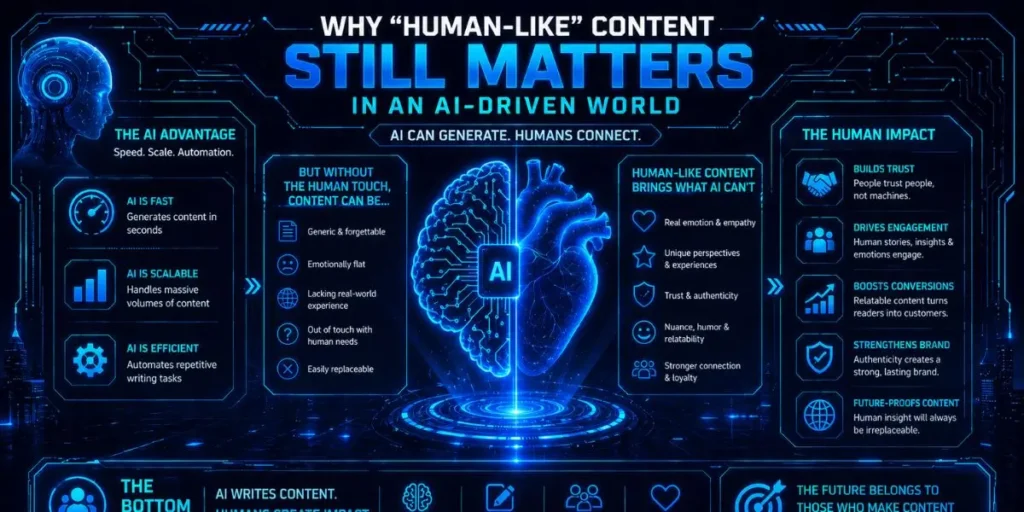
Search engines are much smarter now. They can easily detect low-effort, mass-produced AI content.
Google heavily prioritises E-E-A-T (Experience, Expertise, Authoritativeness, Trustworthiness)—and that’s not something AI can fake on its own.
Also, readers are feeling it too.
There’s a growing sense of AI fatigue. People can instantly tell when content feels robotic or surface-level.
👉 For most writers:
If your content doesn’t feel real, it won’t build trust—and without trust, it won’t convert.
Human-like content works because it feels earned. It shows that someone has actually gone through the process, tested things, and is sharing real insights—not just rewording existing information.
Understanding Your AI Co-Pilot: Beyond the Hype
To use AI effectively, you need to understand how it actually works.
At its core, AI is a prediction engine. It doesn’t “think”—it predicts the next most logical word based on patterns in its training data.
Once you understand this, everything clicks.
👉 You stop expecting originality from AI
👉 And start using it for speed, structure, and pattern recognition
The Core Capabilities of Today’s AI Writing Tools
Modern AI tools are extremely good at recognising patterns and organising information.
Here’s where they really shine:
- Pattern recognition & data synthesis: They can analyse top-ranking content and highlight exactly which subtopics you should include.
- Workflow automation: Many tools now connect directly to your CMS, allowing you to draft and format posts automatically.
- Brand voice mimicry: Advanced models can learn your tone by analysing past content.
- Real-time data access: Newer AI agents can pull live data, reducing the problem of outdated information.
👉 Example: You can turn a rough keyword into a structured article outline in minutes instead of hours.
Setting Realistic Expectations: What AI Can and Cannot Do (Yet)
AI is incredibly useful—but only if you use it for the right tasks.
What AI does well:
- Removes writer’s block instantly
- Organises scattered ideas into a clear structure.
- Speeds up drafting significantly
Where AI falls short:
- It cannot share real personal experiences.
- It cannot create truly original opinions.
- It cannot replace human judgment.
Honestly, if you ask AI to write a full thought-leadership article from scratch, you’ll usually get a safe, predictable summary of existing ideas—nothing stands out.
Choosing the Right Tool for the Job: A Quick Overview of Popular Options (and My Favourites)
There are a lot of tools out there right now, but only a few consistently deliver at a high level for serious content workflows.
- Claude 3.5 (and newer): My go-to for natural, human-like drafts. It usually requires less heavy editing than other tools.
- 👉 Example: Great for writing long-form blog sections that already feel conversational.
- ChatGPT Plus: Strong for data analysis, building custom GPT workflows, and fast idea generation.
- 👉 Example: Perfect for turning messy notes into structured outlines quickly.
- Jasper/Copy.ai: Ideal for teams that need to scale consistent marketing copy across multiple platforms.
- 👉 Example: Useful for generating multiple ad variations in minutes.
👉 Outcome: Choosing the right tool here directly affects how much editing you’ll need later.
Step 1: Strategic Planning with AI (The Human Touch Begins Here)
Everything depends on this step.
If your planning is weak, your final content will feel generic—no matter how good your AI prompts are.
Brainstorming Ideas and Topics: Letting AI Expand Your Horizons
I rarely start from scratch anymore. Instead, I give AI a core topic and ask for multiple angles based on different audience pain points.
And yes—most of them won’t be great.
But here’s the interesting part:
A few ideas usually stand out—and those are often ideas you wouldn’t have thought of yourself.
Outcome: The key takeaway—AI helps move quickly from no ideas to a shortlist of high-potential content angles, expanding your creative range.
Keyword Research and SEO Integration: Guiding AI for Discoverability
AI is surprisingly good at grouping keywords and identifying relationships between them. For example, I often give it a large keyword list and ask it to cluster them into themes for a content silo.
But here’s where you need to be careful.
👉 Important: AI can hallucinate search volume and difficulty data.
So always verify with tools like Ahrefs or Semrush before making decisions.
Outcome: The main takeaway—you get a structured, SEO-aligned plan, but always verify important data beyond AI suggestions.
Crafting a Detailed Outline: Your Blueprint for AI-Assisted Writing
This is where most people go wrong.
Never just say: “Write a blog post about X.”
Instead, build a clear outline with:
- Target audience
- Primary keyword
- Exact H2 and H3 structure
This gives AI direction—and better direction = better output.
I noticed that, how much stronger the final content became when the outline was detailed upfront.
I also like to have an AI review my outline and point out missing sections compared to top-ranking content. One time, this helped me catch a missing troubleshooting section, which turned out to be one of the most valuable parts of the final article.
✅ Pro Tip
A quick hack I found during testing is: ask AI, “What important section is missing based on top-ranking competitors?”
→ This instantly improves your outline quality.
⚠️ Common Pitfalls (Avoid This Early)
- Relying completely on AI-generated ideas without filtering
- Trusting AI keyword data without verification
- Skipping the outline and jumping straight into drafting
Step 1 Result: You should finish this stage with a clear, structured, SEO-aligned outline that sets the foundation for drafting. That is the key takeaway.
Step 2: Drafting Content with AI (Your First Pass)
With a solid outline in place, you can now start generating the actual content. But it’s important to treat this as a rough draft—not the final version.
In practice, AI can give you speed and structure, but it still needs human refinement to make it truly engaging.
Outcome: Remember, the key takeaway is to treat this as a complete, well-structured first draft to improve later, not a final version.
Generating Initial Drafts: From Paragraphs to Full Sections
I prefer working on one H2 section at a time rather than writing the entire article in one go.
Why this works better:
- You get more control over quality.
- The AI stays focused on the topic.
- You avoid losing context halfway through.
If a section feels flat or too formal, I immediately ask the AI to rewrite it in a more conversational tone before moving forward.
👉 Example: Turn a dry paragraph into something more engaging before continuing to the next section.
Outcome: You finish with clear, section-by-section drafts. Key takeaway: This makes editing and improving your content far easier later.
Prompt Engineering: The Art of Getting What You Want from AI
Your prompt is everything. It’s basically your steering wheel.
If your instructions are vague, the output will be vague too. But when you guide the AI properly, the difference in quality is huge.
Key Elements of an Effective Prompt
A strong prompt usually includes:
- Role: “Act as a senior SEO content strategist.”
- Task: “Write a 300-word section on technical SEO.”
- Context: “The audience is beginner bloggers who feel overwhelmed by code.”
- Constraints: “Use short sentences. Avoid the words ‘delve’, ‘crucial’, and ‘landscape’.”
👉 Practically speaking: The more specific your prompt is, the less editing you’ll need later.
Iterative Prompting: Refining AI’s Output
You rarely get perfect output on the first try—and that’s completely normal.
Instead of starting over, I use follow-up prompts to refine specific parts.
For example:
- “Make the second paragraph more actionable”
- “Replace the bullet points with a step-by-step numbered list”
A small but important point is that small adjustments like these can dramatically improve clarity without rewriting everything.
👉 Outcome: You turn an average draft into a targeted, high-quality section through small refinements.
Maintaining Brand Voice and Tone: Guiding AI to Sound Like You
Most modern tools now allow you to create custom voice profiles. You can upload your best-performing content, and the AI learns your tone, structure, and writing rhythm.
If that feature isn’t available, there’s a simple workaround.
Just paste a sample of your writing into the prompt and say:
👉 “Match the tone and style of this text.”
One thing I noticed is that while AI can get very close to your tone, it still struggles with subtler aspects, such as humour and personality nuances.
So I usually let AI handle the core explanation, and then I refine the tone during editing.
👉 Example: Use AI for the main explanation, then manually tweak tone to match your brand voice.
✅ Pro Tip
To save time here, try this: build a reusable prompt template with your role, tone, and constraints already defined.
→ This keeps your outputs consistent across all sections.
⚠️ Common Pitfalls (During Drafting)
- Writing the entire article in one prompt (leads to inconsistent quality)
- Using vague prompts like “write an article”
- Ignoring tone alignment early and trying to fix everything later
👉 Step 2 Result: By the end of this step, you should have a complete,
structured draft—not perfect, but solid enough to refine.
Step 3: Human-Centric Editing and Refinement (Where the Magic Happens)
This is the most important step in 2026. Editing is what separates high-ranking, trustworthy content from generic AI output.
Fact-Checking and Accuracy: Never Skip This Step
AI can sound confident—even when it’s completely wrong.
It may:
- Invent statistics
- Misquote experts
- Or even create fake references.
Because of this, I manually verify every single claim, link, and data point.
If I can’t find a reliable source to support something, I remove it completely.
👉 Outcome: Your content becomes credible and trustworthy, which directly impacts rankings and reader confidence.
Injecting Personal Insights and Originality: Making it Truly Yours.
Search engines now prioritise real experience.
During editing, I review the draft and look for places to add unique insights.
For example:
If AI explains a feature, I add a short line about a real issue or observation related to it.
One thing I found interesting was how much stronger the content became after adding even small, specific details.
In one case, I replaced a generic pros-and-cons list with a real usability issue I faced. That single change made the content feel far more authentic.
👉 Outcome: Your content shifts from generic to experience-driven and unique.
Enhancing Readability and Flow: Polishing AI’s Prose
AI tends to overuse filler transitions like:
- “Furthermore”
- “In conclusion”
- “It is important to note”
I remove these aggressively.
Then I:
- Break long sentences into shorter ones.
- Simplify complex phrasing
- Make the flow more natural.
I usually aim for a Flesch reading-ease score of 60+, which keeps content easy to read without losing depth.
👉 Outcome: The content becomes clear, readable, and engaging.
Optimising for Empathy and Connection: Does it Resonate?
This is where most AI content fails.
After editing, I read the content out loud.
Then I ask:
👉 Does this sound like a real person—or a textbook?
If something feels too robotic, I adjust it.
I also look for opportunities to acknowledge the reader’s challenges. If something is complex or frustrating, I say it clearly instead of letting the AI gloss over it.
👉 If this applies to your workflow,
Readers feel understood—and that’s what builds trust.
✅ Pro Tip
A quick hack I found during testing is: read your draft out loud once after editing.
→ If it sounds unnatural when spoken, it needs rewriting.
⚠️ Common Pitfalls (During Editing)
- Skipping fact-checking
- Keeping AI-generated fluff or filler phrases
- Not adding any original insights.
- Over-editing to the point where the content loses clarity
👉 Step 3 Result: By the end of this stage, you should have clean, accurate, human-sounding content that actually connects with readers—not just ranks.
Step 4: Advanced AI Applications for Content Optimisation
Once your core content is ready, things get more interesting. AI workflow tools can now help you squeeze the maximum value from a single piece of content.
👉 Outcome: Instead of publishing one blog post and stopping there, you turn it into a multi-channel content asset.
Using AI for Content Repurposing: From Blog to Social Post
I usually take my finalised blog post and feed it into an AI tool to extract key insights into different formats—like a LinkedIn carousel or a Twitter thread.
For someone writing daily:
You don’t have to manually rewrite everything for each platform.
After using it regularly, this approach:
- Saves hours of work
- Keeps your messaging consistent
- Helps you stay active across multiple channels
👉 Example: Turn one blog post into 5–6 social posts in minutes.
👉 Outcome: You increase reach without increasing workload.
A/B Testing Headlines and CTAs with AI Assistance
I never rely on a single headline.
Instead, I ask AI to generate multiple variations—usually around 15–20—based on different angles like:
- Curiosity
- Urgency
- Clear benefit
Then I test them.
Put simply, small headline changes can make a big difference in click-through rates.
So I run these variations through A/B testing tools to see which ones actually perform best.
👉 Example: Test “How to Use AI Tools” vs “Stop Wasting Time: Use AI Tools This Way”
👉 Outcome: You move from guessing to data-driven optimisation.
Translating and Localising Content: Expanding Your Reach
AI translation has improved a lot. It’s no longer just word-for-word translation—it can now adapt tone, idioms, and even cultural context.
What that looks like in practice:
You can expand into new markets without building a full localisation team.
One thing I noticed when testing is that while AI handles structure well, you may still need light human review for cultural nuance.
👉 Example: Turn one English article into multiple localised versions for different regions.
👉 Outcome: You unlock global reach with minimal extra effort.
✅ Pro Tip
A quick hack I found during testing is: repurpose your content immediately after publishing—don’t wait.
→ This keeps your messaging fresh and aligned across platforms.
⚠️ Common Pitfalls (During Optimisation)
- Republishing content without adapting it to platform-specific formats.
- Testing only 2–3 headlines instead of enough variations.
- Fully trusting AI translations without human review.
👉 Step 4 Result: By the end of this step, your content should be optimised, distributed, and working across multiple channels—not just sitting on your blog.
Ethical Considerations and Best Practices for 2026
Using AI is powerful—but it also comes with responsibility.
Transparency and integrity are what keep your audience’s trust intact.
Disclosing AI Usage (When and How)
If an AI writes an entire piece (which I don’t recommend), you should clearly disclose that it did.
Readers deserve to know what they’re consuming.
If you’re only using AI for brainstorming or outlining, disclosure becomes less critical—but being open about your workflow still builds credibility.
👉 Outcome: You maintain trust and transparency with your audience.
Avoiding Plagiarism and Ensuring Originality
AI is trained on existing content, so sometimes it can generate text that’s too close to original sources.
Because of that, I always run final drafts through plagiarism checkers like Copyscape.
Important: Even unintentional duplication can damage your credibility.
👉 Outcome: Your content stays original, safe, and trustworthy.
The Future of Content Creation: Human-AI Collaboration
The writers who succeed moving forward won’t be the ones who avoid AI—they’ll be the ones who learn how to work with it effectively.
AI is not replacing creativity—it’s amplifying it.
Think of it like an exoskeleton: it doesn’t do the thinking for you, but it helps you move faster and more efficiently.
👉 If you’re on the fence: You can produce better content in less time—without sacrificing quality.
Conclusion: Your Role as the Author in the Age of AI
The tools will keep evolving, but the fundamentals of great content won’t change.
Embrace AI as a Partner, Not a Crutch
If you rely completely on AI, your content will feel generic—and your brand will suffer.
Instead, use AI to remove friction, while keeping full control over your ideas and direction.
You are the expert. AI is just assisting you.
Continual Learning and Adaptation is Key
AI tools evolve fast.
The tool you rely on today might become irrelevant in a few months.
So it’s important to:
- Test new tools regularly.
- Improve your prompting skills.
- Stay flexible in your workflow.
👉 Outcome: You stay ahead instead of falling behind.
Final Thoughts on Creating Impactful, Human-Like Content
At the end of the day, people connect with people.
They don’t just want information—they want perspective, clarity, and real insight.
AI can help you with:
- Structuring ideas
- Speeding up writing
- Handling repetitive work
But the final layer—the part that makes content truly valuable—comes from you.
Your voice, your thinking, your experience.
👉 Final Outcome: When you combine AI efficiency with human insight, you create content that not only ranks—but actually resonates.
Frequently Asked Questions
Yes, Google has advanced systems that can identify AI-generated patterns.
However, their main focus is not how content is created—but how valuable and helpful it is.
If your AI-assisted content is accurate, useful, and well-edited, it can still rank very well.
No, but they will replace writers who don’t adapt.
At the same time, they will empower writers who learn how to use them strategically.
Human qualities like empathy, judgment, and real experience still cannot be replicated.
Start with better prompts:
- Use clear constraints
- Avoid corporate jargon
- Keep sentences short
But more importantly, edit aggressively.
Add your own:
- Insights
- Opinions
- Natural phrasing
👉 That’s what transforms AI content into human content.

Is an SEO Specialist and AI Tools Researcher with over 4 years of hands-on experience in search engine optimization. As the founder of Smart AI Helper Pro, he tests and reviews AI writing, SEO, and marketing tools to help creators and business owners grow faster with practical, research-backed strategies.
