
Is Notion AI Actually Good? My Honest Experience After 6 Months
By SM Mehedi Hasan

Notion AI is a powerful workspace assistant that excels at summarizing long documents, generating first drafts, and extracting action items directly within your existing notes.
However, it struggles with highly nuanced writing and deep research, making it best suited for workflow automation rather than replacing human creativity.
Six months ago, my workspace felt more like a chaotic digital filing cabinet than an actual productivity system. I was spending way too much time organizing tasks instead of finishing meaningful work.
Most people assume throwing AI at a productivity problem magically fixes it, but actually, it often just creates faster chaos.
I needed something that lived directly inside the place where my work already happened, instead of another disconnected tool fighting for attention.
So that is what pushed me to test Notion AI seriously.
As someone obsessed with workflow efficiency, I wanted to know whether this integrated assistant could genuinely withstand real agency workloads in 2026 or was just another overhyped feature.
When I was managing brainstorming sessions, client emails, and internal task tracking every single day, the tool became part of my actual workflow pretty quickly. The hype around it was impossible to ignore.
But honestly, I cared less about flashy demos and more about whether it could save me real hours every week.
Table Of Contents
ToggleDid Notion AI Survive the First Impression Reality Check?
Setting up Notion AI felt almost suspiciously simple. You press the spacebar inside any Notion page, and the AI prompt instantly appears without extra setup steps.
I noticed the friction was basically nonexistent when I generated my first quick project brief. No API keys. No external dashboards.
No awkward browser tab switching. Everything stayed inside the same workspace, which immediately made the experience feel smoother.
But early on, I ran into limitations I genuinely did not expect. I assumed the AI would automatically understand relationships across all my connected databases.
Instead, most of the intelligence worked at the page level unless I manually structured things carefully.
Honestly, I expected better here. The initial excitement around instant text generation faded a little once I realized I still had to organize large chunks of the workflow myself.
In My Experience: The Setup Phase
Honestly, when I first tried integrating the AI blocks into my daily journaling system, the experience felt slightly overwhelming. I tested the “Summarize” feature on a huge meeting transcript from a client strategy call.
The high-level summary was excellent. It pulled out the major discussion themes almost instantly. But the thing is, it also hallucinated a deadline nobody had actually agreed on during the meeting.
That definitely made me slow down and double-check future outputs more carefully.
Key takeaway: Use Notion AI as an operational assistant, not an autonomous manager; always review AI suggestions, especially for critical items.
How Does Notion AI Handle Core Content Generation?
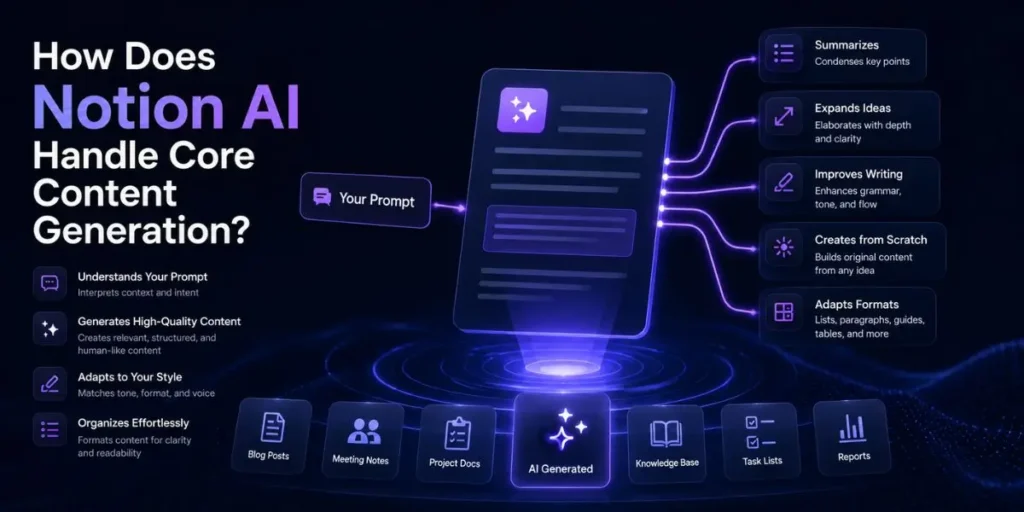
If you’re drafting blog posts, internal updates, client emails, or social media captions, Notion AI gives you a very fast starting point.
Plus, it handles formatting and structure far better than many standalone AI writing tools I have tested.
When I was drafting bulk client emails during a heavy campaign week, the tool adapted surprisingly well to different tones. I could ask for something more professional, conversational, or direct, and it usually stayed consistent.
1. Define your goal and tone
Start by telling the AI exactly what kind of outcome you want. Use descriptive instructions like “casual,” “persuasive,” “friendly,” or “authoritative” instead of vague requests.
So here is what actually happened when I tested this: shorter prompts created generic writing, while highly specific prompts dramatically improved the quality.
2. Provide context in the prompt
Do not simply type “write an email.” Give the AI enough context to understand the situation properly.
For example, explain who the email is for, what happened, why there is a delay, and what tone should be used. Something like: “Write an email to a client explaining a two-day project delay caused by server issues.” The extra detail changes everything.
3. Edit and refine the output
Compared to what I’ve tried before, Notion AI is excellent at quickly creating structured first drafts. But you still need to refine the final copy manually.
Never publish or send AI-generated writing blindly. Review the wording, adjust the nuance, and ensure the voice sounds like you or your brand.
This works well, except when the writing requires deep emotional storytelling or highly opinionated analysis. In these cases, the output may lack authenticity or a distinct perspective.
Even nuanced thought leadership content can still feel generic, leaving readers unengaged and ununique.
In My Experience: Drafting Content
Compared to similar tools I’ve used, Notion AI is incredibly fast at structural drafting. I used it to build a complete standard operating procedure (SOP) for onboarding new freelance writers.
It handled the formatting beautifully. The H2 sections, checklists, and bullet points were organized almost perfectly, requiring minimal cleanup.
But actually, the substance inside those sections was still fairly surface-level. I had to manually add all the agency-specific insights, workflows, and quality standards afterward.
Key takeaway: Notion AI accelerates draft creation but relies on your expertise to add depth and relevance—it’s a starting point, not a full solution.
Can Notion AI Actually Summarize and Brainstorm Effectively?
The summarization feature is easily one of the platform’s strongest features. Long meeting transcripts, messy notes, research pages, and articles can be condensed into usable bullet points within seconds.
If you’re constantly buried under meetings, this matters because manually rereading a 45-minute transcript is exhausting. Notion AI cuts through that clutter quickly and usually surfaces the important decisions fast.
In My Experience: Brainstorming Hurdles
What I didn’t expect was how repetitive the brainstorming outputs could become with weak prompts. I once asked it for “10 unique marketing angles for a SaaS product.”
The results felt painfully generic. Honestly, most of the ideas sounded like recycled advice pulled from old marketing blogs.
The thing is, the quality of the brainstorming depends heavily on how creatively you frame the request. Generic prompts create generic ideas.
Pro Tip: Instead of asking for “ideas,” ask the AI to adopt a specific perspective or role to sharpen responses. For example: “Act as a skeptical CFO and explain 5 reasons you would reject this software purchase.”
This approach helps generate more focused and insightful answers.
How Do You Integrate Action Items and Task Management?
Using AI to extract tasks from messy notes is where Notion AI starts feeling genuinely useful for workflow automation. You can highlight chaotic meeting notes and turn them into structured checklists almost instantly.
A Realistic Workflow Example
Here is the exact workflow I use during client meetings.
Cause: I need to convert raw discussion notes into a usable project plan without wasting 30 minutes manually formatting everything.
Action: I type /ai extract action items directly beneath the raw meeting notes page.
Result: The AI scans the notes, identifies commitments, builds a checklist, and clearly separates responsibilities. I then move those tasks directly into our sprint board for execution.
I noticed that extraction accuracy improves significantly when the notes already include basic structure, such as bullet points or speaker labels.
Completely unstructured note dumps still occasionally confuse it.
Key takeaway: Notion AI’s workflow automation is still limited. It currently cannot auto-assign extracted tasks to database properties; manual dragging, organizing, and confirmation are still required.
Why Is the "Human Touch" Still Mandatory?
Notion AI is absolutely not a replacement for human judgment. You cannot automate your entire workflow, walk away, and assume the output will always be accurate.
I learned this the hard way during a client strategy call. The AI-generated summary looked polished at first glance, but it completely skipped over a critical budget limitation discussed midway through the conversation.
So my workflow changed pretty quickly after that. Every AI-generated summary, outline, or draft now undergoes a manual review before being shared with clients or team members.
Key takeaway: AI delivers structure and speed but can’t capture business subtleties. Always verify key data and decisions to avoid errors.
Common Pitfalls for Beginners
Trusting the AI blindly
Most people assume the AI understands exactly what they meant, but actually, it only responds to the information you provide.
Key takeaway: Always thoroughly review AI-generated results. Even strong outputs may miss subtle context or introduce mistakes.
Using lazy prompts
Typing vague instructions like “make this better” often yields weaker results rather than stronger ones.
Key takeaway: Provide specific instructions in your prompt. Clarity about tone, format, and audience leads to far better AI results.
Ignoring tone alignment
I noticed the default writing style leans heavily toward stiff corporate language when prompts are too generic.
Key takeaway: Align AI output with your brand’s voice by specifying tone. Generic prompts yield generic, overly formal language.
How Fast and Reliable Is the Platform?
Over the past six months, the platform speed has honestly been very consistent. Most outputs appear within seconds, even during larger writing sessions.
Unlike what most reviews say about cloud AI lag, I rarely experienced noticeable delays while working. Even when handling large database pages, the system usually kept pace with my typing without freezing or slowing down.
There was a brief outage in October when the AI servers stopped responding for about an hour. But outside of that, the reliability has been surprisingly stable.
In My Experience: System Performance
After using this for a week during a busy product launch cycle, I started stress-testing the platform with much larger documents.
I uploaded a research file that was close to 10,000 words long just to see how the summarization engine would behave under pressure.
The overall summary generation stayed fast. No timeout issues. No crashing. But actually, it struggled to accurately retrieve quotes buried near the bottom of the document, which felt like a limitation of the context window.
So while the speed is impressive, long-document precision still has some cracks.
What Are the Best Use Cases for Notion AI?
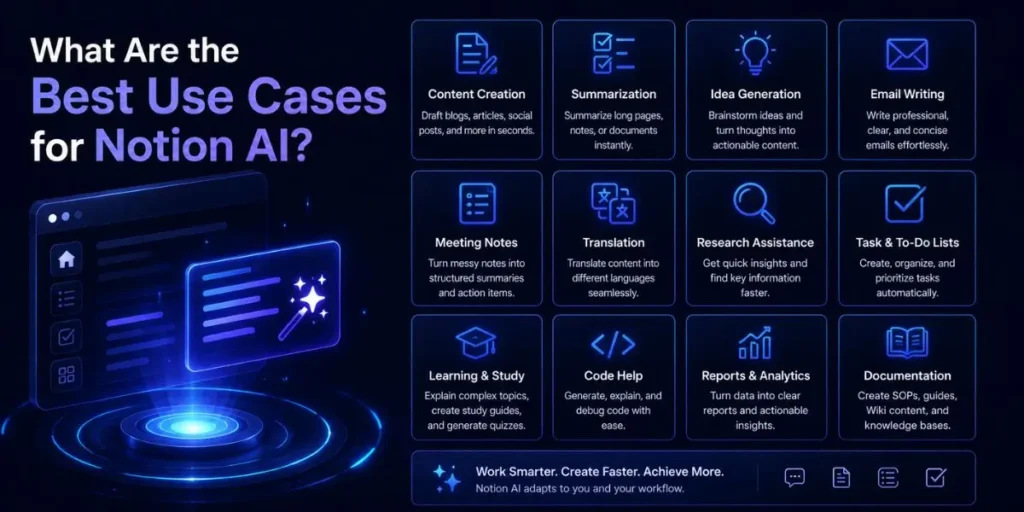
Notion AI works best for repetitive operational tasks, quick first drafts, and reducing blank-page anxiety.
If you’re doing recurring weekly reports, this becomes especially useful because you can template the entire workflow. Press a button, generate the structure, refine the details, and move on.
Compared to what I’ve tried before, the biggest advantage is not necessarily smarter writing. It is workflow convenience. Everything happens directly where your notes, tasks, and databases already exist.
But actually, this is not the tool I would trust for highly nuanced analysis, academic writing, or deep original research. It accelerates execution. It does not replace expertise.
Pro Tip: Build a reusable database template with pre-written AI prompts already embedded inside the page. Every new entry is instantly workflow-ready without having to repeat the same instructions manually.
Is Notion AI Worth the Cost?
Breaking down the pricing is fairly simple. Notion AI works as an additional paid layer on top of your existing subscription.
For heavy users, the time savings can offset the cost very quickly. Saving even 1 hour per month on meeting summaries or repetitive drafting tasks can already justify the subscription fee.
But when does it stop making sense financially?
If you’re only using Notion for personal journaling, grocery lists, or lightweight notes, the AI add-on probably will not provide enough value to justify paying extra every month.
In My Experience: The ROI
The thing that surprised me most was how much time I stopped wasting on context switching.
Before using Notion AI regularly, I constantly bounced between Notion, browser tabs, and external AI tools just to finish simple drafting tasks.
Now the process feels far smoother because the AI sits directly inside the workspace where the work already happens.
That seamless integration is honestly the real value here. Not necessarily a dramatically smarter language model. Just less friction throughout the day.
What Does the Future Hold for Notion AI?
I would genuinely love to see stronger multi-database intelligence added in future updates.
Right now, the AI still feels slightly isolated when handling complex workspace relationships. I want it to automatically connect information across projects, timelines, task boards, and uploaded documents without constant prompting.
Most people assume productivity AI is only about writing faster, but actually, the future probably revolves around autonomous workflow behavior.
Imagine the AI automatically flagging scope changes, detecting conflicting deadlines, or notifying team members when a document update impacts a live project. That is where this category feels headed next.
And honestly, I can see myself continuing to rely on it long term. It has quietly become part of my normal operational workflow.
My Final Verdict on 6 Months with Notion AI
A balanced look at Notion AI shows a tool that is extremely capable at summarization, drafting, formatting, and workflow assistance, while still struggling with deep reasoning and nuanced thinking.
If you’re a project manager, agency owner, marketer, or content creator trying to move faster, the tool fits naturally into daily operations.
But if your work depends heavily on original analysis, advanced research, or highly technical reasoning, human expertise still matters far more than automation.
So here is what actually happened after six months of daily use: I stopped viewing Notion AI as a magical writing machine and started treating it like a fast operational assistant.
That mindset shift made the experience significantly better.
Frequently Asked Questions
Notion AI uses a combination of large language models from providers like OpenAI and Anthropic, optimized specifically for workspace assistance, writing support, and organizational workflows.
No, Notion AI is a paid add-on feature. You can test a limited number of AI responses before upgrading to a monthly subscription.
Not automatically. It mainly accesses the page you are actively working on unless you intentionally use workspace-wide search features like Q&A.
No. Notion states that customer workspace data is not used to train the underlying AI models, helping maintain privacy and security standards.

Is an SEO Specialist and AI Tools Researcher with over 4 years of hands-on experience in search engine optimization. As the founder of Smart AI Helper Pro, he tests and reviews AI writing, SEO, and marketing tools to help creators and business owners grow faster with practical, research-backed strategies.
