
Is Grammarly Plagiarism Checker Good in 2026? Honest Review with Test Results
By SM Mehedi Hasan
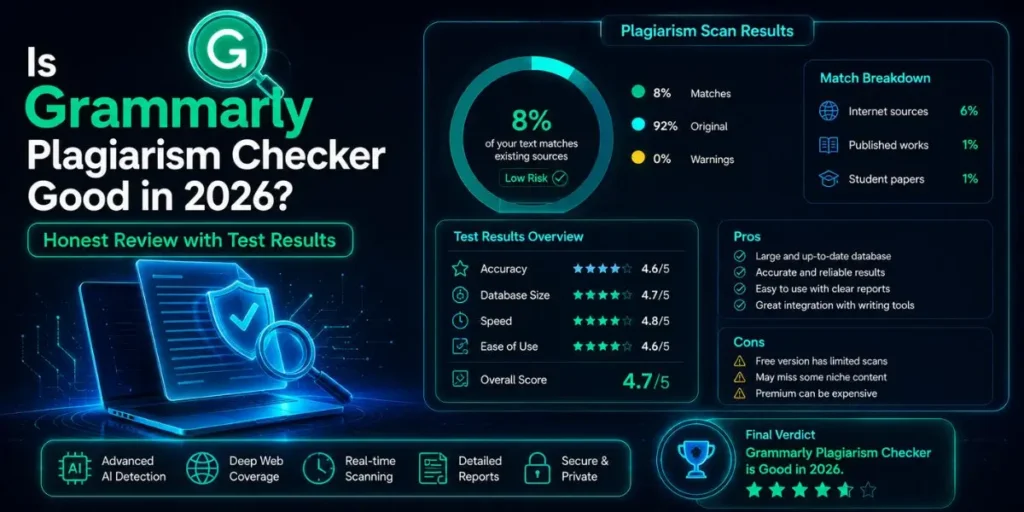
Grammarly’s plagiarism checker is good for bloggers, content writers, and casual academic use. It scans 16 billion web pages plus ProQuest’s academic database and delivers results in seconds.
But its detection rate sits around 54-86% depending on the test, which makes it unreliable for dissertations, thesis papers, or serious academic submissions where Turnitin or Scribbr are the better choice.
Grammarly is primarily known as a grammar tool, and that’s still its main strength. But it bundles a plagiarism checker into its Pro plan, and a lot of people use it as their only originality check before submitting or publishing.
Whether that’s a smart decision depends entirely on what you’re checking and how much is at stake.
This review covers how Grammarly’s plagiarism checker actually performs, where it falls short, how it compares to dedicated tools, and who should rely on it versus who should use something more powerful.
Table Of Contents
ToggleHow Does Grammarly's Plagiarism Checker Work?
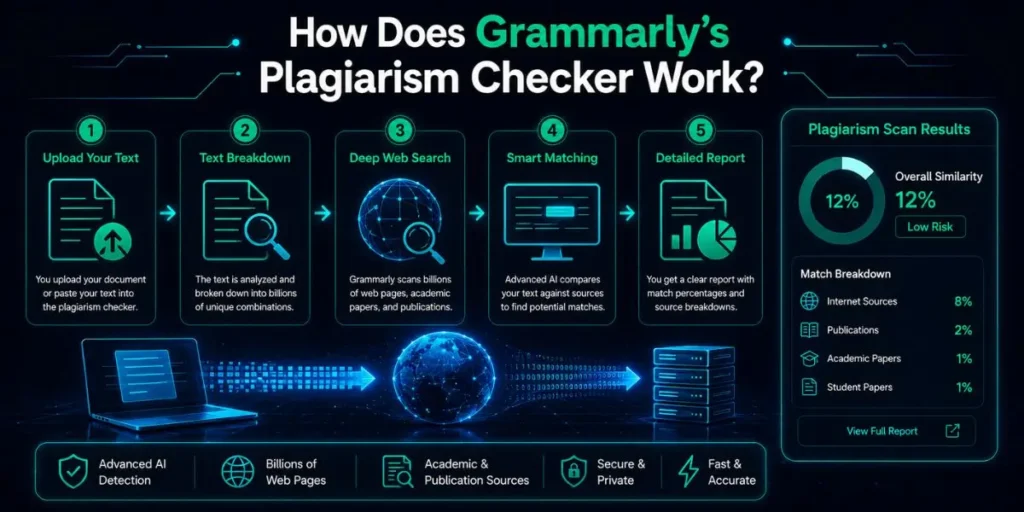
Grammarly’s plagiarism detection scans your text against two source pools. The first is the open web, covering over 16 billion web pages.
The second is ProQuest’s academic database, which gives access to published academic papers, journals, and dissertations.
When a match is found, Grammarly highlights the matching text in your document and links directly to the source where the match appeared.
The check runs inside the Grammarly Editor. You paste or upload your text, then click the Plagiarism option in the sidebar. Results come back within seconds for most documents, typically 3 to 5 seconds for documents under 2,000 words.
The output shows a similarity percentage and a list of flagged passages with source links.
Plan Requirement
The plagiarism checker is only available on Grammarly Pro and above. The free plan shows you that plagiarism was found, but it won’t reveal which passages or sources are affected.
To see the actual matches and fix them, you need a paid subscription. The Pro plan is currently around $12 to $30 per month, depending on the billing cycle.
Is the Grammarly Plagiarism Checker Accurate?
Accuracy is where the honest answer gets complicated, and most reviews pick one test result and run with it. The truth is, the number varies quite a bit depending on the type of content being checked.
For straight copy-paste plagiarism, Grammarly performs reasonably well. When you paste in text that’s been lifted directly from a web source, it catches it reliably.
Sonary’s testing found it correctly identified both fully copied paragraphs and lightly edited versions of the same content in the same test run.
But for paraphrased plagiarism, which is when someone takes an original source and rewrites it sentence by sentence, Grammarly struggles significantly.
It doesn’t reliably detect what’s sometimes called patchwriting, where a writer substitutes synonyms and shuffles sentence structure but keeps the original ideas and logic intact.
Specialized tools with contextual matching, like Quetext’s DeepSearch technology, are substantially better at catching this type of content.
The headline numbers from independent tests vary widely:
- Reedsy’s testing found Grammarly caught only 54.5% of plagiarized content in their test set, the lowest of all tools they tested.
- MasterBlogging cites an 86% accuracy rate based on aggregated online reviews.
- Scribbr’s independent testing of free and freemium plagiarism checkers found its own tool at 88% detection, substantially ahead of Grammarly.
The gap between 54.5% and 86% is large enough that it’s not useful to cite either number alone.
The performance depends heavily on document type, paraphrasing sophistication, and whether the source material is indexed in the web database or behind a paywall.
For publicly accessible web content, Grammarly does well. For paraphrased academic sources, it struggles.
Academic Use Warning
A 54 to 86% detection rate means a meaningful percentage of plagiarism passes through undetected.
If you’re submitting a thesis, dissertation, or any document with serious academic consequences, Grammarly’s plagiarism checker alone is not sufficient. Use it as a first-pass draft check, not as the final verification before submission.
What Grammarly's Plagiarism Checker Is Actually Good At
Most comparative reviews focus on what Grammarly can’t do. That’s useful, but it misses the real picture of where the tool genuinely performs.
Speed Is Genuinely Impressive
Sonary’s testing clocked Grammarly at 3 seconds for 949 words and 5 seconds for 2,100 words. That’s faster than most dedicated plagiarism tools, including ProWritingAid, which can take several minutes for similar content.
If you’re checking multiple pieces of content quickly, that speed advantage is real.
Source Attribution Is Clear and Clickable
When Grammarly flags a match, it highlights the specific passage and provides a direct link to the source page. You don’t get a vague percentage.
You get the exact text, the percentage of your document it represents, and a link to verify the match yourself.
That’s more actionable than some competitors that give you a similarity score without showing you where the match came from.
Catching Accidental Plagiarism in Draft Content
One area where Grammarly genuinely shines is catching the small stuff.
Short phrases, common expressions, and sentence fragments that appear on multiple websites sometimes end up in writing without the writer realising they absorbed those exact words from something they read earlier.
Grammarly’s tendency to flag even short phrase matches, which some users find annoying, actually serves a useful purpose for content writers who want to verify their phrasing is original.
Integrated Workflow with Grammar Checking
If you’re already using Grammarly for grammar and clarity, adding a plagiarism check takes one click inside the same interface you’re already in.
That integration has real value for bloggers and content professionals who want a single-tool workflow.
Running your content through grammar checking and plagiarism detection in the same session saves time compared to exporting to a separate tool.
Pro Tip
Grammarly’s auto-citations feature is available on the free plan and pulls from over 20 research databases, including PubMed, ScienceDirect, SAGE Journals, and arXiv.
Even if you use a different tool for your final plagiarism check, Grammarly’s citation generator is worth using to format references in APA, MLA, or Chicago style before you run the final check elsewhere.
Where Grammarly's Plagiarism Checker Falls Short
Honestly, there are several specific limitations that most reviews mention but don’t explain deeply enough.
Paraphrase and Patchwriting Detection Is Weak
This is the biggest practical gap. Grammarly’s checker works by matching strings of text against its database.
When someone rewrites a sentence using synonyms and a slightly different structure, the string match fails even though the ideas are clearly derived from the source.
Dedicated tools like Quetext use contextual similarity analysis that compares meaning and argument structure rather than just exact word matches. Grammarly doesn’t have this capability at the same depth.
No Access to Student Paper Repositories
Turnitin maintains a massive repository of student-submitted papers, which allows it to catch recycled essays that never appear on the public web. Grammarly has no access to this repository.
If a student submits work that was previously submitted by someone else at another school, Grammarly won’t catch it. For academic institutions, this is a significant gap.
Word Limit Per Document
Even on the paid plan, Grammarly limits plagiarism checks to 100,000 characters per document, roughly 20,000 words.
For most blog posts and essays, that’s fine. For thesis documents or long research papers, you may need to check in sections.
English Only
Grammarly’s plagiarism detection works exclusively in English. If you write in Spanish, French, German, or any other language, the plagiarism checker doesn’t function.
Tools like Scribbr support multiple languages, which matters for international academic contexts.
Cannot Detect AI-Generated Content as Plagiarism
Grammarly has a separate AI detection feature, but it operates independently from the plagiarism checker.
The plagiarism scanner won’t flag a paragraph that was generated by ChatGPT unless that exact generated text has already been published somewhere online and indexed in Grammarly’s database.
For originality in the conventional plagiarism sense, that’s a gap if AI-generated content is a concern in your workflow.
In My Experience
The Moment I Realised It Wasn’t Enough for Academic Work
Compared to similar tools I’ve used, Grammarly’s plagiarism checker handles web-sourced content well.
When I ran a test document with a paragraph directly copied from a published blog post, it flagged it immediately with a source link and a percentage match. Clean, fast, clear.
The issue surfaced when I tested a paragraph that I had paraphrased fairly heavily from a journal article. Same ideas, different words, different sentence structure. Grammarly returned a 0% match on that section.
A dedicated academic checker flagged it at 78% similarity using contextual matching.
That gap is significant. Someone submitting an essay where paraphrasing is the primary issue would get false reassurance from Grammarly’s clean report.
One thing that caught me off guard was how useful the source links are in practice. Most users assume they’ll see a similarity percentage and move on.
But clicking through to the matched sources lets you verify whether the match is a genuine concern or a false positive triggered by a commonly used phrase. That part of the interface is genuinely well thought out.
The limitation I found most frustrating: no way to differentiate between a common industry phrase that everyone uses and actual copied content.
A phrase like “machine learning models have become increasingly sophisticated” will trigger a match on dozens of articles.
The percentage-based system helps somewhat, since that kind of match registers as 1% or less. But for writers in technical or niche fields, those small false positives pile up in a way that makes the report harder to read.
Grammarly Plagiarism Checker vs Competitors: Head-to-Head
| Tool | Database | Detection Rate | Paraphrase Detection | Best For |
|---|---|---|---|---|
| Grammarly Pro | 16B web pages + ProQuest | 54-86% | Weak | Blog/content writers, draft checks |
| Scribbr (Turnitin-powered) | 91B web pages + 69M publications | 88% | Strong | Dissertations, thesis, research papers |
| Turnitin | Academic papers + student repo | 96% | Strong | Institutional academic submissions |
| Quetext | Large web + contextual matching | Good | Strong (DeepSearch) | Paraphrase-heavy content, essays |
| Copyscape | Web only | 89% (web) | Limited | Web content, blog posts, scraping detection |
| Copyleaks | Web + AI detection | Good | Moderate | AI-assisted writing detection |
The pattern is clear. For web-based content, Grammarly competes reasonably well. For academic work where paraphrasing and contextual similarity matter, it trails dedicated academic tools significantly.
Who Should Use Grammarly’s Plagiarism Checker?
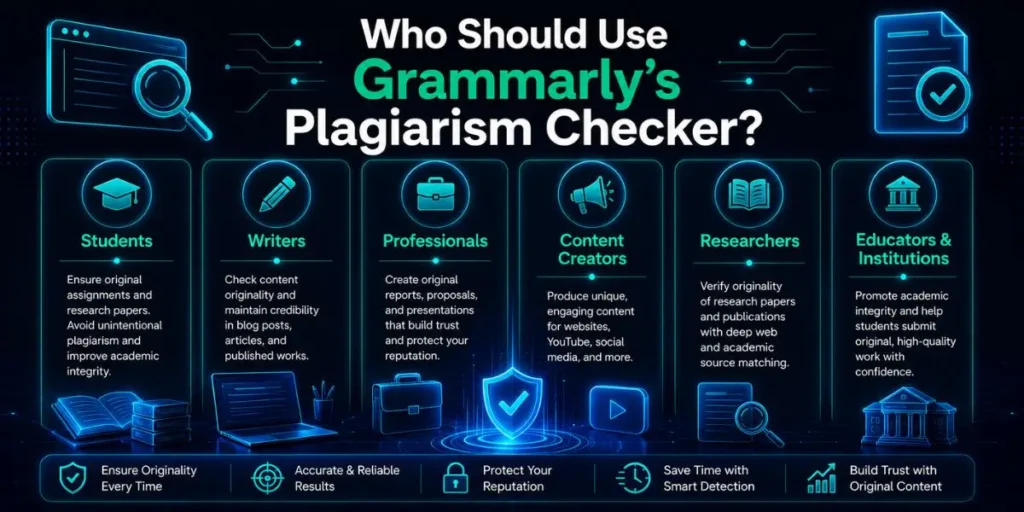
Good fit: Bloggers and content writers
If your primary concern is making sure your blog posts and web articles don’t accidentally echo published online content, Grammarly is a practical choice.
The web database is large, the interface is clean, and you’re already in Grammarly checking grammar anyway. One-click plagiarism checking as part of an existing workflow is genuinely useful here.
Good fit: Students doing early draft checks
Running your essay through Grammarly before submitting it to your institution’s system is a reasonable first step.
It won’t catch everything, but it catches obvious matches and gives you a chance to address them before your work goes through Turnitin or a similar institutional tool. Use Grammarly as a preliminary check, not the final one.
Partial fit: Researchers working on journal submissions
Grammarly will catch self-plagiarism if your own earlier work has been published online. It also catches obvious overlap with published papers that are indexed in ProQuest.
But it doesn’t have the depth of Turnitin or iThenticate for academic journals, and it won’t catch paraphrased content that’s been substantially reworded. Use it alongside a more rigorous tool rather than instead of one.
Not a good fit: Thesis or dissertation submission
The stakes are too high, and the detection gaps are too large. For a dissertation, use Scribbr’s Turnitin-powered checker or iThenticate. The per-document cost is worth it for something you’ve spent months or years writing.
Grammarly’s plagiarism check as the sole verification before submitting major academic work is a genuine risk.
How to Use Grammarly's Plagiarism Checker: Step by Step
- Open the Grammarly Editor at app.grammarly.com and sign in with your Pro account.
- Upload your document or paste your text into the editor. For plagiarism checking, you can paste text directly or upload a .doc, .docx, or .txt file.
- Look for the Plagiarism option in the right-hand sidebar. Click it to initiate the scan. The check runs in the background and typically completes in a few seconds.
- Review the similarity percentage shown at the top of the plagiarism report. A percentage of 0% to 1% on common phrases is usually acceptable. Higher percentages on substantive content deserve attention.
- Click each flagged passage to see the source Grammarly matched it against. Verify the match by clicking the source link. Decide whether the flagged text needs a citation or a rewrite.
- Address flagged passages by either adding a proper citation, paraphrasing the section in your own words, or dismissing the flag if it’s a false positive from a common phrase.
- Run the check again after making edits to confirm the similarity percentage has dropped on the passages you addressed.
Pro Tip
If you write long-form content regularly, check documents in the Grammarly Editor rather than pasting into Google Docs first.
The Editor gives you access to both the grammar panel and the plagiarism check in one session without switching between tabs.
For long documents, check sections separately if the document exceeds 20,000 words, since that’s near the character limit per check.
Common Mistakes When Using Grammarly for Plagiarism Checking
- Treating a 0% result as a guarantee of originality. Grammarly scans against its database, not against all possible sources. A clean result means no matches were found in what Grammarly can access, not that the content is definitely original. Paraphrased sources and content from databases that Grammarly doesn’t cover won’t appear in the report.
- Using the free plan and assuming you’ve checked for plagiarism. The free plan tells you plagiarism was detected, but hides the actual matches. You’re left knowing there’s a problem without knowing where or what it is. Either upgrade or use a free dedicated tool that shows full results.
- Not clicking through to verify flagged matches. Some flags are false positives triggered by common phrases or standard industry terminology. Clicking the source link and reading the flagged context takes 30 seconds and tells you immediately whether the match is a real concern or a phrase that happens to appear everywhere.
- Relying on Grammarly as the sole check for thesis work. See the detection rate discussion above. For high-stakes academic submissions, one tool is rarely enough, and Grammarly’s detection gap on paraphrased content is a meaningful risk.
- Not checking again after revisions. If you rewrite sections to address flagged content, run the plagiarism check again before finalising. Rewriting one flagged section can inadvertently echo a different source that wasn’t flagged before.
Workflow Example: Checking a 1,500-Word Blog Post
Here’s what the actual process looks like for a typical content writer.
- Draft complete. You finish a 1,500-word blog post about email marketing trends.
- Grammar check first. Open Grammarly, paste or upload the document, and work through grammar and clarity suggestions. This takes 10 to 15 minutes.
- Run plagiarism check. Click the Plagiarism option in the sidebar. Results appear in about 4 seconds.
- Review report. Grammarly flags three phrases at 1% each. One is a marketing industry term everyone uses. One matches a sentence you quoted from a study. One matches a phrase that sounds like your original writing but also appeared in an older article.
- Address each flag. Dismiss the common industry term. Add a citation link for the study quote. Rewrite the third phrase to eliminate the match.
- Re-check. Run the plagiarism scan again. The report comes back clean.
- Publish. Confident that the content is original for web publication purposes.
Total time added to the publishing workflow: under 10 minutes. For that use case, Grammarly’s plagiarism checker earns its place in the process.
Frequently Asked Questions
It’s accurate for web-sourced content, with detection rates cited between 54% and 86% across independent tests. It struggles with paraphrased plagiarism and patchwriting. Good for casual checks, not reliable enough for academic thesis submissions.
No. Plagiarism checking is a Pro plan feature only. The free plan alerts you that plagiarism was found, but doesn’t show which passages or sources are affected. A Pro subscription starts at around $12 to $30 per month, depending on the billing cycle.
Grammarly scans against over 16 billion web pages plus ProQuest’s academic database. By comparison, Scribbr, using Turnitin technology, covers 91 billion web pages and 69 million publications, which explains the accuracy difference in head-to-head tests.
No. Turnitin has a larger database, accesses student paper repositories, and detects paraphrased content more reliably. Grammarly is faster and easier to use, but it’s a general writing tool with plagiarism detection built in, not a dedicated academic plagiarism system.
Not through the plagiarism checker. Grammarly has a separate AI detection feature, but it runs independently. The plagiarism scanner won’t flag AI-generated text unless that exact text has been published online and indexed in Grammarly’s database.

Is an SEO Specialist and AI Tools Researcher with over 4 years of hands-on experience in search engine optimization. As the founder of Smart AI Helper Pro, he tests and reviews AI writing, SEO, and marketing tools to help creators and business owners grow faster with practical, research-backed strategies.
