
Does Ahrefs Count Internal Links?
By SM Mehedi Hasan

Yes, Ahrefs counts internal links, but it keeps them in separate reports from your backlinks. You will find them in the Internal Backlinks report in Site Explorer and in Site Audit. Internal links also feed into a page’s URL Rating, not your site-wide Domain Rating.
If you have ever opened Ahrefs, checked your backlink count, and wondered where all your internal links went, you are not alone.
Plenty of people asking “Does Ahrefs count internal links?” assume the big number on the dashboard already includes them. It doesn’t.
Ahrefs tracks internal links; it just files them somewhere else, and once you know where to look, the whole picture gets a lot clearer.
Table Of Contents
ToggleSo, Does Ahrefs Count Internal Links or Not?
Yes, Ahrefs counts internal links, and it tracks them in a few different places depending on which tool you open.
The confusion arises because the main backlink reports show only links from other websites. Internal links live in their own corner.
Here is the quick version of what Ahrefs actually records:
- External backlinks in the standard Backlinks report
- Referring domains as a separate authority signal
- Internal links inside the Internal Backlinks report and Site Audit
Most people assume the headline backlink number covers everything pointing at a page. But that number is external links only.
Internal links are counted, measured, and even factored into your scores. They are simply not mixed into the report you check first.
What Counts as an Internal Link in Ahrefs?

An internal link is any clickable link that goes from one page to another page on the same domain. A blog post linking to your pricing page, a category page linking to articles, your footer linking to the contact page, all of that is internal.
Ahrefs treats these as a distinct link type because they do a different job than backlinks:
- They show search engines how your pages relate to each other.
- They spread authority (link equity) around your own site.
- They help crawlers discover pages faster.
- They guide real visitors deeper into your content.
When I was first sorting through a client’s link profile, I kept mixing internal and external links in my head. So I started thinking of it simply.
Backlinks are votes from strangers. Internal links are like organizing your own house. Ahrefs counts both, but it never confuses one for the other.
Where Does Ahrefs Show Internal Links?
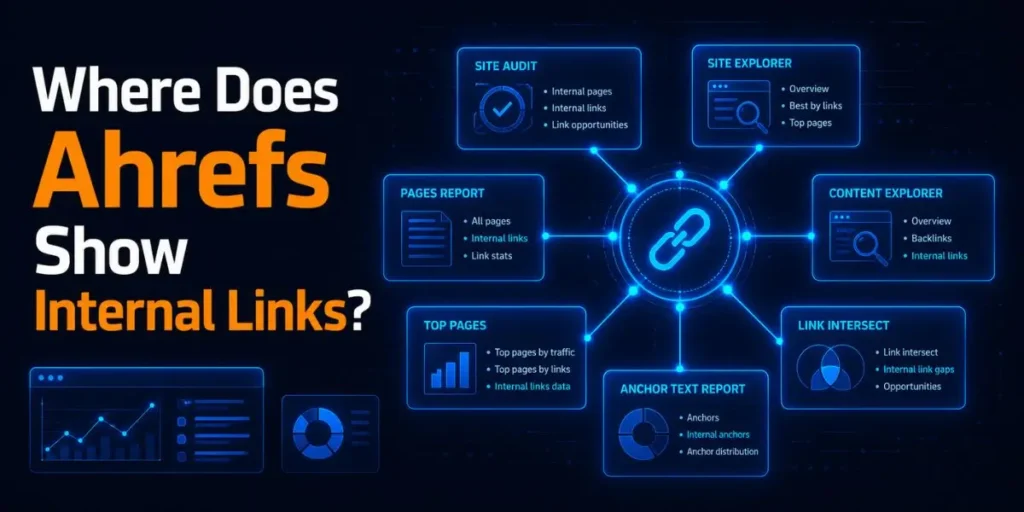
Ahrefs shows internal links in three main spots, each answering a slightly different question. Knowing which report to open saves you a lot of clicking around.
| Feature / Data Type | Tool Name | What it shows / does |
|---|---|---|
| Internal Backlinks | Site Explorer | Which pages link to a given page |
| Internal pages / links | Site Audit | Every internal link from your own crawl |
| Internal Link Opportunities | Site Audit | Where you should add new internal links |
The Internal Backlinks report under Site Explorer is the one most people miss. You type in a URL, scroll past the external backlinks, and there it is.
The report lists every internal link Ahrefs found pointing to that page, along with the anchor text and the source URL.
In My Experience
Honestly, when I first tried to audit internal links, I wasted an afternoon on the wrong report. I was staring at the main Backlinks tab, filtering and refiltering, wondering why a page with dozens of internal links showed almost nothing.
The fix was embarrassingly simple. I had to switch to the Internal Backlinks report. Once I did, the data was all there, quietly sitting the whole time.
The lesson stuck: in Ahrefs, internal link data is never on the front page, and that is by design, not an error.
How Do You Find Internal Links in Ahrefs?
- Open Site Explorer and paste in the URL or domain you want to check. This is your starting point because Site Explorer holds Ahrefs’ crawled link data for any site, including yours.
- Click the Internal Backlinks report in the left sidebar. You will now see internal links instead of external ones, which is exactly the data you came for.
- Apply a filter to reduce noise. Filter by “Target HTTP Code: 404” to spot internal links pointing to dead pages. Those are wasting authority every single day.
- Check the anchor text column. This shows how your pages relate to each other. Vague anchors like “click here” tell Google nothing about relevance.
- Export the list if you want to work through fixes offline. You should end up with a clean spreadsheet of every internal link, its source, and its status.
After step five, you will have a full map of how Ahrefs sees your internal linking. And that map is usually messier than people expect, which is the whole point of running the check.
Pro tip: Filter the Internal Backlinks report by “Nofollow” before you do anything else. Important internal links accidentally tagged nofollow are quietly blocking authority from flowing to pages you actually want to rank.
Site Explorer vs Site Audit: Why the Numbers Don't Match
Site Explorer and Site Audit often show different internal link counts for the same site, which trips up many people. The reason comes down to how each tool gathers data.
| Comparison Criteria | Global Web Crawler | Custom Site Crawl |
|---|---|---|
| Data source | Ahrefs’ global web crawler | A custom crawl of your site |
| Coverage | What it found across the web | Every page it can reach on your site |
| Accuracy for internal links | Partial | Higher and more complete |
Site Explorer shows internal links discovered by Ahrefs’ main crawler as it moves across the internet. It is a good outside-in view, but it can miss pages, especially newer ones or pages buried deep in your structure.
Site Audit is the more reliable source for internal links. When you run an audit, Ahrefs crawls your specific site directly, page by page, the way a search engine would.
It catches links in your navigation, footer, and body text that the global crawler skipped.
In My Experience
The thing that surprised me most was how far apart the two numbers could drift. On a fresh site I was testing, Site Explorer reported a handful of internal links, while Site Audit found over 200. Same site, same day.
The audit crawl simply accessed pages that the global crawler had not yet reached. So now I treat Site Explorer as a rough sketch and Site Audit as the real blueprint. If you only check one, check the audit.
Do Internal Links Affect Ahrefs Metrics?
Internal links affect your URL Rating (UR) but have zero effect on your Domain Rating (DR). This is the single biggest thing most articles skip, and it changes how you should use the data.
Here is the split that actually matters:
| Metric | What it measures | Google Ranking Factor? |
|---|---|---|
| URL Rating (UR) | Strength of one page | Yes, directly |
| Domain Rating (DR) | Strength of the whole domain | No, never |
URL Rating considers all links pointing to a single page, including internal links. So when a high-UR page like your homepage links to a buried blog post, it passes real strength to that post.
You can lift a page’s UR using only your internal structure, at zero cost.
Domain Rating works completely differently. DR only counts external referring domains. No matter how many internal links you build, your DR will not move a single point. People burn hours chasing DR with internal links and get nowhere.
One detail worth nailing down: only followed internal links pass URL Rating. If a link is tagged nofollow, Ahrefs respects that and the link passes no UR.
Compared to what I’ve seen people assume, this catches a lot of folks off guard because they think every internal link automatically helps.
Worth keeping in mind: A page linked from your homepage inherits far more internal equity than a page sitting five clicks deep. Crawl depth is not just a technical stat; it directly shapes how much UR flows where.
How Does the Internal Link Opportunities Report Work?
The Internal Link Opportunities report identifies instances where you mention a keyword on one page but fail to link it to the page that targets that keyword. It does the manual hunting for you.
Here is the exact mechanism Ahrefs uses, straight from how the tool is built:
- Run a fresh crawl in Site Audit. The suggestions are only as current as your last crawl, so always start with new data.
- Open the Internal Link Opportunities report from the Site Audit left sidebar. This is where the suggestions live, not in Site Explorer.
- Read each suggestion. Ahrefs takes the top 10 keywords by traffic for every crawled page, then scans your other pages for mentions of those exact keywords.
- Match the source to the target. It shows you the source page (where the mention sits) and the target page (where the link should point). Your job is to turn that mention into a link.
- Export and implement. Add the suggested links with natural anchor text, then re-crawl to confirm they registered.
The result is a prioritized list of genuinely relevant links, not random ones.
Adding these “missing” links is one of the most reliable ways to nudge a page up the rankings, because the relevance is already there, and you are just connecting the dots.
In My Experience
After using this report for a couple of weeks, I noticed it works best on bigger sites with overlapping topics. On a small ten-page site, it barely had anything to suggest.
But point it at a content-heavy blog, and it surfaces dozens of links you genuinely overlooked.
One frustration: it only works on pages Ahrefs successfully crawled, so if your crawl settings are tight or your site hides links behind JavaScript, the suggestions thin out fast.
Unlike what some reviews claim, it is not magic. It is pattern matching, and it needs good crawl data to shine.
Common Pitfalls People Hit With Ahrefs Internal Links
Beginners make the same handful of mistakes, and almost all of them come from not understanding where the data lives or how it is gathered. Here are the ones I see most often.
- Checking the wrong report. People look at the main Backlinks tab and conclude that Ahrefs ignores internal links. It doesn’t. They are in the Internal Backlinks report. This happens because the dashboard never tells you the front number is external-only.
- Trusting Site Explorer over Site Audit. Site Explorer’s internal count is incomplete. Relying on it makes you think you have fewer internal links than you really do. Run a Site Audit crawl for the accurate number.
- Expecting internal links to raise DR. They never will. DR is external links only. This wastes effort that should go toward UR and page-level structure instead.
- Ignoring nofollow internal links. A nofollow tag on an important internal link blocks UR from passing. Many themes and plugins add these without you noticing.
- Forgetting JavaScript links. Sites built on React, Vue, or Next.js often hide links inside JavaScript. If Ahrefs has to render JS to find a link, look for the “JS” tag. Slow sites can cause both Ahrefs and Googlebot to miss these entirely.
Each of these is easy to avoid once you know it exists. The trouble is that none of them throws an error message. They just quietly skew your data until you go looking.
A Real Workflow Example
Let me walk through an actual internal link cleanup, start to finish, so you can see how the pieces connect rather than reading theory.
Input: A blog with around 80 posts. The owner felt a key “best running shoes” guide was stuck on page two and could not figure out why.
Process:
- Opened Site Audit and ran a fresh crawl of the whole site.
- Checked the Orphan Pages report and found the guide had only three internal links, all from low-traffic posts.
- Opened Internal Link Opportunities and saw eleven other posts mentioned “running shoes” without linking to the guide.
- Added contextual links from the five highest-UR posts, using descriptive anchor text instead of generic phrases.
- Re-crawled to confirm every new link registered with a followed status.
Output: The guide’s internal link count jumped from 3 to 14, with several links now coming from strong pages.
Result: Over the following weeks, the page’s URL Rating climbed, moving from the bottom of page two into the top five. No new backlinks, no fresh content. Just internal links pointed where they mattered.
That is the honest power of internal linking inside Ahrefs. You control every part of it, and the tool tells you exactly where to aim.
Frequently Asked Questions
No. The main backlink count shows only external links. Internal links are counted separately in the Internal Backlinks report and inside Site Audit, never mixed into the headline backlink figure.
No. Domain Rating is based purely on external referring domains. Internal links cannot raise DR. They do, however, raise a page’s URL Rating, which is the metric you should actually track.
It is in Site Explorer. Paste your URL, then click “Internal Backlinks” in the left sidebar. The report lists every internal link Ahrefs found pointing to that page, along with the anchor text and source.
Once a month works for active sites, or right after publishing a batch of new content. Internal link data depends on your latest crawl, so run a fresh Site Audit before reviewing suggestions.
Ahrefs sees and lists them, but nofollow internal links do not pass URL Rating. Only followed links transfer authority, so keep your important internal links followed.

Is an SEO Specialist and AI Tools Researcher with over 4 years of hands-on experience in search engine optimization. As the founder of Smart AI Helper Pro, he tests and reviews AI writing, SEO, and marketing tools to help creators and business owners grow faster with practical, research-backed strategies.
