
How to Find Expired Domains with Ahrefs for SEO
By SM Mehedi Hasan

Finding expired domains with Ahrefs involves analyzing competitor backlinks, using Content Explorer to identify dead niche sites, and monitoring keyword alerts.
Securing domains with existing backlinks and authority lets you bypass the sandbox phase and quickly boost SEO.
Building authority on a brand-new domain can feel like shouting into the void. You publish solid content, pick up a few backlinks, and then… not much happens for months.
Most people assume this slow crawl through Google’s sandbox is unavoidable, but here’s the thing — there’s a much faster route.
By picking up an expired domain with a clean and established backlink profile, you inherit years of SEO trust that would otherwise take serious time to build.
If you’re trying to launch niche sites or scale an existing brand, this matters because it can save both time and budget.
Plus, buying one strong, expired domain is often far cheaper than recreating that same backlink authority link by link.
Compared to building everything from scratch, this approach gives you a head start.
So in this guide, you’ll learn the exact workflows used inside Ahrefs to uncover expired domains, evaluate them properly, and bring them back without creating SEO risks.
Table Of Contents
ToggleWhat Are Expired Domains and Why Do They Matter?
An expired domain is a web address whose registration the previous owner didn’t renew. Once that registration period ends, the domain becomes available for purchase by someone else.
What makes these domains valuable isn’t the name itself. It’s the authority it carries.
When a website disappears, many of the backlinks pointing to it stay live across the web. Those links don’t instantly vanish.
So if you acquire that domain, you gain control of the authority those backlinks may still pass.
Why Do Expired Domains Boost Authority?
Most people focus only on the domain name, but actually, the real strength comes from the SEO signals already attached to it.
Backlink Profile:
High-authority backlinks from trusted publishers like Forbes or The New York Times are extremely difficult to build naturally.
Domain Rating (DR):
A stronger DR often makes it easier to compete for tougher search terms because the domain already carries measurable trust.
Topical Authority:
If the domain previously covered the same niche as your project, search engines may already associate it with that subject area.
I noticed a significant difference when testing this on two similar projects.
The fresh domain struggled to gain traction for weeks, while the expired domain with strong niche relevance began appearing on page 2 for medium-competition keywords within days.
But this only works when the domain is clean. A poor-quality expired domain can create problems before your site even gets off the ground.
How Do You Set Up Ahrefs for Domain Hunting?

Before you start searching, you need the right setup inside Ahrefs.
If you’re doing this without the proper filters, it’s easy to waste hours sorting through junk domains.
You’ll mainly rely on three tools:
Site Explorer — for checking the domains that link to your competitors’ websites (backlink profiles) and for finding broken outgoing links (links from competitor sites that lead to dead pages).
Content Explorer — for discovering dead niche pages (pages no longer accessible online) that may reveal expired domains.
Ahrefs Alerts — for receiving notifications about newly broken links (links that no longer work) and spotting opportunities early.
And honestly, once these are configured correctly, the process becomes far more efficient.
In My Experience
Honestly, when I first tried domain hunting, I wasted way too much time manually checking domain availability one by one through registrar sites.
The thing that surprised me most was how much faster everything became once I got comfortable using Content Explorer’s advanced filters.
I ran into an issue when many promising domains turned out to be broker-owned parking pages. At first, that was frustrating.
Unlike what most reviews suggest, Ahrefs isn’t built to function as a domain marketplace. It works best as a discovery engine.
So the real workflow is this: find broken opportunities in Ahrefs, then cross-check them with a bulk availability tool to confirm whether they’re actually open for registration.
How Can You Find Expired Domains with Ahrefs?
1. Identify Competitor Dead Links
This works because competitors often link to niche resources that quietly disappear over time.
What to do:
- Enter a high-authority competitor into Site Explorer.
- Open the Broken Links report.
- Filter specifically for 404 errors.
- Export the results.
- Extract the root domains.
- Run them through a bulk domain checker.
What you should see:
A filtered list of dead domains that once held niche relevance and may now be available.
Pro Tip:
Instead of targeting massive authority competitors, also check mid-sized niche sites. They often link to smaller expired domains that large investors haven’t spotted yet.
Method 2: Uncovering Dead Websites in Your Niche
While digging through competitive spaces, I noticed some of the best opportunities never appeared in competitor backlink reports.
That’s where Content Explorer becomes incredibly useful.
Why this matters:
It helps uncover expired sites that your competitors may never have linked to.
What to do:
- Search a broad niche keyword.
- Apply the Only Broken filter.
- Review dead pages carefully.
- Check whether the full site is offline.
What you should see:
A list of dead articles and potentially abandoned domains worth investigating.
If the entire site has disappeared, there’s a good chance the domain has expired or is close to becoming available.
Method 3: Reverse Engineering Niche Sites
Most people overlook outbound links, but actually, they’re often where hidden expired-domain opportunities live.
Why this works:
Site owners frequently link to useful resources and never revisit those links.
What to do:
- Find a strong niche website.
- Open the Linked Domains report.
- Filter for broken links
- Review dead external resources.
What you should see:
Relevant expired domains with existing authority.
Compared to random expired domain lists online, this method usually uncovers more contextually relevant opportunities.
Method 4: Monitoring for Expiring Domains
This approach takes more patience, but it can surface opportunities before public drop-catching services notice them.
Why this matters:
Early discovery means less competition.
What to do:
- Set up Ahrefs Alerts for your niche keywords.
- Monitor backlink discovery notifications.
- Watch older, neglected sites closely.
What you should see:
Alerts that help you spot decaying domains before they’re widely listed.
Pro Tip:
Focus alerts around aging niche blogs. Smaller sites often expire quietly, giving you a better chance of grabbing them at the regular registration cost.
Workflow Example: The Competitor Mining Flow
Input:
Your main competitor’s URL (for example: bigpetblog.com)
Process:
Enter it into Site Explorer → Outgoing Links → Broken Links.
Output:
A list of dead domains they previously linked to
Result:
You might discover something like “happydogtraining.org” is available, register it for around $10, and gain access to an existing DR 35 domain profile.
And that’s where things start getting interesting. One solid find can save months of authority building.
How Do You Analyze an Expired Domain's Value?
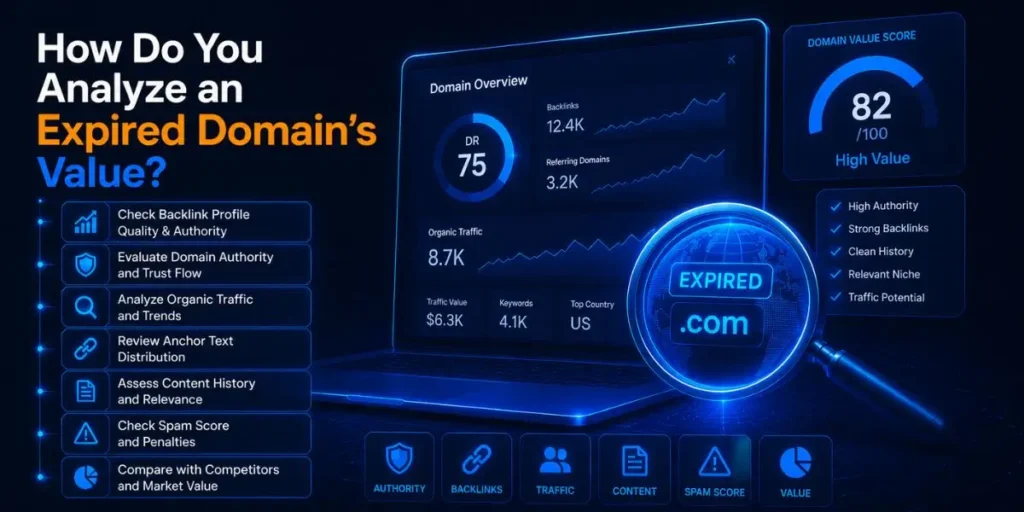
Finding an available domain is only part of the process. The real work starts with proper vetting.
Most people assume a high DR automatically means a valuable domain, but actually, that number alone can be misleading. A domain can look strong on the surface while hiding a messy backlink history underneath.
If you’re planning to build on an expired domain, this matters because a toxic backlink profile can drag your rankings down before your site even has a chance to grow.
The Backlink Profile Deep Dive
I noticed early on that backlink quality tells you far more than raw numbers ever will.
Why this step matters:
This helps you separate genuinely authoritative domains from inflated spam-heavy ones.
What to do:
- Open the domain inside Ahrefs.
- Review the referring domains report.
- Look closely at the link sources.
- Check whether those sites have real traffic and relevant content.
What you should see:
A healthy mix of legitimate niche-relevant websites linking naturally.
Quality always beats quantity.
A domain with 40 backlinks from real niche publications is often far stronger than one with 500 links from weak web 2.0 properties.
And then there’s anchor text.
Check it carefully.
If a dog training domain suddenly has anchor phrases tied to cheap jerseys, adult content, or pharmaceutical offers, that’s usually a sign the domain was hacked or pushed through a spam network.
Pro Tip:
Pay extra attention to anchor-text patterns. If too many links use exact-match commercial keywords, that’s often a warning sign of past manipulation.
Domain History Check
Compared to backlink metrics alone, historical review often reveals the full story.
Why this matters:
A clean-looking backlink profile can still hide a problematic past.
What to do:
- Visit Wayback Machine
- Enter the domain
- Review snapshots across several years.
- Look for major niche or ownership shifts.
What you should see:
Consistent topic relevance over time.
For example, if the domain were always about dog training, that would be a strong signal.
But here’s the thing — if it suddenly became a Japanese casino portal in 2021, search engines likely noticed that shift too.
And once that trust is damaged, recovery can be difficult.
Red Flags to Avoid
During my first serious vetting process, I found a domain that looked almost perfect in Ahrefs. Strong DR. Solid referring domains. Relevant anchor text.
Then I checked the archive.
Turns out, it had been operating as a spam-heavy private blog network for 2 years. That one check saved me from making a costly mistake.
Here are the biggest warning signs:
Spammy foreign-language anchor text, This usually happens when domains get hijacked for automated spam campaigns.
A history of 301 redirects to unrelated sites, This often signals link manipulation.
Hundreds of low-quality directory backlinks, These links rarely provide value and can indicate artificial authority inflation.
Pages missing from the Wayback Machine, Sometimes this suggests deliberate archive blocking to hide questionable history.
Pro Tip:
If multiple red flags appear together, move on. There are always better opportunities.
What Should You Do After Finding a Domain?
Once you’ve confirmed the domain is clean, timing matters.
Good domains rarely stay available for long.
So after registration, the next step is deciding how to extract the most SEO value from it.
The 301 Redirect Strategy
This works well when you already have an established website.
Why this matters:
A properly executed redirect can transfer relevance and authority.
What to do:
- Map old URLs to closely related pages on your site.
- Set up individual 301 redirects.
- Test every redirect path.
What you should see:
Relevant old URLs resolve naturally to matching live pages.
Most people rush this part and redirect everything to the homepage.
Honestly, that’s where problems start.
Search engines may interpret broad homepage redirects as soft 404s, which weakens the value transfer.
Building a New Site
If you’re starting fresh, this is usually the safest route.
Why this works:
It preserves topical continuity and helps maintain historical trust.
What to do:
- Build a new site directly on the expired domain.
- Recreate the highest-linked pages.
- Restore a similar content structure.
What you should see:
Old backlinks pointing to live, relevant pages again.
Compared to redirecting everything elsewhere, this often preserves more link equity.
What Are the Most Common Expired Domain Mistakes?
I ran into most of these mistakes when I was first learning this process.
And honestly, they’re easy to make.
Rushing the analysis
Beginners often see a high DR and buy immediately.
Why does it happen: DR feels like an easy shortcut metric.
How to avoid it: Always review anchor text, referring domains, and historical snapshots.
Ignoring topical relevance
A gardening domain won’t help much if your project is about SaaS tools.
Why does it happen: People focus too heavily on authority metrics.
How to avoid it: Prioritize domains with strong niche alignment.
Forgetting to recreate old URLs
This one catches a lot of people off guard.
Why does it happen: They focus on launching quickly.
How to avoid it: Rebuild the pages attracting the strongest backlinks. Otherwise, that authority disappears into 404 errors.
Ready to Start Your Domain Hunt?
Strategic acquisition of expired domains can give your SEO efforts a serious head start.
Instead of spending months on outreach and link building, you’re working with an authority that’s already there.
So the smartest next step is simple.
Check your top three competitors inside Ahrefs, review their broken outgoing links, and start digging. You might be surprised by what’s sitting there unnoticed.
Frequently Asked Questions
Yes.
Expired domains can perform very well if they have a clean history and relevant backlinks.
The key is making sure the domain wasn’t penalized before expiration.
If you discover them manually in Ahrefs and register them directly, they usually cost the standard registration price.
That’s typically around $10-$15, depending on the registrar.
It can be, if the domain is topically aligned with your site.
The safest approach is redirecting old pages to highly relevant matching pages.
Blanket homepage redirects are where risk usually appears.
Start with a branded Google search.
If nothing appears, the domain may be deindexed.
Also, review historical snapshots through the Wayback Machine for spam, hacked content, or unusual ownership shifts.

Is an SEO Specialist and AI Tools Researcher with over 4 years of hands-on experience in search engine optimization. As the founder of Smart AI Helper Pro, he tests and reviews AI writing, SEO, and marketing tools to help creators and business owners grow faster with practical, research-backed strategies.
