Grammarly Free vs Premium: What's the Real Difference? (2026)
By SM Mehedi Hasan
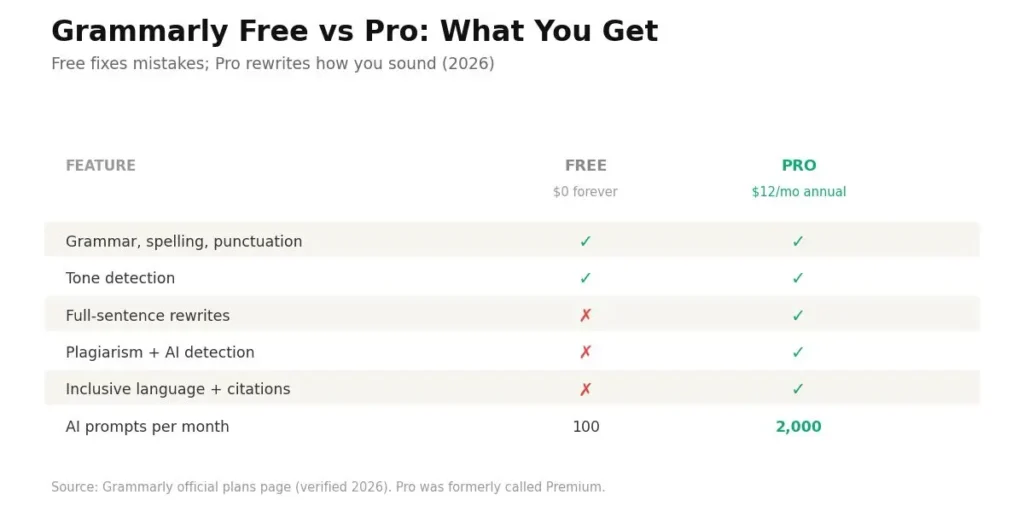
Grammarly Free gives you grammar, spelling, punctuation, tone detection, and 100 AI prompts a month, while Grammarly Pro (the plan formerly called Premium) adds full-sentence rewrites, a plagiarism checker, AI detection, and 2,000 AI prompts for $12 a month billed annually. The gap is depth and volume, not the basics. Free fixes mistakes; Pro rewrites how you sound.
Here is the fastest way to see the split before we go deeper.
| Feature | Grammarly Free | Grammarly Pro |
|---|---|---|
| Price | $0 forever | $12/mo (annual), $30/mo (monthly) |
| Grammar, spelling, punctuation | Yes | Yes (advanced) |
| Tone detection | Yes | Yes |
| Full-sentence rewrites | No | Yes |
| Plagiarism + AI detection | No | Yes |
| AI prompts per month | 100 | 2,000 |
| Inclusive language + citations | No | Yes |
| Team style guide + priority support | No | Yes |
If you just want clean, mistake-free writing for emails and posts, Grammarly Free is enough. If you write for a living or need rewrites, plagiarism checks, and heavy AI drafting, Grammarly Pro earns its price.
Table Of Contents
ToggleWait, Is Grammarly Premium Now Called Grammarly Pro?
Yes, “Grammarly Premium” was renamed to Grammarly Pro in late 2024, and the paid plan you see at checkout today is Pro. Most articles still say “Premium” because that is what people search for, but the current billing name is Pro.
I flag this early because it trips people up constantly. You read an old review talking about “Premium,” then land on the pricing page and see “Pro,” and wonder if you missed a plan.
You didn’t. It is the same paid tier, just rebranded. According to Grammarly’s official plans page, Pro also absorbed the old Business plan, so team features now come baked into the individual paid subscription at no extra cost.
But there is a small catch worth knowing. If you were already on a legacy Premium subscription and you switch to Pro, Grammarly cancels the old Premium plan and issues a prorated refund for the unused time. So nobody loses money in the move.
Throughout this guide, I’ll write “Pro (formerly Premium)” where it helps, so you always know exactly which plan you’re reading about.
What Does Grammarly Free Actually Include?
Grammarly Free is a real writing assistant, not a stripped-down demo.
It catches spelling, grammar, and punctuation errors in real time, shows you the tone of your writing, and hands you 100 AI prompts every month to test the generative features.
Most people assume the free tier is bare bones. It used to be. These days it does more heavy lifting than the built-in checkers inside Word or Google Docs, and it works almost everywhere you type.
Key Features of Grammarly Free
- Grammar and spelling correction that flags subject-verb slips, wrong articles, and typos as you write.
- Punctuation fixes for missing commas, stray apostrophes, and misplaced periods.
- Tone detection that tells you whether your writing reads as formal, friendly, confident, or unsure.
- Conciseness suggestions that trim padding like “in order to” down to “to.”
- 100 generative AI prompts per month to rewrite a paragraph, draft a reply, or brainstorm ideas.
- Works everywhere: browser extension, desktop app, mobile keyboard, and the Microsoft Word add-in.
And the accuracy on core errors is genuinely solid. For a tool that costs nothing, catching the mistakes that quietly damage your credibility is a fair deal.
Who Should Stick With Grammarly Free?
Grammarly Free fits anyone whose writing is mostly casual, short, or personal. If your day is emails, social posts, quick messages, or a personal blog, the free plan covers you without spending a cent.
Students handling everyday assignments get a reliable safety net here too. So do non-native English speakers who want a second set of eyes on basic grammar before hitting send.
Casual bloggers and hobby writers also land in this bucket. When your goal is “no embarrassing typos” rather than “polished, publishable prose,” Free does the job.
Pros and Cons of Grammarly Free
Pros:
- Completely free with no time limit.
- Strong at catching common, obvious errors.
- Full integration across apps, browsers, and mobile.
Cons:
- No plagiarism checker and no AI content detection.
- Limited rewrite and tone-adjustment power.
- 100 AI prompts drain fast if you lean on generative features.
In My Experience: Where Grammarly Free Quietly Falls Short
Honestly, when I first leaned on the free plan for client drafts, it handled the surface stuff fine but left the deeper edits on the table.
It caught a misspelled word instantly, yet it stayed silent on a clunky, run-on sentence that badly needed restructuring.
That gap shows up most on longer content. Free will fix “their” versus “they’re” without blinking, but it rarely tells you a paragraph is repetitive or that your tone drifted halfway through.
For a quick email, that is no problem. For a 2,000-word article, those missed structural notes add up.
Set against Pro, the free tier feels like a proofreader that stops at the obvious and never becomes an editor.
Expert Verdict: Grammarly Free
Pick Grammarly Free if your writing is casual and you mainly need typo and grammar cleanup; move to Pro the moment rewrites, plagiarism checks, or heavy AI drafting become part of your routine.
What Extra Do You Get With Grammarly Pro (Formerly Premium)?
Grammarly Pro keeps everything in Free and adds advanced tools: full-sentence rewrites, tone adjustment, a plagiarism checker, AI text detection, inclusive-language suggestions, citation help, and 2,000 AI prompts a month.
It turns a grammar checker into a writing coach. So what does that feel like in practice? Free tells you what is wrong. Pro shows you how to make the whole thing better, and often rewrites it for you in one click.
Key Features of Grammarly Pro
- Advanced grammar and clarity checks that untangle convoluted sentences and flag passive-voice overuse and vague phrasing.
- Full-sentence rewrites delivered with a single click for cleaner flow.
- Tone adjustment that nudges your wording toward confident, polite, or formal depending on your goal.
- Plagiarism checker that scans billions of web pages and academic databases, and links to the matching source.
- AI text detection to check whether a passage reads as AI-generated.
- Inclusive language and citation consistency suggestions for professional and academic work.
- 2,000 AI prompts per month for drafting, rewriting, shortening, and re-toning.
- Team extras: one shared style guide, one brand tone, snippets, and priority support.
The jump in AI prompts alone (100 to 2,000) is one of the clearest dividing lines between the two plans in 2026.
Who Is Grammarly Pro Actually Worth It For?
Grammarly Pro pays off for anyone whose income or grades depend on polished writing. Marketers, content creators, consultants, and business professionals get the most from the rewrite and tone tools.
Serious students and academics benefit too, especially from the plagiarism checker and citation help. A single flagged source before submission can save a grade or a reputation.
Freelancers and bloggers who publish often round out the group. When you edit thousands of words a week, one-click rewrites and unlimited-feeling suggestions turn hours of manual polishing into minutes.
Pros and Cons of Grammarly Pro
Pros:
- Deep clarity, tone, and rewrite suggestions. Free never surfaces.
- Built-in plagiarism and AI detection in one tool.
- 2,000 AI prompts comfortably cover most solo writers.
Cons:
- The $30 monthly rate stings compared to the $12 annual rate.
- AI detection is helpful but not 100% reliable.
- Overkill if you only write the occasional email.
In My Experience: What Changed When I Upgraded to Pro
The thing that surprised me most was how much time the one-click rewrites saved on repetitive editing.
On a batch of blog drafts, Pro flagged wordy sentences and offered a tighter version instantly, so I stopped rewriting the same awkward phrasing by hand.
I ran into one honest limitation, though.
The AI detector caught text I pasted from ChatGPT and Claude, but it remained unsure about a few passages I had written myself. I treat it as a quick sanity check, not a verdict.
Next to the free plan, Pro behaves less like a checker and more like an editor sitting beside you, which is exactly where the monthly cost starts to justify itself.
Expert Verdict: Grammarly Pro
Choose Grammarly Pro if you write professionally, edit long content, or need plagiarism and AI checks; stay on Free if your writing is light and correctness is all you’re after.
Grammarly Free vs Pro: The Differences That Actually Matter
The real decision comes down to five practical gaps, not the long feature lists. Here is how each one plays out when you actually sit down to write.
How Deep Do the Grammar and Clarity Checks Go?
Free handles the visible tip of the iceberg, while Pro works well below the waterline. Free reliably catches spelling, basic grammar, and obvious punctuation errors.
Pro digs into complex sentence structure, run-ons, awkward phrasing, and overuse of the passive voice.
When I fed both plans the same messy paragraph, Free returned a handful of fixes, and Pro returned rewrites that changed how the whole thing read.
If you need surface cleanup, go with Free. If you need structural editing, Pro is the better choice.
Does the Free Plan Include a Plagiarism Checker?
No, Grammarly Free does not include a plagiarism checker, and this is one of the starkest differences between the plans. Only Pro scans your text against billions of web pages and academic sources.
Pro also shows the matching source and lets you add a citation on the spot. Free simply doesn’t offer the feature at all.
For students and content creators, this single gap often settles the debate. If originality checks matter to your work, Pro is the only option that delivers them.
How Many AI Prompts Do You Really Get?
Free gives you 100 AI prompts a month; Pro gives you 2,000 per member. That is a 20x jump, and it matters more than most people expect.
Those 100 free prompts disappear faster than you’d think. Every rewrite, every “make this sound more professional,” every draft request counts against the cap, and heavy editors can burn through them in just a few working days.
So if AI drafting is a core part of your workflow, Pro is worth it. For occasional AI use, Free holds up fine.
What About Tone, Rewrites, and Inclusive Language?
Free detects your tone, but Pro actually adjusts it. Free will tell you a message reads as too casual or slightly aggressive.
Pro goes further and suggests softer, more confident, or more formal wording to fix it, plus inclusive-language nudges and citation consistency.
These are the touches that separate “correct” writing from writing that lands the way you intended.
For tone awareness, Free is enough. For tone control and polish, Pro wins.
Do Both Plans Work in Word, Docs, and Your Browser?
Yes, both plans integrate across the same surfaces: browser extensions, desktop apps, mobile keyboards, and the Microsoft Office add-ins for Word and Outlook. The access points are identical.
What differs is the depth of suggestions inside those integrations. You open the same sidebar in both plans; Pro just surfaces more inside it.
So integration is a tie. The gap is always about what gets checked, not where.
Grammarly Free vs Pro for Your Specific Use Case
The plan that wins changes depending on what you write. Same tool, different answer for a blogger versus a business team. Here is how the choice shakes out across the four groups that ask about it most.
Which Plan Is Better for Bloggers and Content Creators?
Grammarly Pro is a better fit for anyone publishing regularly, especially given the rewrites and AI prompt volume. When you’re shipping several posts a week, one-click sentence rewrites, and 2,000 AI prompts shave real hours off editing.
Free still works for a hobby blog you update now and then. But the moment writing becomes income, the plagiarism check and AI detection matter, since republished or AI-flagged content can quietly hurt your credibility.
So for a casual blog, Free is fine. For a monetized content operation, Pro is the practical choice.
Should Students and Academics Pay for Pro?
Students should upgrade to Pro when a graded paper is on the line, but Free covers most day-to-day coursework. Basic essays, discussion posts, and emails to professors don’t need more than the free grammar and clarity checks.
Where Pro becomes hard to skip is the plagiarism checker. A thesis, dissertation, or major research paper needs originality and confidence, and Free simply can’t scan for it.
A smart move is to run Free all semester and buy a single month of Pro around big deadlines.
That way you get the plagiarism reports without paying year-round. For light coursework, lean on Free; for high-stakes academic work, Pro is worth the short-term cost.
Do You Need Pro for Business and Work Emails?
For occasional work emails, Grammarly Free is genuinely enough. It catches typos and flags a tone that reads too casual or too sharp before you hit send.
But client-facing writing raises the stakes. Proposals, reports, and cold outreach benefit from Pro’s tone adjustment and clarity rewrites, where a single awkward line can cost a deal or dent your professional image.
Teams gain the most, since Pro now includes a shared style guide and brand tone so everyone’s writing sounds consistent. For solo, low-volume email, Free holds up; for professional or team communication, Pro pulls ahead.
Is Pro Worth It for Non-Native English Speakers?
Grammarly Pro tends to pay off for non-native English speakers because the fluency and rewrite suggestions catch patterns generic spell-checkers miss.
Free flags obvious grammar mistakes, but it rarely explains why a sentence sounds unnatural.
Pro fills that gap. Its “write fluently in English” suggestions reshape phrasing that is technically correct yet reads slightly off, which is exactly where many non-native writers want help.
The 2,000 AI prompts also add rewriting capacity for longer documents. If English is your first language and you only need typo cleanup, Free is enough; if you want your writing to read effortlessly native, Pro delivers more.
How Much Does Grammarly Pro Cost in 2026?
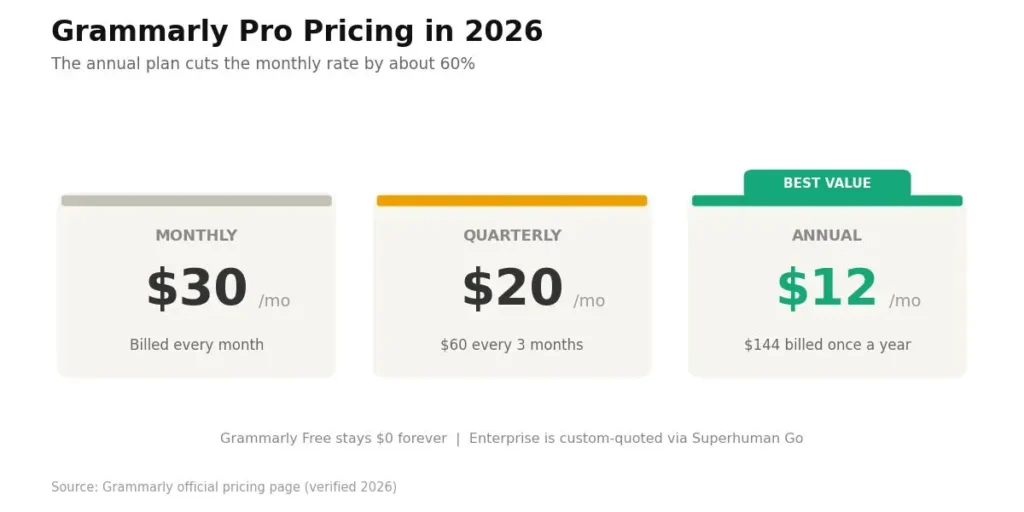
Grammarly Pro costs $12 per month on the annual plan, $20 per month on the quarterly plan, or $30 per month on the month-to-month plan. Grammarly Free stays free with no time limit.
Here is the current breakdown, confirmed on Grammarly’s official pricing page:
- Grammarly Free: $0, forever.
- Grammarly Pro (annual): $12/month, billed as $144 up front for the year.
- Grammarly Pro (quarterly): $20/month, billed as $60 every three months.
- Grammarly Pro (monthly): $30/month, no long-term commitment.
- Grammarly Enterprise: custom pricing, quoted by sales for larger organizations.
The annual plan is where the value sits. Paying yearly cuts the effective monthly rate from $30 to $12, roughly a 60% savings over paying month to month.
One more detail on seats: Pro now supports 1 to 149 members, so small teams no longer need a separate Business plan. Organizations above 149 users move to Enterprise.
Is the Grammarly Free Trial Real in 2026?
Yes, Grammarly currently offers a free trial on Pro, and the checkout shows a $0.00 charge today with an email reminder two days before the trial ends. That lets you test the paid features before committing any money.
Older reviews claim there is no trial, which is outdated. Just remember the auto-renewal: if you don’t cancel before the trial ends, the plan will bill at the rate you selected.
My honest advice is to start on Free first anyway. Use it for a week, notice where you keep wishing for more, and if those wishes are Pro features, then start the trial with a clear reason to upgrade.
The 2026 Update Most Reviews Miss: Grammarly Is Now Part of Superhuman
Here is the piece almost no comparison mentions: Grammarly now operates under the Superhuman Platform, and its footer even reads “2026 © Superhuman Platform.”
The Enterprise tier is delivered via the Superhuman Go product. For Free and Pro users, day-to-day writing hasn’t changed. Your grammar checks, rewrites, and AI prompts work exactly as before.
But it explains why you’ll see Superhuman branding around the product and why Grammarly keeps folding in acquired tools.
If you ever evaluate the Enterprise tier for a team, you’ll now do it through Superhuman Go rather than a standalone “Grammarly Business” page. Knowing this saves you a confusing moment at checkout.
Common Mistakes People Make Choosing Between Free and Pro
A few predictable traps cost people either money or quality. I’ve watched each one play out more than once.
Paying monthly out of habit.
So many users click the $30 monthly option when the $12 annual plan does the same job for far less. If you know you’ll use Grammarly for a few months, annual almost always wins.
Assuming Free includes plagiarism checks.
It doesn’t, and students learn this at the worst possible moment. If originality reports matter, you need Pro from the start.
Upgrading before you’ve hit a wall.
Some people buy Pro on day one without ever feeling Free’s limits. Run Free first, and let the friction tell you when to upgrade.
Burning AI prompts on tiny tasks.
On Free, using a prompt to reword a five-word phrase wastes your monthly 100. Save them for real rewrites, or the cap arrives early.
So Which Grammarly Plan Should You Choose?
The right plan depends on how much you write and what’s riding on it. Here is a clean way to decide based on your situation.
Budget-first and casual writer:
Grammarly Free. Emails, social posts, and personal notes need correctness, not a coach, and Free delivers that for nothing.
Student on a tight budget:
Free for everyday assignments, Pro when a graded paper needs plagiarism checks and advanced clarity. The plagiarism tool alone often justifies a single month of Pro around deadline season.
Professional writer, marketer, or creator:
Grammarly Pro on the annual plan. The rewrites, tone control, and 2,000 AI prompts pay for themselves in saved editing time.
Small team needing consistency:
Grammarly Pro, since it now carries a shared style guide, brand tone, and team analytics without a separate Business plan.
Large organization with security needs:
Grammarly Enterprise through Superhuman Go, where you get unlimited AI, SSO, and advanced controls.
Free is the safety net; Pro is the upgrade you feel every day you write for a living. Start free, and let your own frustration decide when it’s time to pay.
The 60-Second Decision Guide
Answer three quick questions and the plan chooses itself. This is the exact filter I use when someone asks me point-blank.
- Do you need a plagiarism or AI-content check?
If yes, you need Pro, because Free doesn’t offer either one. If not, keep reading. - Do you write and edit long content most days?
If yes, Pro’s rewrites and 2,000 AI prompts save enough time to cover the cost. If no, Free likely handles you. - Is $12 a month a comfortable spend for your writing?
If yes and either question above leaned toward Pro, go annual. If money is tight and your writing is casual, Free is a genuinely capable option.
Most casual users end this quiz on Free. Most professionals, students with big papers, and daily content writers end it on Pro. Both outcomes are correct answers, just for different people.
Frequently Asked Questions
Yes. Grammarly renamed Premium to Pro in late 2024, and Pro also absorbed the old Business plan. The features are the same or better, and the current checkout name is Grammarly Pro.
For casual emails, short assignments, and social posts, Grammarly Free is enough. But students submitting academic papers should use Pro for its plagiarism checker and advanced clarity suggestions, which Free doesn’t include.
Grammarly Pro costs $12 per month billed annually, $20 per month billed quarterly, or $30 per month billed monthly. The annual plan saves roughly 60% over paying month to month.
No. The plagiarism checker is a Pro-only feature. Grammarly Free covers grammar, spelling, punctuation, tone detection, and 100 AI prompts, but it cannot scan your text for plagiarism or detect AI-generated content.
Grammarly Free includes 100 AI prompts per month, while Grammarly Pro includes 2,000 prompts per member each month. Enterprise offers unlimited prompts. Heavy AI drafting can exhaust the free cap within days.

Is an SEO Specialist and AI Tools Researcher with over 4 years of hands-on experience in search engine optimization. As the founder of Smart AI Helper Pro, he tests and reviews AI writing, SEO, and marketing tools to help creators and business owners grow faster with practical, research-backed strategies.