
How Does Semrush Detect Duplicate Content? A Clear 2026 Breakdown
By SM Mehedi Hasan

Semrush detects duplicate content using its Site Audit bot, which crawls your pages and flags any two URLs that are at least 85% similar. It compares on-page body text, not just titles.
For content copied from other websites, Semrush uses a separate originality tool powered by Copyleaks.
Most people lump every “duplicate content” warning into one bucket. That mistake leads to wasted hours fixing the wrong thing.
So before you touch a single canonical tag, it helps to understand what Semrush is actually measuring and which of its two very different tools is doing the measuring.
Table Of Contents
ToggleHow does Semrush detect duplicate content?
Semrush detects duplicate content by crawling your website with its Site Audit bot and comparing the body text of every page against every other page. If two pages share 85% or more of the same content, the bot flags them as duplicates.
This is the core of how Semrush detects duplicate content across a domain.
The bot reads your site the way Googlebot would. It loads each URL, strips out the structural code, and examines the visible text a reader would actually see.
Then it runs a similarity comparison between pages. Anything that crosses the 85% line is pulled into the duplicate content report in Site Audit.
But here is the part that trips people up. The Site Audit bot only compares pages within the site you are crawling. It does not scan the wider internet to see if someone stole your article or if you accidentally copied a competitor.
What actually counts as “duplicate content” inside Semrush?
There are two separate detection systems, and confusing them is the single biggest reason people misread their reports. One looks inward at one’s own site. The other looks outward across the web.
Honestly, when I first started using Semrush, I assumed Site Audit checked for plagiarism too. It does not. That assumption sent me down a rabbit hole, fixing problems that were never really there.
Site Audit: your internal duplicate content
Site Audit handles duplicate content that exists within your own domain. This is the report most people mean when they say “Semrush flagged my duplicate content.”
It catches things like the same blog post living on two URLs, http and https versions of a page, or thin pages that look identical because they share the same header and footer.
This check is purely technical. It is about which version of a page Google should index, not about whether your writing is original.
SEO Writing Assistant: external originality
The SEO Writing Assistant runs a completely different check using the Copyleaks plagiarism engine. This one tells you whether your text appears anywhere else on the internet.
You paste or write your draft, click the Originality check, and it returns a percentage of copied words plus the source URLs where matching text was found.
You can even exclude your own domain so updates to existing posts do not get falsely flagged.
If your real question is “did someone copy my content” or “is my writer plagiarising,” this is the tool you want, not Site Audit.
| Detection type | Tool used | What it checks |
|---|---|---|
| Internal duplicates | Site Audit | Same content across your own URLs |
| External plagiarism | SEO Writing Assistant | Text copied from other sites |
| Quick spot-check | Free Plagiarism Checker | Originality of a single draft |
How does the Site Audit bot actually compare pages?
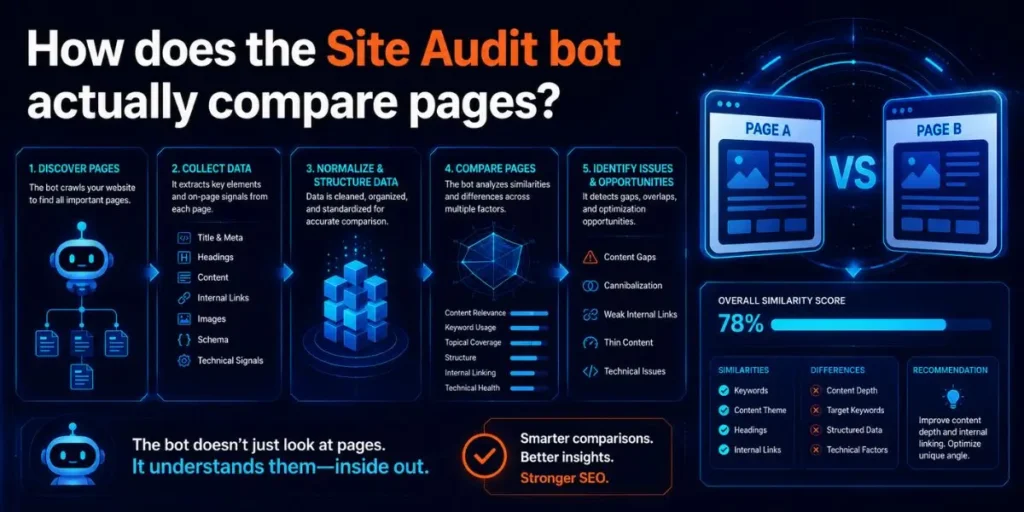
The Site Audit bot compares the visible body text of two pages and calculates the overlap between them. When that overlap hits 85% or higher, both pages get marked as duplicate content.
Unlike what most reviews say, the bot is not matching your pages word-for-word against a giant database. It is performing a page-to-page comparison within your crawl scope.
A few details shape how this works:
- It reads rendered text, and you can enable JavaScript rendering so it can see content loaded by scripts.
- You choose whether it crawls the mobile or the desktop version of your site.
- It can process up to 20,000 pages per audit on standard plans, and far more on the Business tier.
- The duplicate check sits among 140+ technical checks, including a newer AI Search category for GEO.
So the “content” being compared is whatever the bot can see after the page loads. That single fact explains most of the confusing flags people run into.
What actually triggers a duplicate content flag in Semrush?
Several specific situations push two pages past that 85% similarity line. Knowing them up front saves you from guessing later.
- HTTP and HTTPS versions: When both load, the bot treats them as two separate documents with identical content
- WWW and non-WWW versions: Same problem, two URLs serving the same page
- Thin pages: When body text is just one or two sentences, the shared header and footer alone push similarity over 85%
- URL parameters: Filtered or tracking URLs (like ?ref= or ?sort=) can serve the same page under many addresses
- Boilerplate templates: Category, tag, and archive pages with little unique text often look near-identical
And here is something worth sitting with. Most of these are not really “bad writing” problems. They are canonicalization and site-structure problems wearing a duplicate-content costume.
Pro tip: Before you panic over a long duplicate list, check whether http/https or www/non-www redirects are missing. Fixing redirects once often clears dozens of flags at once.
How do you find duplicate content in Semrush?

- Open Site Audit from the SEO menu and create or select a project for your domain.
- Configure the crawl, set your page limit, and choose mobile or desktop, then start the audit.
- Wait for the crawl to finish and the Site Health score to appear.
- Type “duplicate” into the issue search bar inside the report.
- Click the duplicate content issue to see the exact list of affected URLs grouped together.
Each step here builds on the last. You run the crawl so the bot has data, then filter that data to only look at duplicate flags instead of all 140+ checks at once.
When you click into the issue, Semrush shows you the pairs or clusters of pages it considers duplicates. That grouping is what tells you whether the cause is a redirect issue, a thin page, or genuinely repeated content.
Why does Semrush flag pages that are not really duplicates?
Semrush flags some pages as duplicates even when they are not true copies, usually because thin content makes the shared template dominate the comparison. This is the false positive problem, and it catches almost everyone at some point.
Picture a contact page and a thank-you page. Both have your full header, sidebar, and footer, but only a sentence or two of unique body text. To the bot, those pages look 85% similar because the template is most of the content.
The thing that surprised me most was how often these false positives outnumber the real issues. On one small site I audited, roughly half the flagged pages were just thin utility pages, not duplicated articles.
So the fix is not always “rewrite the page.” Sometimes the right move is to add genuine, unique content, and sometimes it is to noindex pages that were never meant to rank anyway.
Worth knowing: A high duplicate count on a brand-new site is often normal. Sparse content plus heavy templates inflate the number until you publish more real text.
How do you fix duplicate content flagged by Semrush?
- Open the duplicate content issue and note each affected URL group.
- Decide the role of each page: keep, merge, redirect, or block from indexing.
- Add a rel=”canonical” tag on duplicate pages pointing to the version you want indexed.
- Set up 301 redirects for http-to-https and www-to-non-www mismatches.
- Expand thin pages with real, useful content, or apply noindex to utility pages.
- Re-run the audit to confirm the flags are clear.
Why this order matters: You classify before you act, so you never accidentally redirect a page that should stay live. Canonicals and redirects come next because they resolve the most common technical causes in bulk.
After re-running the crawl, the duplicate count should drop. If a flag stays, that page usually has a real content overlap you need to address by rewriting.
In My Experience
After using Site Audit for a while, the report stopped feeling like a scary error list and started feeling like a map. The trick was learning to read the groupings instead of the raw number at the top.
I ran into an issue once where a client swore their content was unique, yet Semrush kept flagging dozens of product pages.
Turned out their store generated a separate URL for each colour variant, all serving nearly identical descriptions. The bot was right. The human just could not see it.
What I did not expect was how much faster the audit ran in 2026 with the Copilot suggestions sitting next to each issue.
Instead of guessing the fix, I got a plain-language recommendation per flag. It does not replace judgment, but it cuts the second-guessing.
One frustration stayed, though. The 85% threshold is fixed, so you cannot loosen it for sites where heavy templates naturally inflate similarity. You just learn to mentally subtract the false positives.
Common Pitfalls When Reading Semrush Duplicate Content Reports
Beginners make a handful of predictable mistakes here, and each one wastes real time.
- Treating Site Audit as a plagiarism checker: It only compares your own pages. Use the SEO Writing Assistant for external copying.
- Rewriting thin pages that should be noindexed: A thank-you page does not need 800 words. It needs a noindex tag.
- Fixing pages one by one: Many flags share a single root cause, such as a missing https redirect. Fix the cause, not each symptom.
- Ignoring the grouping: The number at the top means little. The clustered URLs tell you what is actually happening.
- Panicking over a new site’s count: Low content volume inflates similarity. Publish more, then re-audit.
Each mistake usually comes from reading the headline number instead of the detailed view. The detail view is where the real story lives.
Workflow Example: From Flag to Fix
Here is a realistic pass through the whole process, start to finish.
Input: A 40-page blog reports 22 duplicate content issues in Site Audit.
Process: Open the duplicate issue, group the URLs, and notice that 14 of them are HTTP versions of existing HTTPS pages. Another 5 are thin tag-archive pages. Only 3 are genuinely repeated articles.
Output: Apply a sitewide http-to-https 301 redirect, add noindex to the tag archives, and rewrite the 3 truly duplicated posts with unique angles.
Result: Re-running the audit drops the issue count from 22 to 0. Site Health improves, and Google now has a single, clear version of each page to index, rather than competing copies.
That breakdown (14 technical, 5 thin, 3 real) is pretty typical. The genuine writing problem is almost always the smallest slice of the report.
Frequently Asked Questions
No. Site Audit only compares pages within your own domain. To find your content copied on other sites or check a draft for plagiarism, use the SEO Writing Assistant, powered by the Copyleaks engine.
Semrush flags pages as duplicate content when they share 85% or more of the same body text. This threshold is fixed and applies to page-to-page comparisons in Site Audit.
This usually happens with thin pages. When body text is minimal, the shared header and footer make pages look 85% similar. Adding unique content or applying noindex resolves these false positives.
No. Duplicate content alone is rarely a penalty. Google simply picks one version to index and may split ranking signals. The Semrush flag is a warning to consolidate, not proof of a penalty.
Use canonical tags to point duplicates to a preferred page, set 301 redirects for http/https and www mismatches, expand or noindex thin pages, then re-run the audit to confirm the flags clear.

Is an SEO Specialist and AI Tools Researcher with over 4 years of hands-on experience in search engine optimization. As the founder of Smart AI Helper Pro, he tests and reviews AI writing, SEO, and marketing tools to help creators and business owners grow faster with practical, research-backed strategies.
