
How to Use Ahrefs Keyword Explorer Like a Pro
By SM Mehedi Hasan

With Ahrefs Keyword Explorer, enter a seed keyword, use the Keyword Difficulty (KD) filter to find low-competition terms, and analyze the top-ranking pages to spot content gaps for traffic potential.
Finding keywords used to feel like throwing darts in the dark. You would guess what people were searching for, publish an article, and then wait to see if anything happened. Sometimes it worked. Most of the time… not really.
Most people assume keyword research requires a massive spreadsheet and a degree in data science, but actually, it comes down to consistently following the right process.
Ahrefs Keyword Explorer helps remove much of the guesswork by showing you the phrases people are actively searching for, rather than forcing you to rely on assumptions.
Compared to older SEO workflows I used years ago, the biggest difference with Ahrefs is speed.
You can validate a topic, spot ranking opportunities, and estimate traffic potential in minutes instead of manually piecing data together from multiple tools.
This efficiency is a game-changer, especially if you have been struggling to get consistent organic traffic. In the next section, I’ll walk you through how to get started finding topics you can realistically rank for.
Table Of Contents
ToggleHow do you access and navigate the tool?
- Log in to your Ahrefs account and click “Keywords Explorer” in the top navigation bar.
This matters because all keyword discovery and SERP analysis starts from this dashboard. Once you open it, you will see a large search field along with a search engine and country filters. - Select your target search engine from the dropdown menu.
You can choose Google, YouTube, Amazon, Bing, and several others. If you are researching blog topics, stick with Google. If you create video content, YouTube search data will usually make more sense. - Enter one or more broad seed keywords (general terms that represent your main topic) into the search bar.
These are the starting topics Ahrefs uses to generate keyword ideas. For example, if you run a marketing blog, you might enter terms like “email marketing,” “SEO tools,” or “content strategy.” - Choose your target country, then tap the search icon.
This step is easy to overlook, but here’s the thing — location changes the data completely. After running the search, Ahrefs will generate an Overview report filled with metrics, graphs, keyword suggestions, and SERP data.
The dashboard can feel overwhelming the first time you open it. You will see traffic estimates, keyword metrics, trend graphs, percentages, and dozens of filters everywhere.
Ignore most of that initially and focus only on the “Overview” tab. That single section gives you the clearest snapshot of whether a keyword deserves your attention.
In My Experience
Honestly, when I first tried Keyword Explorer, I wasted hours staring at global search volume numbers instead of checking local data first.
I targeted a keyword showing nearly 50,000 monthly searches, started outlining content around it, and then realized most of that traffic came from countries I did not even serve.
So now, the very first thing I check is the target location filter before analyzing anything else.
If you’re doing SEO for a local business, regional service, or country-specific audience, this matters a lot because the wrong location setting can completely distort your keyword decisions.
What should you look for in your first search?
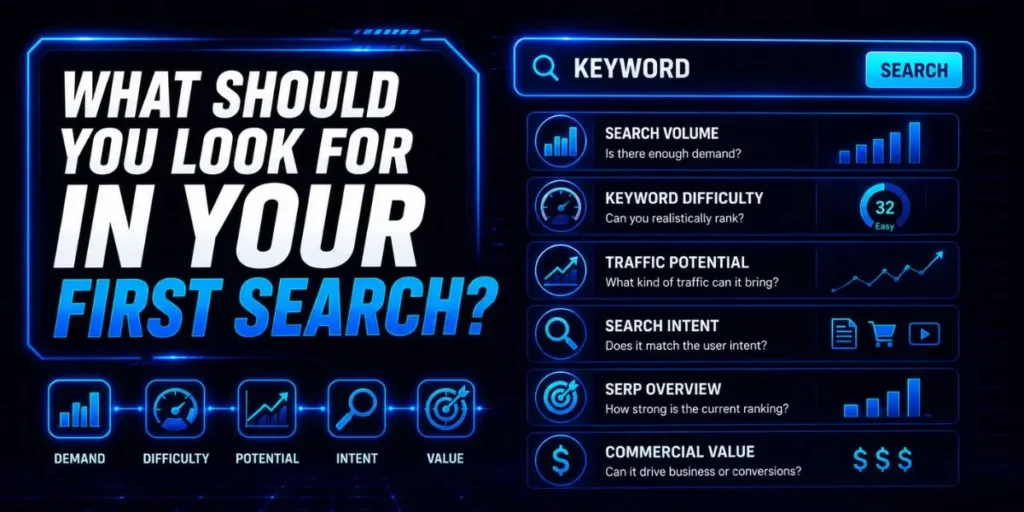
The Overview report acts like a quick reality check for any keyword idea. Sometimes a topic looks promising on the surface, but once you open the report, you immediately realize the competition is far too strong, or the traffic potential is much lower than expected.
But not every metric deserves equal attention.
Keyword Difficulty (KD) estimates how difficult it may be to rank on the first page of Google using a scale from 0 to 100.
Lower numbers usually mean weaker competition, while higher scores often indicate that strong, authoritative websites already dominate the search results.
Search volume tells you how many times people search for that exact keyword each month. Useful, yes. But search volume alone can be misleading if you rely on it without context.
The metric that usually matters more is Traffic Potential. Instead of focusing on one keyword only, Ahrefs estimates how much total organic traffic the top-ranking page receives from all related keywords combined.
So a keyword with only 200 searches per month could still drive thousands of visits if the ranking page also appears for dozens of long-tail variations (more specific keyword phrases with lower search volume).
I noticed this happens constantly with informational SEO topics where one strong article naturally ranks for hundreds of related phrases.
Pro Tip: If two keywords have similar search volume, prioritize the one with higher Traffic Potential. In many cases, that single page can rank for far more variations than the raw keyword volume suggests.
How do you find untapped keyword goldmines?
The “Matching Terms” report is where keyword research usually becomes much more practical.
Instead of showing one keyword at a time, Ahrefs generates thousands of related search queries based on your seed topic (the general subject you start your research with).
Most beginners stop at the Overview report. But honestly, this section is where you start uncovering the lower-competition opportunities that smaller websites can actually target.
Broad Match casts a wider net and shows keywords containing your seed terms in different combinations or orders. This is useful when you want to explore adjacent topics or discover unexpected search variations.
Phrase Match works differently. It only shows keywords that contain your exact seed phrase in the same order without interruption. So the results tend to stay tighter and more focused around your original topic.
And this distinction matters more than people realize. Broad Match is great for idea expansion, while Phrase Match helps when you already know the core topic you want to build content around.
In My Experience
What I didn’t expect was how useful the “Questions” toggle inside the Matching Terms report would become in real SEO workflows.
Compared to similar tools I’ve used before, Ahrefs does a surprisingly good job of surfacing highly specific informational searches that people are actively typing into Google.
I routinely use this section to uncover long-tail question keywords where forums like Reddit or Quora are already ranking on page one.
When that happens, it usually signals weaker competition and a gap for better-structured content.
One limitation, though, is that not every question keyword is worth targeting. Some look interesting at first glance but have almost no click activity once you inspect the SERP.
So before creating content, I still check the actual search results to confirm that users are clicking through to websites rather than getting instant answers directly from Google.
Which keyword metrics actually drive revenue?
Cost Per Click (CPC) shows how much advertisers are willing to pay for a single click on a keyword. CPC stands for cost per click and is often used in paid advertising campaigns.
And honestly, this metric reveals a lot more than most beginners realize. If companies are consistently paying $15 or more per click, it usually means the traffic behind that keyword has strong buying intent and real commercial value.
Most people focus entirely on search volume first, but here’s the thing — high traffic does not automatically mean profitable traffic.
A keyword with lower volume and stronger intent will often outperform a massive informational keyword that never converts into leads or sales. Clicks are another metric you should never ignore.
Search volume can be misleading because Google now answers many queries directly in search results through calculators, featured snippets, AI summaries, weather widgets, and instant-answer boxes.
So a keyword may show 10,000 monthly searches on paper, but if users never leave Google to visit actual websites, the traffic opportunity is much smaller than it appears.
I noticed this problem constantly with calculator-style searches and simple factual queries. The volume looked incredible at first. Then I checked the Clicks metric and realized hardly anyone was clicking through to websites anymore.
Pro Tip: If a keyword has high search volume but unusually low clicks, manually inspect the SERP before targeting it. Sometimes, Google already satisfies the query directly on the results page, dramatically reducing the potential for organic traffic.
How do you filter for the best opportunities?
- Open the Matching Terms report for your seed keyword.
This is where Ahrefs generates a large pool of related keyword ideas. Once the report loads, you will see filtering options across the top of the screen. - Set the KD filter to a maximum of 15.
This helps eliminate heavily competitive keywords that newer websites usually cannot rank for yet. After applying the filter, you should notice the list becoming much more manageable. - Set the Volume filter to at least 100.
Doing this removes keywords with almost no search demand while still keeping realistic low-competition opportunities on the table. - Use the “Include” filter to add modifiers like “best,” “how to,” or “vs.”
These modifiers matter because they often reveal stronger user intent. For example, “best email marketing software” signals a very different search intent than simply “email marketing.” - Review the refined keyword list and save strong targets to a Keyword List.
At this point, you should start seeing keywords that balance reasonable traffic potential with lower competition levels.
This filtering process removes a lot of the vanity metrics that distract beginners early on.
Instead of scrolling through thousands of impossible keywords, you end up with a tighter list of terms a smaller or newer site can realistically compete for.
But this works best when you stay realistic about your site’s authority. If your website is brand new, even KD 20 keywords can sometimes be tougher than they initially appear.
In My Experience
After using this workflow for a while, I realized the biggest mistake was being too aggressive with filters too early. I used to set the minimum search volume way too high because I assumed low-volume keywords weren’t worth targeting.
What happened was the opposite.
Some of the lowest-volume keywords drove the most qualified traffic because their intent was extremely specific. A keyword with only 150 monthly searches can still drive leads consistently if the audience already knows what they want.
So now I pay much closer attention to intent and SERP competition rather than just chasing raw volume.
What does a real keyword workflow look like?
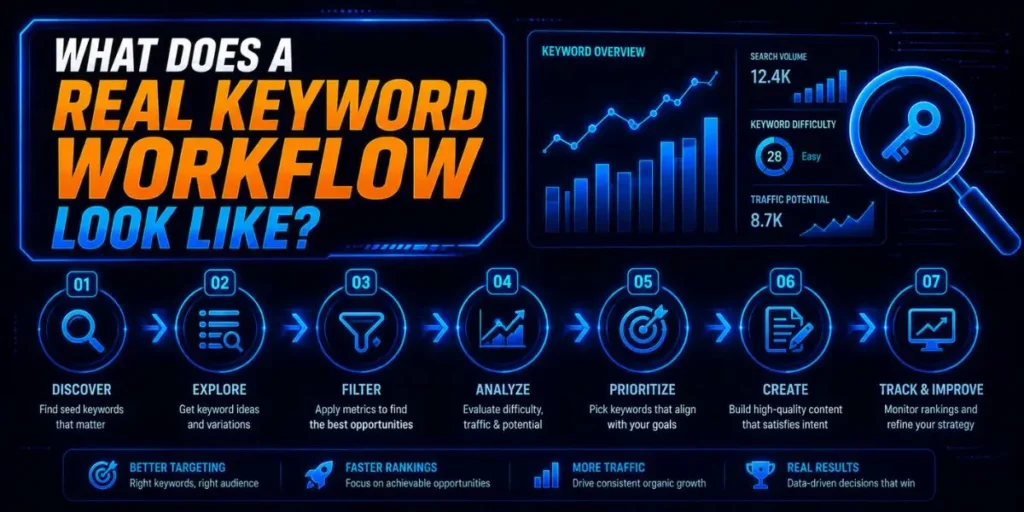
Here is a practical workflow I use to uncover high-value content opportunities without wasting hours digging through random keyword lists.
First, I enter a broad industry topic, such as “email marketing,“ into Keyword Explorer. Then I immediately open the “Related Terms” report, as it usually reveals adjacent topics and niche angles people actively search for.
Next, I start scanning for keywords with a KD under 20 and a CPC above $5.00. That combination often signals a balance between achievable rankings and strong commercial intent.
When I spot a keyword like “email marketing for real estate agents,” I pay closer attention because it targets a specific audience with a very clear use case.
So instead of competing against giant broad-marketing websites, you are narrowing the competition into a more specialized topic area.
Finally, I scroll down to the SERP Overview section at the bottom of the page. This step matters a lot because keyword metrics alone never tell the full story.
I check whether smaller websites with a Domain Rating (DR) under 30 are already ranking inside the top results.
If weaker sites are generating traffic from that keyword, there is usually an opportunity to create something more comprehensive and compete realistically.
Compared to what I tried years ago with manual keyword spreadsheets, this workflow feels much faster and more grounded in actual ranking data instead of assumptions.
What are the most common pitfalls?
Chasing high volume only
Beginners often fixate on keywords showing 50,000 or 100,000 monthly searches because the numbers look exciting.
But those terms are usually dominated by massive authority websites with years of backlink history and enormous content libraries.
So even if you publish a solid article, outranking established brands becomes extremely difficult without comparable authority.
A better approach is to target lower-competition, long-tail keywords first. Smaller wins build topical authority over time, and that authority makes larger keywords more achievable later.
Ignoring search intent
This mistake happens more often than people think.
You might write a detailed blog post targeting a keyword for which users clearly expect a software landing page, pricing tool, or product comparison. Then the content struggles to rank, even if the writing itself is strong.
And Google usually tells you exactly what it wants.
Before creating content, open the SERP Overview and study the current top-ranking pages.
If most results are tools, category pages, or ecommerce listings, publishing a standard informational article may not accurately reflect user intent.
Forgetting the parent topic
Most people assume every keyword variation deserves its own separate article. But actually, splitting closely related terms across multiple thin pages often creates keyword cannibalization.
I ran into this problem early on when I created separate posts targeting nearly identical long-tail variations. Instead of ranking better, the pages competed against each other, weakening overall performance.
Grouping related keywords under one strong parent topic usually works much better. One comprehensive guide can often rank for dozens or even hundreds of related keyword variations naturally.
Pro Tip: Before creating a new article, search the keyword inside your existing content library first. Sometimes updating and expanding an older page produces better results than publishing another overlapping post.
Where do you go from here?
Keyword research is not a one-time task you finish and forget about. Search trends shift, competitors publish new content, and Google constantly updates its ranking systems.
So the process keeps evolving.
Your next step should be to build a master keyword list in Ahrefs and organize those keywords by intent. Separate informational searches from commercial ones, then strategically map them to your content calendar.
If you’re building a new website, focus on consistency over perfection at first. Keep testing different seed keywords, explore new filters, and pay attention to the SERPs in which smaller websites are already ranking.
Over time, you start recognizing patterns. And once you understand the type of keywords your site can realistically compete for, content planning becomes much easier.
Frequently Asked Questions
If your website is still new or has a Domain Rating (DR) under 20, targeting keywords with a KD between 0 and 15 usually gives you the best chance of ranking without needing a large backlink profile.
Lower-difficulty keywords may not always have high traffic, but they are often much more achievable early on.
Yes. You can select specific countries directly from the dropdown menu before running your search. Ahrefs will then display keyword metrics and search volumes for the selected location, rather than global estimates.
This matters because keyword popularity can vary massively between regions.
Google Keyword Planner often groups similar keywords together and displays broader traffic ranges, which can inflate or blur the actual data.
Ahrefs uses clickstream data to provide more precise estimates of search volume for individual queries. So the numbers between the two platforms rarely match exactly.
Yes. Ahrefs Keyword Explorer includes a dedicated YouTube search engine option that focuses specifically on YouTube search behavior.
Once selected, you can research video-focused keywords, estimate search demand, and analyze metrics tailored to YouTube users instead of traditional Google web search.

Is an SEO Specialist and AI Tools Researcher with over 4 years of hands-on experience in search engine optimization. As the founder of Smart AI Helper Pro, he tests and reviews AI writing, SEO, and marketing tools to help creators and business owners grow faster with practical, research-backed strategies.
