
How to Interpret Ahrefs Anchor Text Data (2026 Guide)
By SM Mehedi Hasan

Interpreting Ahrefs anchor text data means reading the Anchors report by referring domains, not raw backlinks, then judging whether your branded, exact-match, and generic anchors look natural.
Healthy profiles lean heavily on branding (around 40 to 60 percent), with exact-match anchors kept under 10 percent, always checked at the page level first.
Most people open the Anchors report, see a list of words, and close it again. That list is actually a diagnosis.
It tells you how the rest of the web describes your pages, and whether that description looks like real people linking or like a campaign you ran on a spreadsheet.
This guide walks through how to read every part of that data, what each number signals, and the one mistake that quietly tanks rankings even when your overall numbers look fine.
Table Of Contents
ToggleWhat does Ahrefs' anchor text data actually tell you?
Ahrefs anchor text data tells you the exact words other sites use when they link to you, and how often each word appears. Think of it as a vocabulary report for your backlink profile.
When I first treated it as just a list, I missed the point. The value is in the pattern.
If forty different sites link to you using your brand name, Google reads that as a real entity.
If forty sites all link with the same money keyword, that reads as something you engineered.
So the report answers three quiet questions at once:
- How does the web describe this page?
- Does that description look earned or manufactured?
- Which keyword is Google most likely to associate with this URL?
That last one matters more than most beginners realize. The anchors pointing at a page help decide what that page ranks for, not just whether it ranks.
Where do you find the Anchors report in Ahrefs?
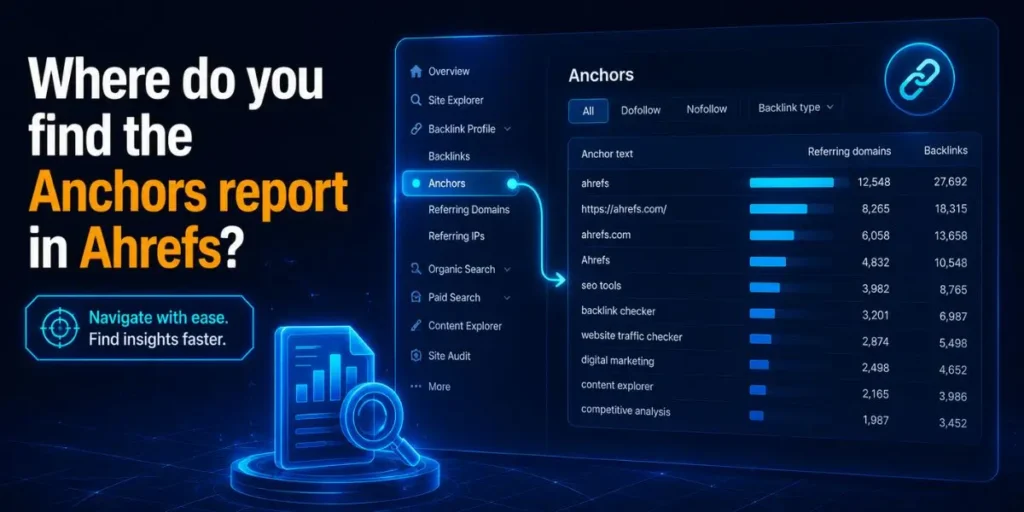
- Open Site Explorer from the top navigation bar.
- Enter your domain, subdomain, or a single URL, then hit search.
- Click Anchors in the left sidebar under the Backlink profile section.
- Apply the Dofollow filter to focus on links that actually pass value.
- Set the sort to Referring domains, not Backlinks. This one change fixes most misreadings.
Why start at the URL level for important pages? Because risk hides at the page level, not the domain level. A homepage can look spotless while a money page is buried in exact-match anchors. More on that danger zone below.
How do you read each column in the Anchors report?
Each column answers a different question about the link, so reading them together is what turns raw data into a decision.
| Column | What it shows | What to actually watch for |
|---|---|---|
| Anchor | The clickable words used in the link | Repeated money keywords stacking up |
| Referring domains | How many unique sites use that anchor | The real popularity signal, trust this over backlinks |
| Backlinks | Total links using that anchor | High here but low domains means one site spamming you |
| Dofollow | Whether the anchor passes link equity | Filter on this before judging anything |
And here is the trap. The Backlinks column can scream a number like 500 while Referring domains shows 2. That is not 500 sites agreeing on a keyword.
That is two sites linking you 250 times each. Read by referring domains, and the noise disappears.
What are the anchor text types, and what do each signal do?
There are seven anchor types, and each one sends a different message to Google about how natural your profile is.
| Anchor type | Example | Signal it sends |
|---|---|---|
| Branded | smartaihelperpro |
Trust, real entity, safest type |
| Exact match | best ai writing tool |
Powerful but risky in volume |
| Partial match | this ai writing guide |
Natural, keyword-adjacent, safe |
| Generic | click here, read more |
Human, low risk, dilutes nicely |
| Naked URL | smartaihelperpro.com | Neutral, looks organic |
| Image | alt text of a linked image | Often overlooked, counts as anchor |
| Compound branded | smartaihelperpro AI tools |
Branded plus context, very safe |
Honestly, when I started auditing, I lumped partial and exact matches together. Big mistake. Partial match anchors are your friend because they read naturally inside a sentence.
Exact match anchors are the ones that pile up and get you flagged. Keep them separate in your head.
What is a healthy anchor text distribution in 2026?
A healthy 2026 distribution leans branded and generic, keeps exact-match small, and never looks perfectly balanced. Real link profiles are messy, and Google now expects them to be.
Here is the breakdown most credible 2026 sources converge on:
| Anchor type | Healthy range | Risk if exceeded |
|---|---|---|
| Branded | 40 to 60 percent | Almost none, this is good |
| Generic and naked URL | 25 to 40 percent combined | Low |
| Partial match | 10 to 15 percent | Low to moderate |
| Exact match | Under 10 percent, ideally under 5 | High above 15 percent |
But here is the part most articles get wrong. There is no universal safe ratio. Those numbers are a starting reference, not a target to hit exactly.
Your real target is whatever the top three ranking pages for your keyword already have, because that tells you what this specific SERP rewards.
And a contrarian point worth sitting with: in 2026, the safest profiles are often the most uneven ones. Google’s systems learn routines, not single events.
A profile that looks too clean, too evenly spaced, too consistent month after month, reads as managed. A lumpy, organic-looking spread reads as earned. Perfection is now a flag.
In My Experience
The thing that surprised me most was how often a “clean” account hid a dirty page. I once pulled a domain that showed roughly 6 percent exact-match overall, which looks textbook safe.
Then I filtered to a single commercial landing page, and the same money keyword accounted for over half the incoming anchors to that URL.
The domain average had completely masked it. That page was the one losing rankings, not the site.
Since then, I have always run the URL-level Anchors report on money pages before trusting any domain-wide numbers. The aggregate lies. The page tells the truth.
Why should you read anchor data by referring domains, not backlinks?
Reading by referring to domains prevents a single loud site from distorting your whole picture. Backlinks count every single link, so a widget or footer link repeated across thousands of pages can fake a pattern that does not exist.
Picture a free tool you released with a credit link in the embed code. One popular blog embeds it on 800 posts. Suddenly, your Backlinks column shows 800 identical anchors. Read that way, you look dangerously over-optimized.
Switch to referring domains, and it is one site. One. The risk was imaginary.
So referring domains is the honest denominator. Always calculate your percentages off it.
How do you spot over-optimization in the data?
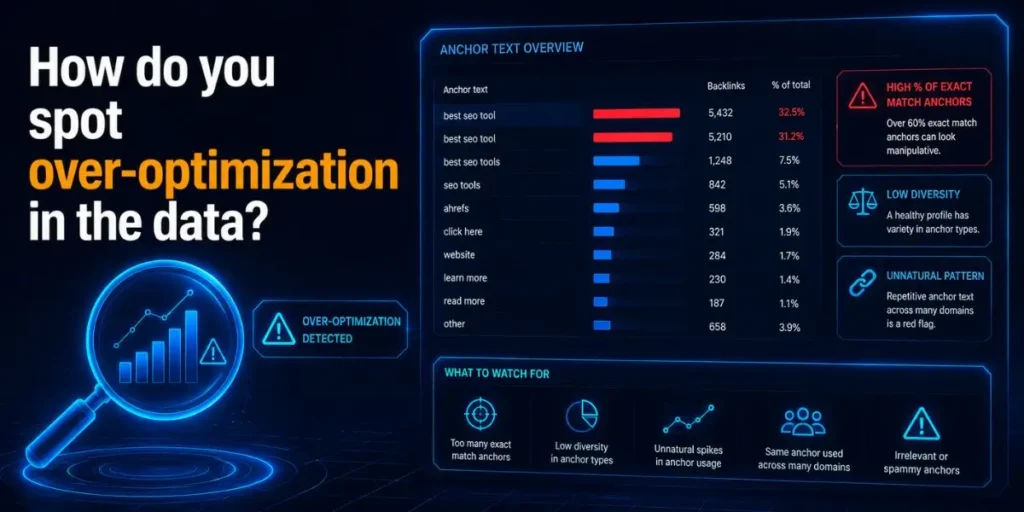
You spot over-optimization by looking for concentration, not just high percentages. Three patterns matter more than any single number.
- Page-level concentration: one URL where a single keyword dominates incoming anchors, even if the domain average looks fine.
- Velocity clustering: a batch of similar anchors that all appeared in a tight window, which reads as a deliberate push rather than natural growth.
- Keyword cannibalization: the same exact-match anchor spread across several pages, splitting the relevance signal so none of them rank well.
When I was auditing a client site that suddenly stalled, none of these showed at the domain level. The velocity pattern gave it away.
Forty keyword-rich anchors had landed inside the same fortnight. Spaced out, they would have been fine. Bunched, they looked bought.
Worth knowing: a genuinely editorial link can still add to an over-optimization problem if it stacks onto an already concentrated page. The quality of the link and the safety of the anchor are two separate things.
How do you interpret a competitor's anchor data?
You interpret a competitor’s anchor data to reverse-engineer what your SERP actually rewards, instead of guessing from generic ratio tables.
- Search for your target keyword and note the top 3 organic results, excluding directories and aggregators.
- Drop each competitor URL into Site Explorer and open the Anchors report.
- Filter Dofollow, sort by referring domains, and read their type breakdown.
- Average the exact-match percentage across all three.
That average is your real target. If the top pages all sit near 4 percent exact-match, the SERP wants conservative anchors, and pushing harder will hurt you.
If they tolerate 12 percent, you have more room. The competitors are doing your risk testing for free.
If you do nothing else from this section, do this: never set your anchor goal from a blog post’s ratio table. Set it from the live SERP you are trying to win.
Common Pitfalls When Reading Ahrefs Anchor Data
These are the mistakes I see most often, and why each one quietly costs you.
- Judging the domain, ignoring the page. Risk concentrates on individual money pages. A safe site’s average can hide a poisoned URL. Always drill into key pages.
- Trusting Backlinks over Referring domains. One spammy site can inflate an anchor into looking like a trend. Read by domains every time.
- Forgetting the Dofollow filter. No-follow anchors carry minimal weight, so leaving them in muddies your percentages and makes safe profiles look risky.
- Panicking and disavowing. A slightly high exact-match ratio is not a penalty. The fix is usually to dilute with branded and generic links over the next few months, rather than removing anything.
- Treating ratios as targets. Chasing a perfect spread creates the exact uniformity that now looks engineered. Aim for natural, not symmetrical.
Each of these comes from reading a single number in isolation. Anchor data only makes sense in context, page by page, source by source.
Workflow Example: Auditing One Money Page
Here is the full flow I run on a single important URL, start to finish.
Input: One commercial page that has slipped in rankings, plus Ahrefs access.
Process: Open Site Explorer, paste the exact URL, and click Anchors. Apply the Dofollow filter and sort by referring domains. Group the anchors into branded, exact, partial, generic, and naked URLs.
Calculate each as a percentage of referring domains, not backlinks. Then check whether the exact-match anchors all arrived around the same time.
Output: A simple table showing this page sits at 38 percent exact-match by referring domains, most of it from a three-week burst last quarter.
Result: The diagnosis is page-level over-optimization driven by velocity, not a toxic-link problem.
The action is clear: pause keyword anchors to this page, point the next batch of branded and generic links here, and let the ratio dilute naturally over three to six months. No disavow needed.
That is the whole point of interpreting the data. You are not collecting numbers. You are deciding your next move.
Does anchor text data matter for AI Overviews in 2026?
Yes, but indirectly, and in a way most guides skip. Anchor text helps Google and AI systems associate your brand with an entity and a topic, which feeds how confidently they cite you.
A profile rich in branded and compound-branded anchors reinforces that your site is a real, recognized source on a subject.
That entity clarity is exactly what AI Overviews and answer engines rely on when choosing which entities to pull from. Keyword-stuffed anchors do not help here. Consistent, natural brand association does.
So the same habits that keep you safe from over-optimization, lots of branded anchors, and a clean topical footprint, also quietly support AI visibility. The interpretation skill stays the same. The payoff just widens.
Frequently Asked Questions
Keep exact-match anchors to no more than 10 percent of your profile, ideally under 5. Above 15 percent enters high-risk territory, especially when concentrated on one page.
Both, but page-level catches what domain-level hides. A safe site average can mask a single money page where a single keyword dominates incoming anchors.
Because one site can link to you many times using the same anchor. Always judge popularity by referring domains, so a single source cannot distort your percentages.
Usually yes. Pause keyword anchors to the affected page and build branded and generic links instead. The ratio dilutes naturally over three to six months.
Review it monthly, and always after a new link-building push. Important pages targeting competitive keywords should be checked at the page level more often.

Is an SEO Specialist and AI Tools Researcher with over 4 years of hands-on experience in search engine optimization. As the founder of Smart AI Helper Pro, he tests and reviews AI writing, SEO, and marketing tools to help creators and business owners grow faster with practical, research-backed strategies.
