Can You Use AI Art for Album Covers? (Yes, But Here’s What Actually Matters in 2026)
By SM Mehedi Hasan
Yes, you can use AI-generated art for album covers, and no major distributor bans it for being AI-made. The catch is ownership: after the Supreme Court’s March 2026 refusal to hear Thaler v. Perlmutter, purely AI-made images can’t be copyrighted in the US, so anyone could legally copy your cover.
So the honest answer isn’t a clean “yes” or “no.” It’s “yes, and here’s exactly where it gets complicated.” Most guides stop at “it’s easy, just type a prompt.”
That’s the part that gets artists in trouble later, when a release stalls in review or a bigger act reuses their artwork, and there’s nothing they can do about it.
This guide walks through the legal side (updated for the 2026 court ruling most articles missed), which AI tools actually give you commercial rights, what your distributor will reject, and a safe step-by-step workflow to get a cover live without a takedown.
Table Of Contents
ToggleCan you legally use AI art for an album cover?
Yes, using AI-generated art on an album cover is legal in the United States, and no rule stops you from releasing music with an AI-made cover.
What people really mean when they ask this question is two separate things, and mixing them up is where the confusion starts.
There are two questions hiding inside “can I use this”:
- Do I have the right to put this image on my release? Usually yes, if you used the tool correctly and own the rights to what’s in the frame.
- Can I stop someone else from copying my cover? Often no, if the image is mostly raw AI output.
Those aren’t the same thing, and the gap between them is the whole story. You can have a perfect legal right to use a cover while having almost no power to protect it.
Keep that split in your head for the rest of this article, because every distributor rule and every copyright decision below traces back to it.
Do you actually own an AI-generated album cover?
Not in the way most people assume. In the US, you can use an AI-generated cover, but you often can’t claim copyright over the AI-generated parts, which means you can’t legally stop others from reusing the same or a near-identical image.
Honestly, this is the piece almost every “AI album cover” post glosses over. They tell you the tool “gives you full ownership,” then never explain that a tool’s terms of service and actual copyright law are two different animals. One is a private contract. The other is federal law. They don’t always agree.
What did the Supreme Court decide about AI art copyright?
On March 2, 2026, the US Supreme Court declined to hear Thaler v. Perlmutter, thereby affirming a lower court ruling that copyright requires a human author. That decision ended a years-long case and made the “human authorship” rule the settled law for now, rather than a temporary guideline that might change soon.
Here’s why it matters for your cover. The case involved an image generated entirely by an AI system with no human creative input, and the courts refused to register it.
With the Supreme Court stepping aside, the US Copyright Office position stands: a work created purely by a machine, with no meaningful human hand, gets no copyright protection.
You can read the office’s own guidance on the Copyright and Artificial Intelligence initiative page, and Holland & Knight’s legal analysis of the denial is well covered.
Most articles you’ll find still describe this as “under active review” or “unsettled.” That framing was true a year ago. It’s outdated now. As of March 2026, the top of the court system has spoken, and the message is consistent: no human, no copyright.
Does writing the prompt make the art yours?
Sometimes, but usually not on its own. Typing a prompt, even a long and detailed one, generally isn’t treated as enough human authorship to earn copyright over the resulting image.
Intent shows effort, but the law looks for creative control over the final expression.
The Copyright Office has tested this directly. In the case of a comic called Zarya of the Dawn, it protected the human-written text and the panel arrangement but refused protection for the individual AI-generated images.
Another decision involved an artist who entered more than 600 detailed prompts to shape a single award-winning image, and the office still declined to register it because the AI, not the human, determined the final look.
But there’s a real path to stronger footing. Where artists tend to get on safer ground is when they add genuine human creativity on top of the AI output:
- Compositing several generated elements by hand
- Painting over, retouching, or redrawing key features
- Adding original typography, layout, and color decisions
- Starting from a human-made base (your own photo or sketch) and transforming it
The more of your own creative decisions end up baked into the final file, the stronger your claim to the human-authored parts becomes.
Raw, untouched output sits at the weak end. A heavily reworked composition sits at the strong end.
What’s the difference between owning and being able to use it?
Owning a copyright and having a license to use an image are two different rights, and AI tools give you the second, not always the first. A commercial license allows you to use, sell, and distribute the image.
Copyright means you can stop other people from using it. AI outputs frequently lack the second and include the first.
Think of it like renting versus deed. Midjourney, Adobe Firefly, and OpenAI can hand you broad permission to use what you generate. None of them can hand you a copyright that federal law says doesn’t exist for machine-made work.
And a tool’s contract only binds that tool’s users, not the general public. So if a stranger screenshots your AI cover and slaps it on their own single, your license with the tool won’t stop them.
Pro tip: Screenshot and date-stamp the exact terms of service section that granted you commercial rights on the day you generated the image. Terms change without notice, and if a rights question ever comes up, proof of what was permitted when you created the work is worth more than a memory.
Which AI tools let you use art commercially on album covers?
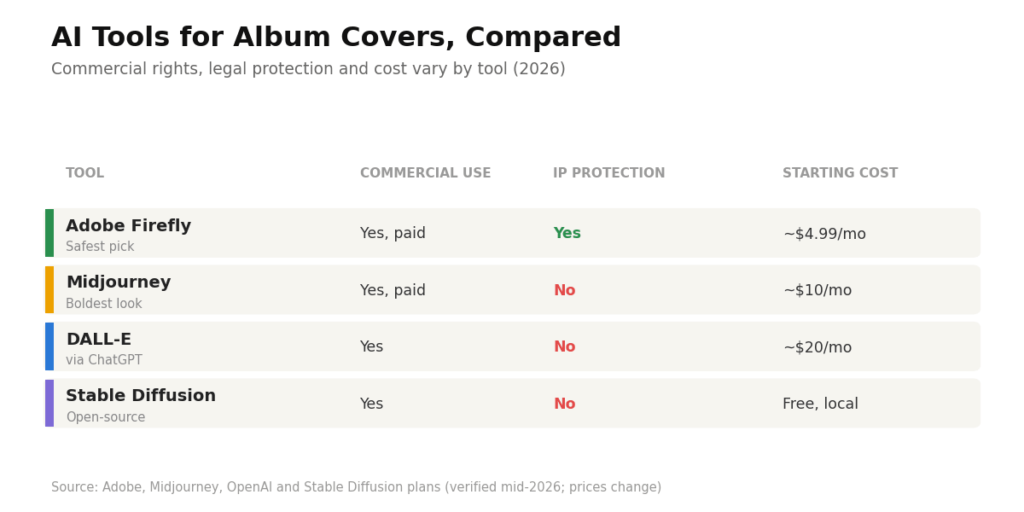
Most paid AI image tools let you use outputs on a commercial album cover, but they differ sharply on legal protection, cost, and hidden conditions. The table below compares the four most-used cover art generators in 2026 so you can pick based on your actual risk level, not marketing copy.
| AI Tool | Commercial use on covers? | Legal protection (indemnification) | Cost to unlock commercial rights | The catch |
|---|---|---|---|---|
| Adobe Firefly | Yes, on paid plans | Yes, IP indemnification on qualifying paid plans | From about $4.99/mo (Premium) | Indemnity covers copyright, not trademark or a real person's likeness |
| Midjourney | Yes, on any paid plan | No indemnification | From $10/mo (Basic) | Companies over $1M/year revenue must use Pro or Mega; free tier is non-commercial only |
| DALL-E (via ChatGPT) | Yes, you own outputs | No comparable indemnification | Free tier works; ChatGPT Plus about $20/mo | No copyright on pure AI output; free-tier use in paid work is risky |
| Stable Diffusion | Yes, open-source | No indemnification | Free if you run it locally | Needs your own hardware and setup; you carry all legal risk |
(Prices and terms verified as of mid-2026. Always confirm current pricing on each tool’s official plans page before a commercial project, since these change often.)
Why is Adobe Firefly the safest pick for commercial covers?
Adobe Firefly is the safest mainstream choice because it’s the only major generator to offer IP indemnification, meaning Adobe agrees to defend you if someone sues, claiming your generated image infringes their copyright.
That protection exists because Firefly was trained on licensed Adobe Stock, public domain, and openly licensed content rather than scraped web images. Even so, the protection has edges worth knowing.
Adobe’s indemnity is copyright-focused, so it doesn’t cover you if your prompt names a living celebrity, a real brand, or a copyrighted character. Do that, and you void the coverage and expose yourself to direct trademark and right-of-publicity claims.
Firefly also embeds Content Credentials into its outputs, which quietly label the image as AI-generated, which is useful for disclosure but something to be aware of. Midjourney produces more striking, stylized covers, and many artists prefer its look.
Just watch the two traps: the free tier gives you no commercial rights at all (Midjourney owns those images), and if you’re generating on behalf of a company grossing over a million a year, you need a Pro or Mega plan to use the work commercially.
You can confirm the current rules in Midjourney’s own commercial use documentation. One more thing that surprises people about Midjourney: images generated on the public generation feed are visible to other users and can be reused or remixed.
So the “one-of-a-kind” cover you generated on a shared server may not be exclusive to you at all.
Will Spotify or your distributor reject an AI album cover?
No streaming platform rejects a cover simply for being AI-generated, but they will reject it for content and technical problems that AI art commonly triggers. You don’t upload directly to Spotify or Apple Music.
Instead, you go through a distributor like DistroKid, TuneCore, or CD Baby, and that distributor has to feel confident that the rights are clean and the file complies with the rules.
Here’s a distinction that trips up a huge number of artists, and almost no article cleanly separates it. The strict “no AI” policies you may have read about apply to AI-generated music, not to the cover image.
- CD Baby bans fully AI-generated tracks outright, but that’s about the audio, not your artwork.
- DistroKid and TuneCore accept AI-assisted music, provided it is disclosed and rights are proven.
- For the cover image specifically, every distributor cares about one thing: can you prove you have the rights, and does the image follow content rules?
So if you read “CD Baby rejects AI,” don’t assume that means your AI cover is dead. It’s aimed at machine-made songs. Your image is judged on rights and content, which is a different test.
What cover art gets automatically rejected?
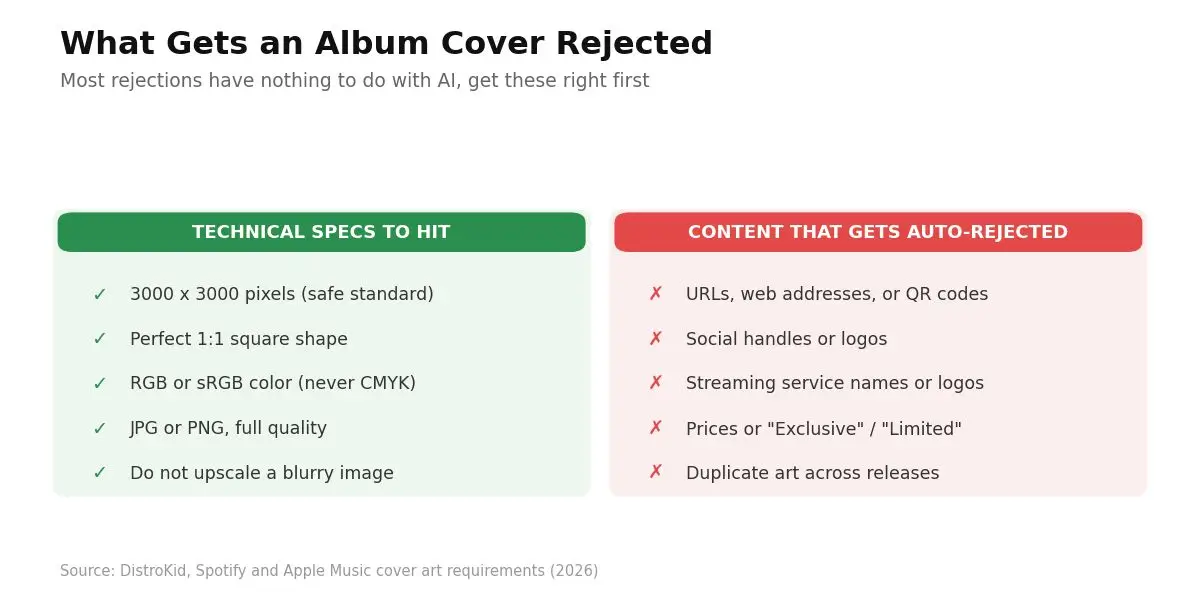
Distributors auto-reject covers for specific technical and content issues, and most rejections have nothing to do with AI. Get these right and being AI-made becomes a non-issue.
Technical specs your file must hit:
- Size: 3000 x 3000 pixels is the safe standard that clears every distributor. DistroKid accepts a minimum of 1000 x 1000, but recommends 3000. See DistroKid’s artwork requirements.
- Shape: A perfect 1:1 square. Rectangular covers get bounced.
- Color: RGB or sRGB. CMYK is rejected outright by Spotify and Apple.
- Format: JPG or PNG, full quality, and don’t upscale a small blurry image to fake the size. You can check Spotify’s cover art requirements directly.
Content that triggers an instant rejection:
- URLs, website addresses, or QR codes.
- Social media handles or logos (Instagram, TikTok, X)
- Streaming service logos or names (Spotify, iTunes, Apple)
- Prices or terms like “Exclusive” or “Limited Edition”
- References to physical formats like “CD” or “Vinyl”
- Nudity, gore, or other explicit imagery not properly tagged
- Duplicate artwork reused across multiple releases.
Worth doing before you upload:
Shrink your cover to 80 x 80 pixels and look at it. That’s the thumbnail size most listeners actually see before they decide to press play. If the title turns to mush or the art blurs at that scale, simplify it now. AI generators love busy detail that vanishes in a thumbnail.
Why is 2026 stricter than before?
Distributors got stricter in 2026 because platforms are drowning in auto-generated uploads and cracking down hard.
Spotify removed tens of millions of tracks flagged as spam, and one distributor reported receiving around 50,000 fully AI-generated tracks per day in late 2025.
That volume pushes stores toward conservative, reject-first decisions on anything that looks mass-produced.
What that means for your cover: a striking, clearly intentional piece of art with a real artist profile behind it sails through. A generic, obviously raw AI thumbnail on a faceless account uploading dozens of releases gets extra scrutiny.
The bar isn’t “did you use AI.” The bar is “does this look like a real release from a real artist.”
How do you create a safe, publish-ready AI album cover?
Follow these steps to go from a prompt to a cover that survives distributor review and holds up legally.
- Nail your concept before touching a generator.
Decide the mood, genre, main subject, color palette, and where text will sit. A clear concept means fewer wasted generations and a cover that actually fits the music, not a random pretty image. You should end this step with a one-line creative brief you can turn into a prompt. - Generate with a paid, commercial-safe tool.
Use Adobe Firefly for maximum legal safety, or a paid Midjourney plan for a bolder look, and never publish from a free tier that grants no commercial rights. Doing this locks in your right to actually use the image on a release. After generating, you’ll have a base image you’re legally cleared to build on. - Add meaningful human editing.
Bring the output into Photoshop, Canva, or Illustrator and change it: composite elements, retouch, adjust color, and add your own typography and layout. This step does double duty, since it both improves quality and strengthens any claim to the human-authored parts of the final file. You’ll come out with a cover that no longer looks like raw prompt output. - Check the content and technical rules.
Confirm the file is 3000 x 3000, square, RGB or sRGB, JPG or PNG, and scrub the image of any logos, URLs, handles, QR codes, or prices. This is what keeps the release from getting auto-rejected on upload. When done, you’ll have a distribution-ready file that matches every distributor spec. - Keep a proof folder from day one.
Save your prompts, your subscription receipt from the day you generated it, your edited layers, and a dated screenshot of the tool’s terms. If a distributor ever asks “where did this come from,” speed and documentation win. You’ll have a clean paper trail that proves the cover is yours to use. - Disclose AI use where required, then export and upload.
Some distributors and platforms ask you to indicate whether AI tools were involved, so answer honestly in the upload form. Being upfront avoids retroactive takedowns during routine platform sweeps. The result is a live release with clean rights and no surprises months later.
In My Experience
The thing that surprised me most about AI covers was how quickly a raw generation can go from “wow” to “obviously AI.” At first glance, a Midjourney output looks gallery-ready.
Zoom in and you catch the tells: a hand with the wrong number of fingers, text that dissolves into gibberish, a light source that makes no physical sense. On a 3000-pixel cover blown up on someone’s TV, those flaws get loud.
That’s why the editing pass isn’t optional for me anymore. I ran a batch of covers straight from a generator once, and they read as cheap next to anything with a human touch on top.
Twenty minutes in Photoshop, fixing the typography and compositing a cleaner background, changed the whole read of the release.
One thing that caught me off guard early on was the duplicate-artwork rule. I reused a generated background across two singles to keep a visual theme, and the second one got flagged for duplicate art.
Now I treat every release as needing its own distinct image, even when I want them to feel like a set. Little rule, easy to miss, real headache when it stalls a release date.
What are the common pitfalls to avoid?
Most AI cover problems come from a handful of avoidable mistakes, and every one of them is easy to sidestep once you know it’s there.
- Publishing from a free tier.
Free Midjourney gives you only a non-commercial license, and the tool retains ownership of those images. Why it happens: people test for free, love the result, and forget the license. How to avoid it: generate the final image only after your paid plan is active. - Prompting a living artist, brand, or character.
“In the style of [famous living artist]” or dropping a trademarked character into your cover invites trademark and likeness claims and voids Firefly’s indemnity. How to avoid it: describe moods, palettes, and genres, never a specific living person or brand. - Uploading raw output with zero human input.
It looks obviously AI, ranks as low-effort to platforms, and gives you the weakest possible copyright footing. How to avoid it: always add a genuine editing and design pass. - Assuming the tool’s “ownership” equals copyright.
A commercial license lets you use the image; it doesn’t prevent others from copying it. How to avoid it: treat exclusivity as something you build with human authorship, not something the tool hands you. - Reusing the same art across releases.
Duplicate album art gets rejected. How to avoid it: give every single, EP, and album its own distinct image. - Skipping the proof folder.
When a distributor questions your rights, “trust me” isn’t an answer. How to avoid it: save prompts, receipts, and dated terms from the start.
Workflow Example: from prompt to published cover
Here’s the full flow on a real-style release so you can see how the pieces connect, not just the theory.
Input: An independent lo-fi artist needs a cover for a single called Midnight Transit tonight. The budget is basically zero, no designer on call, and the track goes live through DistroKid in three days.
Process: She writes a concept briefly first: “moody, neon-lit empty subway platform at night, rain reflections, cinematic, muted teal and magenta, space at the top for the title.”
Then she generates four options on a paid Adobe Firefly plan for the commercial safety and indemnification.
The strongest one goes into Photoshop, where she deepens the shadows, composites a cleaner platform edge, and hand-sets the title and artist name in a custom font.
Export settings: 3000 x 3000, sRGB, JPG. Finally, she saves the prompt, her Firefly receipt, the layered file, and a dated screenshot of Adobe’s terms into a folder named after the release.
Output: A distribution-ready cover that no longer looks like raw AI, meets every DistroKid spec, and carries a clean documentation trail.
Result: The release clears review with no rejection, goes live on schedule, and because she added real human design work, she has a defensible claim to the human-authored elements of the artwork.
If anyone questions the rights later, she has the receipts, literally.
Frequently Asked Questions
Not if it’s purely AI-made. After the March 2026 Supreme Court decision, US copyright still requires human authorship. Only the parts you meaningfully create or edit by hand may qualify for protection.
No. Spotify and distributors don’t reject covers for being AI-made. Rejections stem from technical issues (wrong size or color mode) or from banned content such as logos, URLs, handles, or explicit imagery.
Yes, as long as you have commercial rights to the image and it complies with the platform’s content rules. Use a paid tool tier, avoid trademarked or celebrity elements, and disclose AI use where asked.
Sometimes. Some distributors ask whether AI tools were used during upload, so answer honestly. Non-disclosure can trigger retroactive takedowns during platform sweeps, so being upfront protects your release.
Adobe Firefly, because it’s the only major generator offering IP indemnification and trains on licensed data. Paid Midjourney offers a bolder look, but it provides no indemnification and has a $1M revenue threshold for companies.
The bottom line on AI covers in 2026
Can you use AI art for album covers? Yes, and it’s often the fastest, cheapest way to get a striking cover live.
The trap isn’t permission, it’s ownership. Use a paid, commercial-safe tool, add real human design work on top, follow your distributor’s content and technical rules, and keep a proof folder.
Do that, and you get a cover that ships clean, survives review, and actually belongs to you where it counts.
Disclaimer:
This article is for informational and educational purposes only and does not constitute legal advice. AI, copyright, and platform policies change quickly, and how the law applies depends on your specific situation.
Before you publish or monetize a release with an AI-generated cover, verify the current terms of your AI tool and distributor, and consult a qualified attorney for advice tailored to your case.

Is an SEO Specialist and AI Tools Researcher with over 4 years of hands-on experience in search engine optimization. As the founder of Smart AI Helper Pro, he tests and reviews AI writing, SEO, and marketing tools to help creators and business owners grow faster with practical, research-backed strategies.