
Does Grammarly Have a Free Trial in 2026? Full Honest Answer
By SM Mehedi Hasan
Grammarly does not currently offer a standard free trial in 2026. A periodic 7-day Pro trial was available in the past and reappears occasionally for select users, but it is not a consistent offer.
The free plan, however, serves as a functional alternative and includes grammar and spelling checks, 100 AI prompts per month, and more.
This is one of those questions whose answers keep changing, and many articles still contain outdated information.
Grammarly overhauled its pricing structure in late 2024, renamed Premium to Pro, removed the standalone Business plan, and, in doing so, quietly ended the 7-day free trial that used to be attached to the Business plan.
So if you’re searching for a Grammarly free trial right now, here’s what’s actually available, what the free plan genuinely covers, and the legitimate ways to access Pro features without committing to a full subscription.
Table Of Contents
ToggleDoes Grammarly Have a Free Trial in 2026?
Not in the traditional sense. Grammarly does not currently offer a guaranteed, always-available free trial for its Pro plan.
There’s no standard 7-day or 14-day trial you can claim whenever you sign up, the way many SaaS products offer.
What does exist is a periodic promotional trial that Grammarly offers to selected users at certain times of the year.
It’s not predictable. You might sign up today and see an offer for 7 days of Pro access, or you might sign up and see no such option at all.
The offer tends to appear during back-to-school season, around major discount periods, or when Grammarly is running an acquisition campaign.
Some users also report seeing a trial offer after signing up for the free plan and using it for a short time, suggesting that Grammarly uses account behavior data to determine who sees the trial option.
There’s no way to force it or guarantee it will appear.
Current Status: May 2026
As of May 2026, no active free trial for the Pro plan is listed on Grammarly’s official pricing page. The subscription page shows annual and monthly Pro plans with occasional discount promotions.
If a trial becomes available, it will appear when you click “Get Grammarly Pro” after logging into your existing free account.
What Did the Old Grammarly Free Trial Look Like?
Understanding the history explains why so many articles still reference a “7-day free trial.”
Until late 2024, Grammarly offered two paid tiers: Premium for individuals and Business for teams. The Business plan came with a standard 7-day free trial, which was the most commonly cited offer.
When Grammarly restructured its pricing in late 2024, it merged Premium and Business features into a single Pro plan, and the dedicated Business plan ceased to exist. The 7-day trial that was attached to Business disappeared with it.
Some promotional trials for the Pro plan have appeared since then, but they’re not a consistent feature of the sign-up flow the way the Business trial was.
So if you read an article from 2023 or early 2024 saying “Grammarly has a free trial,” it’s describing something that no longer works the same way in 2026. The structure changed.
How to Check If a Free Trial Is Available Right Now
- Go to grammarly.com and create a free account if you don’t already have one.
- Once logged in, click on your profile icon or go to account.grammarly.com/subscription
- Look at the upgrade options displayed on the subscription page.
- If a trial is currently available, you’ll see it listed as an option before the standard payment options.
- If no trial is available, only the paid plan options will appear.
That’s the only reliable way to check. Third-party sites claiming to have exclusive trial links or promotional access are almost always outdated or misleading.
The offer, if it exists, appears on Grammarly’s subscription page and is tied to your specific account.
Watch Out
If a free trial appears and you sign up, you must cancel before the trial ends; otherwise, your card will be charged for the full subscription.
Grammarly requires payment details up front to activate a trial. Set a calendar reminder on the day you activate so you don’t miss the cancellation window.
What Does the Grammarly Free Plan Actually Include?
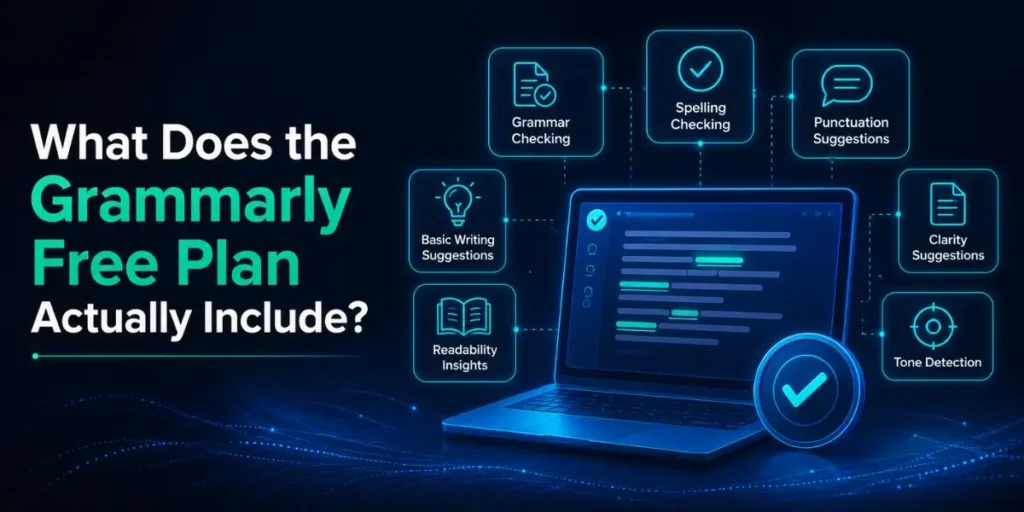
Most people looking for a free trial are really trying to answer one question: Can I try the tool before paying? The honest answer is yes: the free plan is permanent and doesn’t require a credit card.
The free plan is more capable than most competitors’ free tiers, and it gives you a genuine sense of how Grammarly works. But it’s not a full preview of Pro features.
| Feature | Grammarly Free | Grammarly Premium |
|---|---|---|
| Grammar and spelling checks | Yes | Yes |
| Punctuation corrections | Yes | Yes |
| Basic tone detection | Yes | Yes |
| Conciseness suggestions | Yes (basic) | Yes (full) |
| AI writing prompts | 100/month | 2,000/month |
| Clarity and engagement suggestions | No | Yes |
| Plagiarism checker | No | Yes |
| Full tone rewrites | No | Yes |
| Advanced vocabulary suggestions | No | Yes |
| Generative AI features (GrammarlyGO) | Limited | Full access |
| Works in Chrome, Word, Slack | Yes | Yes |
| Auto-citations from research databases | Yes | Yes |
| Credit card required | No | Yes |
The free plan works well for casual writing, email proofreading, and basic grammar correction.
Where it falls short is in anything that requires deeper writing feedback: clarity rewrites, plagiarism detection, advanced style suggestions, and consistent AI assistance for longer documents.
And the AI prompt limit is worth understanding specifically. Free users get 100 AI prompts per month. That sounds like a lot until you’re using Grammarly daily for work or study.
At 100 prompts, you might burn through your monthly allocation in a single productive week.
Three Legitimate Ways to Access Pro Features for Free
1. The Grammarly Free Plan (No Time Limit, No Card)
The most practical way to evaluate Grammarly before paying is to use the free plan genuinely for a week or two.
It’s not a Pro trial, but it shows you the interface, app integration, how the suggestion system works, and whether the tool fits your workflow.
You only discover what’s missing, which tells you whether Pro is worth it for your specific use case.
2. Grammarly for Education (If You’re at a Participating Institution)
Many universities and colleges have institutional agreements with Grammarly that give students free access to premium features through the Grammarly for Education program.
If your institution has this agreement, you access it through your school email address when creating or linking your Grammarly account.
Check with your institution’s IT or library department to confirm whether this benefit is available to you.
This is one of the most consistently overlooked options. Students often pay for Grammarly Pro without checking whether their university already provides it.
Some institutions have provided free premium access to tens of thousands of students through these agreements.
3. Wait for a Promotional Offer
If the 7-day trial isn’t currently available on your account, it may appear during Grammarly’s promotional cycles.
These tend to cluster around back-to-school periods (late August and September), major sale events, and occasionally when Grammarly rolls out new features and wants users to try them.
Sign up for the free plan and check your account and email periodically. Trial offers sometimes arrive via email to free plan users.
Pro Tip
After signing up for the free plan, don’t try to upgrade right away. Use the free version for a few days and let Grammarly observe your usage patterns.
Several users on Reddit and Quora have reported receiving a trial offer via email after actively using the free plan for a week, suggesting that Grammarly targets engaged free users with upgrade incentives.
Grammarly Pricing in 2026: What You Pay If You Upgrade
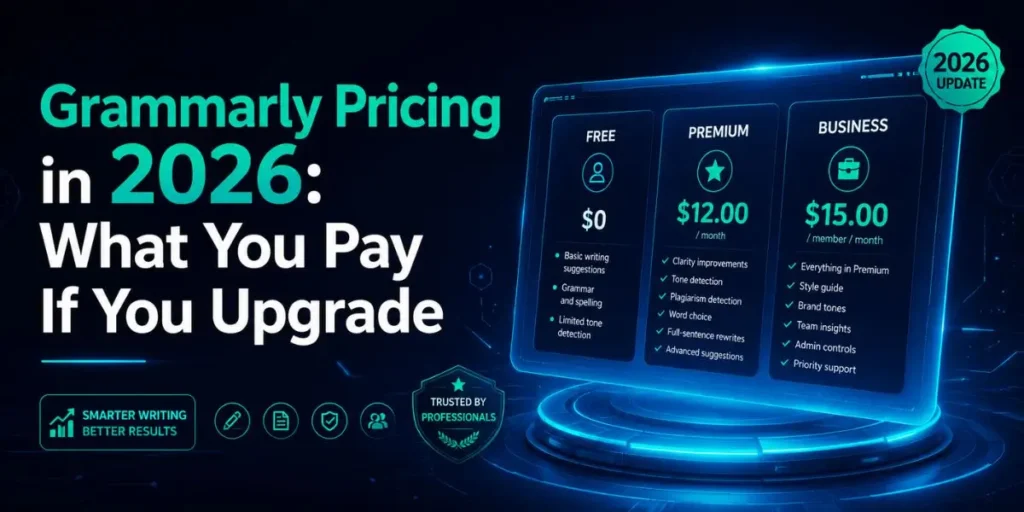
If you decide the free plan isn’t enough and want to upgrade, here’s exactly what Grammarly’s plans cost as of May 2026.
| Plan | Yearly Plan (Breakdown) | Monthly Plan | Best For |
|---|---|---|---|
| Free | $0 | $0 | Casual users, basic grammar checks |
| Pro | $12/month ($144/year) | $30/month | Individual writers, students, professionals |
| Enterprise | Custom pricing | Custom pricing | Large organisations with security needs |
The price gap between annual and monthly billing is significant. At $30 per month, you pay $360 per year. On annual billing, that drops to $144. That’s more than 50% more expensive to pay month-to-month.
If you decide to subscribe, annual billing is the better financial decision unless you’re genuinely only planning to use it for one or two months.
Pricing Note
Grammarly frequently offers promotional discounts on the Pro plan, typically between 20% and 30% off. These promotions are common enough that paying full price is rarely necessary.
Check Grammarly’s pricing page directly and look for a promotional banner before paying. The student discount (around 50% off) also appears periodically on Grammarly’s website and on partner student deal platforms.
In My Experience
Why the Free Plan Worked Better Than I Expected
Honestly, when I first tried the free plan, expecting it to be thin and frustrating, I was surprised by how much it actually covers for everyday writing.
Grammar fixes, spelling, basic punctuation, and even the 100 monthly AI prompts came up less as a limitation in regular use than I’d anticipated for light tasks like drafting emails and short blog sections.
The limitations became clear when I tried to use it on longer documents that needed structural feedback.
The free plan flags grammar issues but doesn’t offer the deeper clarity of rewrites that make a real difference on anything over 800 words.
I noticed this when editing a 1,200-word article draft. The free plan caught a dozen grammar errors, none of which were the actual problem with the piece.
The structure and clarity issues that were making the piece read awkwardly weren’t surfaced.
One thing that caught me off guard was the auto-citations feature available on the free plan. Most competing tools lock citation features behind a paywall.
Grammarly’s free plan lets you generate APA, MLA, and Chicago citations from live research databases, including PubMed, arXiv, and ScienceDirect, with no character limit.
For students doing essay work, that feature alone makes the free account worth creating, even if you use a different tool for plagiarism checking.
The trial availability question frustrated me when I first researched it. Multiple articles from 2024 confidently described a 7-day free trial process, complete with screenshots.
Going through those steps in 2026 leads to a dead end because the Business plan those guides referenced no longer exists.
That’s the core of the confusion: outdated information from before Grammarly’s pricing restructure is still ranking well in search and sending people on a process that doesn’t work anymore.
Is Grammarly Pro Worth Paying For Without a Trial?
That depends on what you write and how often you write. For someone writing daily emails, drafting professional content, or regularly working on academic assignments, the Pro plan’s features add enough value to justify the $12 per month on an annual billing plan.
For someone who writes occasionally, sends a few personal emails per week, and doesn’t need plagiarism detection or advanced style suggestions, the free plan handles the job well enough that there’s no urgent reason to upgrade.
The most honest way to decide is to use the free plan for one full week of your normal writing. If you keep running into the paywall on features you actually want, that’s your answer.
If the free version covers what you need without friction, there’s no reason to pay.
- Upgrade to Pro if you write long-form content regularly, need plagiarism checking, draft professional communications daily, or use Grammarly’s AI features heavily.
- Stay free if: you write occasionally, mainly need basic grammar and spelling help, or your institution already provides premium access through Grammarly for Education.
Pro Tip
Before subscribing at full price, search for “Grammarly student discount” or “Grammarly coupon code” alongside the current month and year.
Promotional codes for 20% to 30% off are frequently available through Grammarly’s partner sites and education-focused deal platforms. These apply to new subscriptions and are applied at checkout.
Common Mistakes People Make When Looking for a Free Trial
- Following outdated guides that reference the Business plan trial. The 7-day Business plan trial existed before 2025.
That plan no longer exists as a separate offering. Any guide that walks you through claiming a “Business plan free trial” is describing a process that no longer works. - Clicking third-party “free trial” links. Many affiliate sites publish “get your Grammarly free trial here” links that lead to a standard sign-up page with no trial.
These sites are promoting a discount or affiliate signup, not an actual trial. Always check your own subscription page after signing up rather than trusting a third-party redirect. - Not checking the institutional route first. Students and university staff often subscribe and pay for Grammarly Pro without realizing their institution provides it free through Grammarly for Education.
Check with your campus IT or library resources before paying out of pocket. - Forgetting to cancel during a trial. If a trial does appear and you activate it, you must cancel before the trial period ends. The cancellation isn’t automatic.
Go to your subscription settings and cancel the upcoming renewal before the trial expires. You keep access until the trial ends, regardless of when you cancel. - Confusing the free plan with a time-limited trial. The Grammarly free plan has no expiry date. It’s not a trial. You can use it indefinitely. The features don’t disappear after 30 days.
It’s a permanent free tier with limited features rather than a time-limited preview of everything.
Frequently Asked Questions
Not as a standard offer. Grammarly periodically offers a 7-day Pro trial to select users, but it’s not consistently available. Check your subscription page after creating a free account to see if a trial is currently showing for your account.
Yes. The free plan has no expiry date, no credit card required, and no conversion deadline. You can use it indefinitely. It includes grammar, spelling, and punctuation checks, basic tone detection, and 100 AI prompts per month.
Check whether your university has an institutional agreement with Grammarly for Education. If your school participates, you can access premium features for free through your institutional email. Contact your campus IT department or library to verify access.
The 7-day trial matched the Grammarly Business plan. Grammarly restructured its pricing in late 2024, merging Business into the Pro plan. The guaranteed trial ended with the Business plan. Occasional promotional trials still appear for some users.
No. The Grammarly free plan requires only an email address to sign up. No credit card details are needed. A card is only required if you activate a free trial or upgrade to a paid subscription.

Is an SEO Specialist and AI Tools Researcher with over 4 years of hands-on experience in search engine optimization. As the founder of Smart AI Helper Pro, he tests and reviews AI writing, SEO, and marketing tools to help creators and business owners grow faster with practical, research-backed strategies.
