
What Is Branded Traffic in Semrush? A Real 2026 Guide for SEOs
By SM Mehedi Hasan
Branded traffic in Semrush is the organic traffic a website earns from search queries that include its brand name or close variants. You can find it in Organic Research, under the Positions tab, using the Advanced Filter set to “Branded.” It measures how much of your visibility comes from people who already know you.
If you have ever opened a Semrush report and wondered why your traffic splits into “branded” and “non-branded,” you are looking at one of the most underused signals in the whole platform.
Branded traffic in Semrush tells you something most keyword reports cannot: how many people are searching for you specifically, not just the topic you happen to rank for.
And in 2026, with AI Overviews quietly changing how brands are discovered, that number matters more than ever.
Let me walk you through exactly what it is, where to find it, and how to read it without fooling yourself.
Table Of Contents
ToggleWhat is branded traffic in Semrush?
Branded traffic is the share of a domain’s organic visits that come from keywords including the brand name.
So if someone searches “semrush pricing,” “ahrefs login,” or “nike running shoes,” those queries count as branded for the matching domain.
The user already has the brand in mind. They are not discovering you; they are returning to you.
I noticed this clears up fast once you see a live example. Search a big domain in Semrush, and the Domain Overview will show a branded vs non-branded ratio near the bottom of the Organic Research section.
A brand like Best Buy might pull a large slice of its traffic from people typing “bestbuy” plus a product word. That slice is brand demand, captured in data.
Branded keywords carry a different intent than generic ones. Someone searching for “best project management tool” is comparing.
Someone searching “asana login” has already chosen. That intent gap is the entire reason Semrush separates the two.
How does Semrush actually decide what counts as branded?
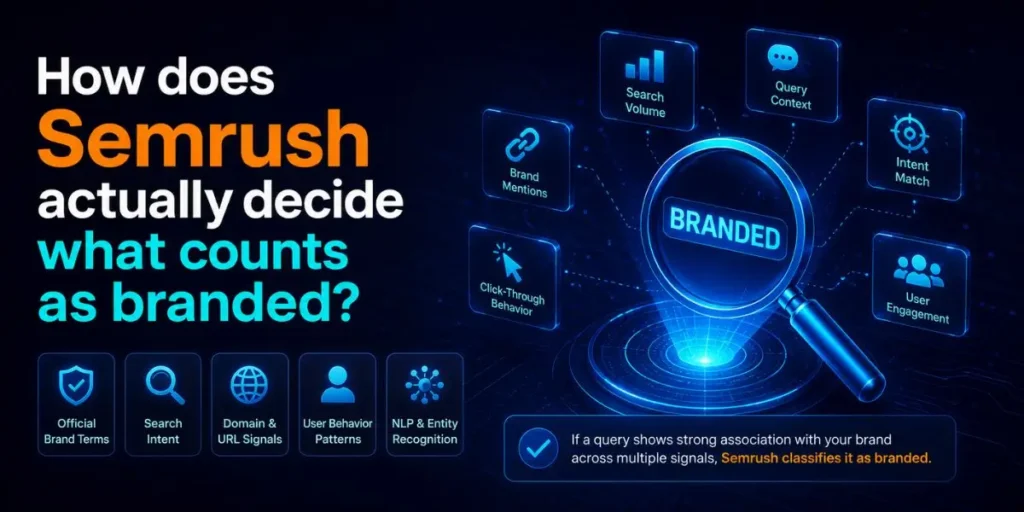
Semrush flags a keyword as branded only when the brand term is unique to that domain. This is the part most guides skip, and it trips up a lot of people.
Here is the catch. For a keyword to register as branded for your site, the brand modifier has to clearly belong to you and nobody else.
The official Semrush documentation gives a sharp example: “Amazon discount” is not treated as one of Amazon’s branded keywords, because dozens of other sites also target that phrase. So it lands in Amazon’s non-branded bucket instead.
Most people assume any keyword that includes their name counts as branded.
But that is not how the system reads it. If your brand word doubles as a common word, a city, or an industry term, Semrush often cannot tie it cleanly to you.
Think of a sandwich shop on Chatham Street. Plenty of searches include “Chatham” (Chatham deli, Chatham menu), yet Semrush will treat most of them as non-branded, because Chatham is also a town in New Jersey.
The word is not unique to one business, so the tool stays cautious. So the rule is simple: the stronger and more distinctive your brand name, the more accurately Semrush attributes your branded traffic. Generic names get blurred into the general pool.
How do you find branded traffic in Semrush?
- Open Organic Research. From the left menu, click the SEO toolkit, then select Organic Research. This is where domain-level keyword data lives.
- Enter the domain. Type your site (or a competitor’s) into the search bar and run it. Make sure you set the database to the United States if your target audience is in the USA, since traffic and keyword data shift by country.
- Switch to the Positions tab. The Overview gives you the headline ratio, but the Positions report lists every keyword the domain ranks for. That is where filtering happens.
- Open Advanced Filters. Click the Advanced Filters dropdown above the keyword table. You will see a filter category for keyword type.
- Select “Branded.” Apply it, and Semrush rebuilds the table to show only branded keywords, with their volume, position, and estimated traffic.
- Read the traffic column. Add up the traffic across those branded keywords, or compare it against the non-branded view to get your real split.
After you apply the Branded filter, you should see a noticeably shorter keyword list with higher click-through patterns.
That shrinkage is normal. Branded queries are fewer in number but heavier in intent, so the traffic per keyword tends to run high.
Quick tip worth stealing: run the same domain with the Non-branded filter right after, and screenshot both. Seeing them side by side is far clearer than relying on a single overview percentage.
What are the three branded keyword filters in Semrush?
Semrush gives you three filter options, not two, and the third one is a competitive goldmine most users never touch.
| Filter | What it shows | Best use |
|---|---|---|
| Branded | Keywords containing the domain’s own brand name | Measure your brand demand and loyalty |
| Non-branded | Keywords with no brand term at all | Find pure discovery and growth traffic |
| Branded for other domains | Keywords with a competitor’s brand name that this domain ranks for | Spot conquesting and comparison content |
That third filter is the one I keep coming back to. “Branded for other domains” reveals when a domain is ranking for someone else’s brand.
If your competitor shows up for “[your brand] alternative” or “[your brand] vs,” they are quietly siphoning your branded intent. Comparison pages and alternative roundups are exactly how this happens.
So when you analyse a rival, do not just exclude their branded keywords to see their organic strength. Flip it around and check what they rank for under your name, too.
Why does branded traffic matter for your SEO in 2026?
Branded traffic is the clearest proxy for brand demand, and Google increasingly rewards demand it can see. A rising branded search volume tells you marketing, PR, and content are building real recognition, not just chasing keywords.
If you run an affiliate or review site, this matters because branded growth signals a maturing audience. People bookmarking you, returning by name, and trusting your recommendations.
That trust converts better than any cold organic visit, and it tends to be far more stable when algorithm updates shake the rankings.
Honestly, I expected branded traffic to be a vanity metric when I first started tracking it. It is not.
A steady climb in branded searches has consistently lined up with sites that survive core updates, while sites living entirely on non-branded discovery traffic get hit hardest. Brand demand is a cushion.
There is also a strategic read here. If your branded traffic is tiny but your non-branded traffic is large, you are renting attention from Google, not owning it.
The goal over time is to grow the branded slice, so your business is less exposed to ranking swings.
How does branded traffic connect to AI Overviews and Semrush One?
Branded search now feeds directly into how AI systems describe and recommend you, and Semrush built new tooling in 2026 to track exactly that.
Compared to a year ago, the picture has shifted hard. Semrush reports AI search traffic up 527% year over year, and the platform now projects AI-generated results to overtake organic search traffic by 2028.
That means the people typing your brand into ChatGPT, Gemini, or Google AI Mode are becoming as important as the ones typing it into classic search.
Semrush folded this into a unified product. The Semrush AI Visibility Toolkit shows you how brands appear in AI-generated answers, helping you measure a layer of visibility beyond traditional search.
Through Semrush One, you can see how often your brand is recommended by AI, benchmark competitors, and find gaps worth closing, all alongside your traditional SEO workflows.
So, branded traffic in 2026 is bigger than the Organic Search filter. It now spans three layers:
- Classic branded search: people Googling your name (the Positions filter).
- AI Overview citations: your pages cited inside Google’s AI summaries.
- LLM share of voice: how often AI assistants mention your brand by name.
Here is the part worth flagging. If you see “Missed” in the “Your Brand” column, that means your URL is cited, but your brand is not mentioned in the AI answer.
You are doing the work, and a competitor is getting the brand credit. Fixing those misses is one of the fastest branded-visibility wins available right now.
To optimise for that, structure pages the way AI retrieval likes: clear question-and-answer formatting, concise summaries near the top, and your brand name stated plainly in context so the model attributes the information to you.
In My Experience
The thing that surprised me most was how often a strong brand name “hides” branded traffic inside the non-branded report.
I was auditing a client whose product name was also a common English word, and Semrush filed almost everything as non-branded. The overview made it look like they had near-zero brand demand.
I only found the truth after cross-checking Google Search Console, where the brand queries were clearly visible. Semrush could not isolate them because the term was not unique enough to attribute.
So the lesson stuck: treat the branded number as directional, not absolute, especially for generic names.
When I was setting up reporting for that account, I started pairing the Semrush-branded filter with a GSC query filter for the brand term. The two together gave a far more honest split than either alone.
That combination is now my default for any branded audit, and it has saved me from underselling a client’s actual brand strength more than once.
Common pitfalls when reading branded traffic in Semrush
Most mistakes here stem from trusting a single number too much. These are the ones I see constantly.
- Assuming every name keyword is branded. If your brand word is generic or shares a meaning, Semrush parks it in non-branded. Your real brand demand may be higher than the report admits.
- Forgetting to set the country database. Running a USA brand on the default global database gives you a muddy split. Always lock the database to your target market first.
- Ignoring the third filter. Skipping “Branded for other domains” means missing every competitor that ranks under your name. That is a leaked branded intent you could reclaim with a comparison page.
- Treating Semrush data as exact volume. It is an estimate built from a keyword sample, not a direct feed from Google. Use it for direction and trend, then confirm sensitive numbers in GSC.
- Reading branded traffic in isolation. A branded spike after a campaign is good. A branded spike with flat non-branded traffic might mean you are coasting on past awareness rather than growing.
And the biggest one: never report branded traffic as a single static figure. Track the trend month over month. The direction tells the story, not the snapshot.
A real workflow example: auditing branded traffic step by step
Theory only goes so far, so here is the full flow I actually run for a review-site client.
Input: A client domain in the AI tools niche, targeting a USA audience, wanting to know whether their brand is gaining traction or just renting traffic.
Process:
- Open Organic Research, enter the domain, and set the database to the United States.
- Go to Positions, apply the Branded filter, export the keyword list and total the traffic.
- Re-run with Non-branded, export, and total again to get a clean ratio.
- Apply “Branded for other domains” to catch competitors ranking on the client’s name.
- Cross-check the brand terms in Google Search Console to catch anything Semrush filed as non-branded.
- Open Semrush One’s Visibility Overview to see whether the brand is mentioned in AI answers, and flag any “Missed” citations.
Output: A two-line split (branded vs non-branded traffic, plus trend over six months), a short list of competitors ranking on the client’s brand, and a list of AI-cited pages where the brand was not named.
Result: The audit showed branded traffic climbing 18 per cent over the half-year, while non-branded traffic held flat, indicating that awareness was building but discovery content had stalled.
We fixed three AI “Missed” pages by adding the brand name to the summary sections, and built one comparison page to reclaim a competitor ranking for “[client] alternative.” Branded share continued to rise in the next quarter.
That is the whole point of the metric. Not to admire a percentage, but to decide what to build next.
Branded vs non-branded traffic: quick comparison
| Aspect | Branded traffic | Non-branded traffic |
|---|---|---|
| Search intent | Already knows you, high intent | Discovering a topic, mixed intent |
| Typical volume | Lower count, higher value | Higher count, broader reach |
| What it signals | Brand demand and loyalty | Growth and visibility potential |
| Risk if it shrinks | Awareness is fading | Discovery pipeline is drying up |
A healthy site grows both. Branded traffic proves people want you, while non-branded traffic keeps filling the top of the funnel with new people who might become branded searchers later.
Frequently Asked Questions
No. Branded traffic comes from search queries containing your brand name, tracked through organic search. Direct traffic is when someone types your URL or uses a bookmark, without any search step.
Usually, because your brand name isn’t unique enough. If it matches a common word, city, or industry term, Semrush cannot attribute it cleanly and files it under non-branded instead.
Indirectly, yes. Rising branded search signals genuine demand and trust, which correlates with stronger stability during core updates, though it is a demand signal rather than a direct ranking factor.
Yes. Run their domain in Organic Research, open Positions, and apply the Branded filter. You can also use “Branded for other domains” to see whose brand names they rank for.
Build recognition through consistent content, PR, and brand mentions, then optimise pages for AI Overviews so assistants name your brand. Track progress with the Branded filter and Semrush One’s AI Visibility tools.

Is an SEO Specialist and AI Tools Researcher with over 4 years of hands-on experience in search engine optimization. As the founder of Smart AI Helper Pro, he tests and reviews AI writing, SEO, and marketing tools to help creators and business owners grow faster with practical, research-backed strategies.
