7 Best AI Art Generators for Print on Demand (2026)
By SM Mehedi Hasan
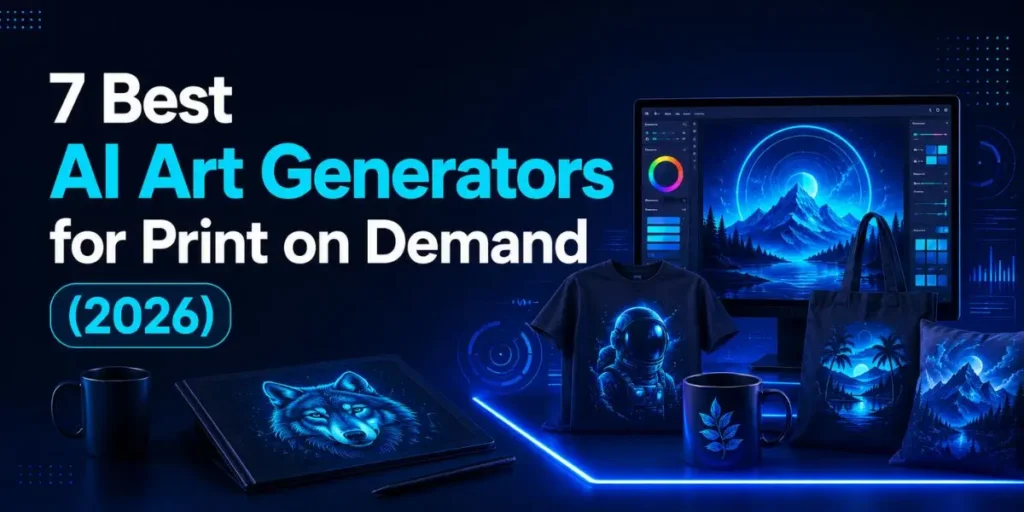
Ideogram is the best all-around AI art generator for print-on-demand in 2026, thanks to native transparent PNGs and roughly 90% text accuracy that most tools still miss. Midjourney wins for posters, Adobe Firefly is safest for Etsy and Amazon Merch, and Recraft makes true print-scalable vectors.
Picking an AI art generator for print-on-demand is not the same as picking one for pretty screen images. A design that looks sharp on your monitor can print blurry on a 24-inch poster, box out on a black tee, or spell “COFFE” instead of “COFFEE” on a mug.
So the real question is not which tool paints the nicest picture. It is which tool gives you print-ready, sellable files without a takedown. This guide ranks the seven best options for 2026, with verified pricing, the print traps each one hides, and a plain decision framework for what you actually sell.
Table Of Contents
ToggleWhat makes an AI art generator good for print on demand?
The best AI art generator for print-on-demand is the one that clears six technical hurdles at once: print resolution, transparent backgrounds, readable text, scalable vectors, style consistency, and commercial safety.
Most “best of” lists only score image quality, which is the wrong test for a business that prints on physical products.
Here is why each hurdle decides whether a design earns money or gets rejected:
- Print resolution and DPI.
Most POD platforms want 300 DPI at the printed size. A 24×36 poster needs roughly 7,200 x 10,800 pixels. Many generators output near 1,024 x 1,024 by default, so upscaling is not optional; it is the whole game. - Transparent backgrounds.
A graphic on a white background prints as a white rectangle on a colored shirt. Mugs, stickers, hats, and dark apparel all need clean transparent PNGs, ideally straight out of the tool. - Readable text.
Slogan tees and quote prints are a huge slice of the POD market. If your generator garbles letters, that whole category is off the table unless you add typography later. - Vector scalability.
A true SVG scales from a sticker to a banner with zero quality loss. This is the criterion most roundups skip, and it is exactly why a vector-native tool earns a spot below. - Style consistency.
A shop that sells is not 200 random designs. It is one niche look (“vintage motorcycle badges,” “cottagecore mushrooms”) repeated across a catalog. The right tool locks that look in. - Commercial safety.
Some tools ship clean “you own it, sell it” terms and even legal cover. Others quietly disclaim liability. On Etsy, Amazon Merch, or Redbubble, that difference is real money.
Score tools on those six, not on “which one is prettiest,” and the ranking below stops being subjective.
Which are the 7 best AI art generators for print on demand in 2026?
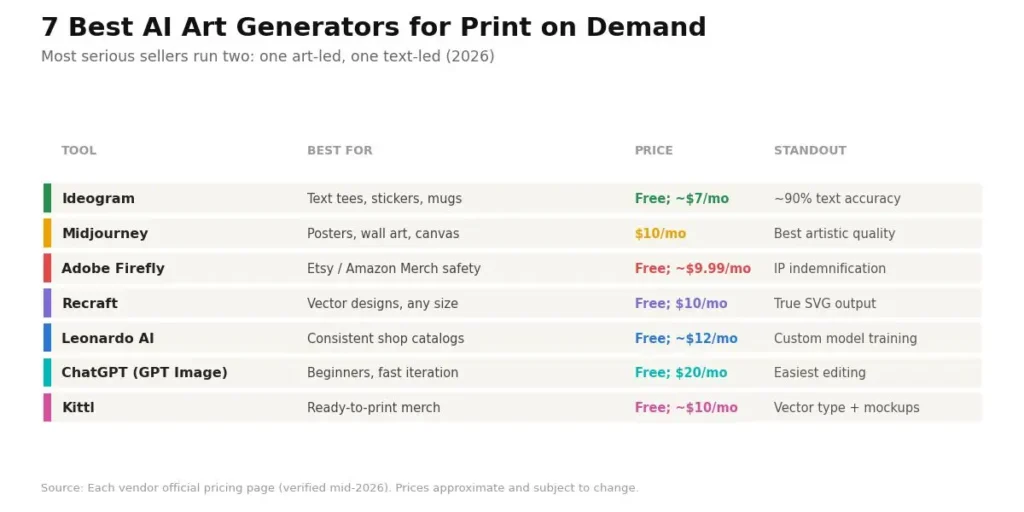
The seven that clear the POD bar are Ideogram, Midjourney, Adobe Firefly, Recraft, Leonardo AI, ChatGPT (GPT Image), and Kittl. Each wins a different job, so most serious sellers end up running two of them rather than betting everything on one.
| Ideogram | Text tees, stickers, mugs | Free; paid from ~$7/mo | Native transparent PNG + ~90% text accuracy |
| Midjourney | Posters, wall art, canvas | From $10/mo (no free tier) | Highest artistic quality at print scale |
| Adobe Firefly | Etsy / Amazon Merch safety | Free; paid from ~$9.99/mo | Licensed training data + IP indemnification |
| Recraft | Vector designs, any print size | Free; paid from $10/mo | True SVG output, 300 DPI CMYK export |
| Leonardo AI | Consistent shop catalogs | Free; paid from ~$12/mo | Custom model + character consistency |
| ChatGPT (GPT Image) | Beginners, fast iteration | Free; Plus $20/mo | Easiest conversational editing |
| Kittl | Finished, ready-to-print merch | Free; paid from ~$10/mo | Vector typography + built-in mockups |
Prices verified in mid-2026 from each vendor’s official pricing page and are subject to change, so confirm the live tier before you subscribe.
Now the detail on each, with the parts the sales pages leave out.
1. Ideogram: Best AI art generator for text-based POD
Ideogram is the strongest pick for any design with text, because it renders text with roughly 90% accuracy and outputs transparent PNGs natively. That combination removes two of the most annoying steps in the POD workflow at once: fixing garbled letters and cutting out backgrounds.
The current model, Ideogram 4.0, added character reference (keeping a mascot consistent across a product line) on top of the text engine that made earlier versions famous. For slogan tees, sticker packs, and mug typography, nothing else is this clean out of the box.
Where it slips: pure illustration quality sits a notch below Midjourney. Fine for a bold tee graphic, weaker for a painterly fine-art poster. And the free tier images are public, so a competitor can see your winner.
Pricing runs from a free tier (10 credits per week) up through paid plans in the roughly $7 to $42 per month range, with credits burning faster on the higher-quality models. Check the official Ideogram pricing page before you commit, since credit values shift by model.
After using this for a week on quote shirts, the thing that stuck with me was the time math. I used to lose about 20 minutes per design cleaning up smeared text from other tools. With Ideogram, that step basically disappeared, which changes how many designs you can ship in an evening.
2. Midjourney: Best for posters, canvas, and wall art
Midjourney produces the most print-ready artistic output of any tool here, and it holds detail at large sizes like 24×36 inches without obvious AI mush. If the design quality is the product (fantasy illustration, vintage botanical, painterly portraits), this is still the one to beat.
It now runs on a proper web interface, so the old “you must use Discord” complaint is gone. The current default is V7, with V8.1 (released April 30, 2026) adding faster generation and HD 2K image output. Style references let you lock a single look across an entire drop.
But do not use it for slogan tees. Text rendering is its weak spot, and native transparency needs a separate background-removal step.
There is no free tier. Plans are $10 Basic, $30 Standard, $60 Pro, and $120 Mega per month, with 20% off annual billing, per the official Midjourney plan comparison. One rule scaling sellers miss: if your business earns more than $1,000,000 in gross revenue a year, you are required to be on Pro or Mega for commercial use.
Compared to the cheaper tools I have tested, Midjourney takes more iterations to dial in a design. Most POD-grade results needed 5 to 15 generations before one was worth printing. That is fine for a hero poster you will sell for months, and wasteful for a throwaway trend test.
Pro tip: On the Basic plan, do all your rough exploring in Relax Mode where available, and save Fast GPU time for final upscales only. This one habit can stretch a $10 plan across far more usable designs than the raw hour count suggests.
3. Adobe Firefly: Best for marketplace commercial safety
Adobe Firefly is the safest choice for sellers who lose sleep over Etsy delistings or Amazon Merch policy changes, because it is trained only on licensed Adobe Stock, openly licensed, and public-domain content.
On paid plans, Adobe adds IP indemnification, meaning if someone claims a Firefly output infringes their copyright, Adobe agrees to defend the claim. No other major generator offers that legal backstop.
Midjourney, Stable Diffusion, and most others trained on broadly scraped data disclaim it. Firefly also stamps Content Credentials on outputs and plugs directly into Photoshop and Illustrator, so the design-to-print pipeline is already in place.
Where it falls short: raw artistic flair trails Midjourney, and text rendering is still average. Firefly is understated and professional rather than bold, which is a plus for commercial work and a minus if you want wide creative range.
There is a free tier (about 25 generative credits a month), standalone paid plans starting around $9.99 per month, or Firefly bundled into Creative Cloud. Terms and indemnity scope are strongest on paid and enterprise tiers, so read the Adobe Firefly plans page for the seat you are buying.
What I did not expect was how much the indemnification matters for client work versus personal shops. For a blog thumbnail, the risk is theoretical, and any tool is fine. For a campaign or a client’s storefront, being the one holding the liability is a bad place to stand, and this is where Firefly quietly pays for itself.
4. Recraft: Best for scalable vector designs
Recraft is the only major AI tool that generates true SVG vector files directly from a prompt, which means one design scales from a 4-inch sticker to a full banner with zero quality loss. Every other tool on this list outputs raster images that pixelate when you push them past their native size.
That single feature solves a POD headache most guides ignore. Instead of generating a PNG and manually tracing it in Illustrator, you get an editable vector with clean paths. Recraft (running its V4 models) also exports up to 300 DPI CMYK, has a brand kit and Style Lock for consistency, and includes a built-in mockup generator.
The catch: it leans graphic and illustrative, not photorealistic, and complex wordmark typography still needs a human pass in Figma or Illustrator. Free-tier images are public and unowned, so commercial work needs a paid plan.
Recraft offers a free tier (around 30-50 daily credits) and paid plans from $10 per month that unlock private images and full commercial rights, with higher tiers adding more credits and API access.
See the Recraft pricing details for the current credit math. Unlike what most POD reviews say, vector output is not a “nice to have” for merch. When I generated one badge design as an SVG and dropped it onto a sticker, a tote, and a hoodie back print, I never once worried about resolution. That is the workflow difference raster tools cannot match.
5. Leonardo AI: Best for style-consistent catalogs
Leonardo AI is the best fit for a shop with a single, consistent aesthetic that needs to be repeated across hundreds of designs, because it lets you train a custom model from your own reference images.
Once that model learns your look, every new generation lands in the same niche style. For POD specifically, custom model training, along with the Consistent Character Engine, is the standout.
Train on 15 to 20 of your best-selling references, and your catalog stops looking like 500 random uploads and starts looking like a brand. It runs on a clean web interface with multiple base models, native transparency, and a generous free allocation.
The downside is the learning curve. Five model dropdowns and several settings can overwhelm a beginner, and headline image quality is good rather than Midjourney-good on artistic prompts.
There is a real free tier (150 tokens a day, though those images are public and owned by Leonardo), with paid plans starting around $12 per month that add private generation, custom model training, and the character engine. Confirm the live tiers on the Leonardo pricing page, as plan names have recently changed.
I ran into an issue when I tried to build a cohesive collection on the free plan. Custom training and private generation are both locked there, which are the two features that actually separate a shop from a hobby.
That is the moment the $12 tier stops being optional.
6. ChatGPT (GPT Image): Best for beginners and fast iteration
ChatGPT is the lowest-friction way into AI design, because you can describe a design in plain English and refine it through chat.
Worth knowing for 2026: the old DALL-E 3 model is retiring (support ends on May 12, 2026), and ChatGPT now generates images with OpenAI’s GPT Image family, most recently ChatGPT Images 2.0.
That native model reads instructions like nothing else, which makes it great for concept iteration. Brainstorm 50 variations on a niche in the same window where you write your product copy, then produce the winners.
Free accounts get a small daily image quota; ChatGPT Plus at $20 per month lifts that ceiling, and you own the outputs commercially on all plans.
The limits for print are real, though. Output resolution tops out in the 1,024-1,792 pixel range, so you must upscale every design before production.
Style consistency across sessions is also unreliable, which makes it better suited to one-off designs than to a matched product line. So think of it as the idea engine, not the finishing tool.
What I keep coming back to is speed of exploration: it is the fastest tool here for going from a vague idea to a usable sticker-ready concept, and the slowest to trust for a print-final file without an upscale step.
Pro tip: Add a closing line to your prompt like “flat design, bold outlines, minimal shading, transparent background” when you want a print-friendly graphic.
GPT Image follows plain-language instructions closely, so spelling out the print constraints up front saves an editing round later.
7. Kittl: Best for finished, ready-to-print merch
Kittl is the closest thing to a tool built specifically for the t-shirt-and-mug economy, combining AI generation with real vector typography, badges, POD-shaped templates, and mockups in one place.
It skips the usual “AI image, then Photoshop text, then Illustrator vectorize” relay. The reason it works for slogan and badge merch is that the text is real vector type, not AI-painted letters.
So it comes out crisp every time, and templates are pre-sized for shirts, mugs, totes, and stickers. Scaling to any print size is clean, and the built-in mockup generator gets you a listing image fast.
Where it is weaker: the underlying image-generation quality is a step below Midjourney or Ideogram for raw output. Kittl’s strength is the finishing pipeline, not the base model, so it is less useful for artistic posters where typography is not the point.
It has a free tier, with paid plans from roughly $10 per month unlocking the AI features and unlimited exports. Pricing moves, so check Kittl’s current plans before subscribing.
The thing that surprised me most was how much faster a finished listing came together. Generating raw art elsewhere and then rebuilding it into a print file is where hours quietly vanish. Kittl collapses that into one tool, which for a text-heavy shop is worth more than a slightly prettier base image.
How do you choose the right AI art generator for what you sell?
Choose by your dominant product type first, then by your skill level and volume. The single highest-leverage move for most sellers in 2026 is a two-tool stack, not one tool that does everything at 80%.
| Posters, canvas, wall art | Midjourney | Best artistic detail at large print sizes |
| Slogan tees, mugs, stickers | Ideogram or Kittl | Clean text plus native transparency |
| Vector logos, badges, any-size prints | Recraft | True SVG scales with no quality loss |
| Etsy or Amazon Merch as main channel | Adobe Firefly | Licensed data and IP indemnification |
| A tight-niche brand catalog | Leonardo AI | Custom model locks one consistent look |
| Fast trend tests as a beginner | ChatGPT (GPT Image) | Lowest learning curve, quick iteration |
For most people, the winning combination is one art-led tool (Midjourney or Leonardo) plus one text-led tool (Ideogram or Kittl). That runs roughly $20 to $40 a month total and covers almost every product a general POD shop lists.
What resolution do you need for print-on-demand?
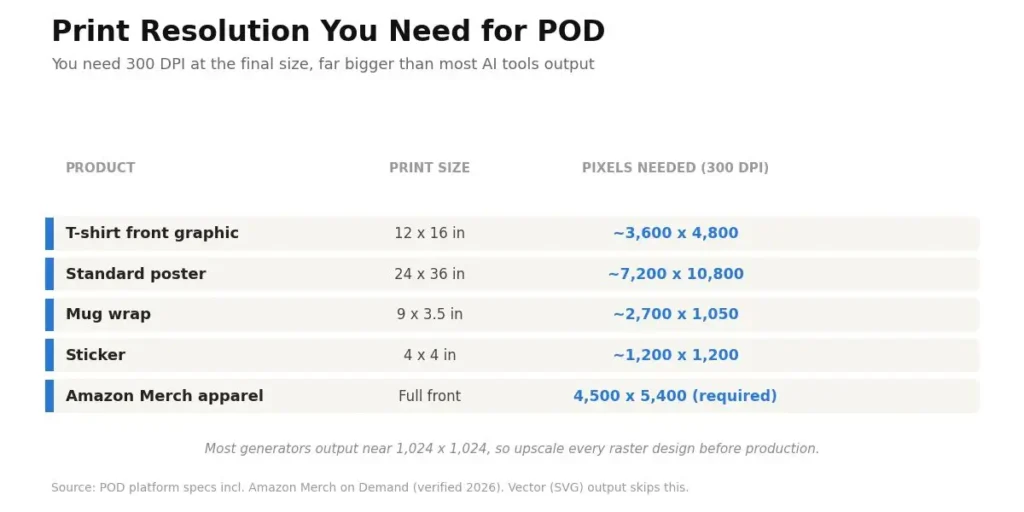
You need 300 DPI at the final printed size, which is far bigger than most AI tools output by default. That is why upscaling is a required step, not a bonus one. Merch by Amazon, for example, requires 4500 x 5400 pixels for apparel.
| T-shirt front graphic | 12 x 16 in | ~3,600 x 4,800 |
| Standard poster | 24 x 36 in | ~7,200 x 10,800 |
| Mug wrap | 9 x 3.5 in | ~2,700 x 1,050 |
| Sticker | 4 x 4 in | ~1,200 x 1,200 |
Since most generators output near 1,024 x 1,024, plan to upscale every design before production. Recraft’s vector output sidesteps this entirely (vectors have no fixed resolution), and Topaz Gigapixel or Magnific are the go-to upscalers for raster tools.
Can you legally sell AI-generated art in 2026?
Yes, you can sell AI-generated art, but you generally cannot copyright a purely AI-made design, and you can still infringe someone else’s work. Those are two separate risks, and both matter for a POD business.
On ownership: the U.S. Copyright Office has held that works generated by AI without meaningful human authorship are not eligible for copyright protection. That position stood firm in 2026.
On March 2, 2026, the U.S. Supreme Court declined to hear Stephen Thaler’s petition in Thaler v. Perlmutter, which left in place the D.C. Circuit’s March 2025 ruling that human authorship is a bedrock requirement.
In plain terms: a pure prompt-to-image design is not yours to protect, so anyone could legally reproduce it. Adding real, demonstrable human creative input (editing, composing, integrating the art into a larger work) is evaluated on a case-by-case basis. You can read the primary source on the U.S. Copyright Office AI portal.
On infringement: the model does not violate copyright; you do when you list something. Generating a recognizable character, a real public figure, or a trademarked logo produces an infringing design, no matter which tool is used. Avoid all three.
On marketplace policy, which is stricter than any model’s terms:
- Etsy still allows AI art but updated its Creativity Standards in June 2025 so that “Made by the seller” listings must be created from scratch by the seller, and it enforces AI disclosure. Thousands of listings have been removed for disclosure and quality violations, so adding human editing to your designs is now a practical requirement.
- Amazon Merch on Demand tightened its content policy, uses image recognition to flag trademark and likeness infringement, and auto-rejects blurry or pixelated uploads. Upscaling is effectively mandatory there.
- Printful and Printify both support AI designs and don’t restrict which model you use, giving you more flexibility if you sell on your own Shopify store. They still recommend adding creative input.
The pattern across all of them is the same: platforms are not banning AI; they are banning lazy, unedited, spammy AI. Curated catalogs with human polish are fine. Bulk unchecked uploads are what get accounts suspended.
This section is general information, not legal advice. For a specific situation, check the current platform policy and, for anything high-stakes, consult a qualified attorney.
Common pitfalls when using AI art generators for POD
Most sellers lose money not because their designs are ugly, but because their workflow leaks quality at a step they did not check. These are the mistakes that keep showing up.
- Uploading low-resolution files.
If art looks soft on the mockup, it looks worse in print. This happens because people forget the default output is tiny. Upscale to the target DPI every time, and preview at full print size before listing. - Over-detailed designs on fabric.
Hyper-detailed images turn muddy on a shirt. The fix is bold shapes and limited colors, because ink and fabric flatten fine detail that a screen preserves. - Trusting AI for text.
Even text-friendly tools slip on longer phrases. Keep slogans short, proofread every letter, and for anything critical, add the type in Kittl, Canva, or Illustrator rather than inside the generator. - Rough background removal.
Halos and jagged edges around a cutout scream amateur. Use a tool with native transparency (Ideogram, Recraft, Firefly) or a clean remover, and zoom in on thin lines and text edges. - Chasing recognizable IP.
Prompting a famous character or trademarked phrase feels clever until the takedown or account ban arrives. Build original concepts, and reverse-image-search your winners before uploading to catch accidental lookalikes. - Build your catalog on public free tiers.
Ideogram, Leonardo, and Recraft free plans make your images public, so a competitor can copy your best seller. Move to a paid tier with private generation once a design starts earning.
None of these are hard to avoid. But skipping the checks is exactly how a “good” design turns into a refund or a suspension.
Workflow example: from prompt to a published product
Here is a realistic run-through of the whole process, shown as Input, Process, Output, and Result, so you can see how the tools fit together rather than in isolation.
Input: A niche and a design brief. Say the niche is “cottagecore mushroom illustrations” for tote bags, and the brief is a bold, limited-color, centered graphic that prints clean on natural canvas.
Process: Generate 10 to 15 concepts in Ideogram with “transparent background, bold outlines, 3-color palette, centered composition” in the prompt. Pick the two strongest.
Bring the winner into Kittl or Canva if it needs a slogan added in real type. Upscale the raster file to roughly 3,600 x 3,600 pixels for a tote print area. Confirm the background is a clean transparent PNG.
Output: One print-ready, correctly sized, transparent PNG (or an SVG if you generated it in Recraft), plus a lifestyle mockup showing it on a natural canvas tote.
Result: A listing you can publish on Printify, Printful, or your own Shopify store.
The design is original (no IP risk), print-safe (300 DPI at size), and part of a matched cottagecore collection rather than a random one-off, which is what actually builds repeat buyers.
Run that loop 10 times over the weekend, and you have a small collection, not one lonely design hoping to go viral.
Frequently Asked Questions
For most sellers, it is a two-tool stack: Ideogram for text-based designs (slogan tees, stickers, mugs) and Midjourney for artistic products (posters, wall art). Recraft is best if you need scalable vectors, and Firefly is safest for Etsy and Amazon Merch.
Yes, both allow it, but with rules in place. Etsy requires AI disclosure and human creative input under its updated Creativity Standards, and Amazon Merch screens for trademark infringement and rejects low-quality uploads. Add human editing and avoid recognizable IP to stay listed.
Generally no for purely AI-made art. The U.S. Copyright Office treats work without meaningful human authorship as uncopyrightable, and the Supreme Court declined to revisit that in March 2026. You can still sell the design, but others could legally copy it unless you add real creative input.
Ideogram, Leonardo AI, Recraft, and ChatGPT all offer usable free tiers, and Adobe Firefly provides about 25 free credits per month. Free-tier images are usually public, so upgrade to a paid plan for private, commercially owned designs once you start selling.
300 DPI at the final print size. A 12×16-inch t-shirt graphic needs about 3,600 x 4,800 pixels, and a 24×36-inch poster needs about 7,200 x 10,800 pixels. Most AI tools output smaller, so upscale every raster design before production.

Is an SEO Specialist and AI Tools Researcher with over 4 years of hands-on experience in search engine optimization. As the founder of Smart AI Helper Pro, he tests and reviews AI writing, SEO, and marketing tools to help creators and business owners grow faster with practical, research-backed strategies.