
Why Is Semrush Taking So Long to Update Metrics? (2026 Guide)
By SM Mehedi Hasan

Semrush takes time to update metrics because each data type runs on its own refresh cycle. Position tracking updates every 24 hours, backlinks within 24 to 48 hours, and keyword databases anywhere from daily to monthly. Slow updates usually mean Semrush is still crawling or recalculating, not that your account is broken.
If you have been hammering the refresh button, waiting for numbers to move, you are not alone. I have stared at a “stuck” keyword difficulty score more times than I want to admit.
The short version is that Semrush is not one single database. It is a stack of crawlers, SERP scrapers, clickstream partners, and recalculation engines, and each one runs on its own clock.
This guide breaks down exactly why metrics lag, how long each one really takes in 2026, and how to force a faster refresh when you actually need it.
Table Of Contents
ToggleWhy Is Semrush Taking So Long to Update Metrics?
Semrush takes so long to update metrics because different metrics pull from different data sources, and each source refreshes on its own schedule.
Some data comes from live crawls, some from third-party SERP partners, and some from heavy recalculation jobs that only run every few weeks.
Here is what actually happens behind the scenes:
- Crawl-based metrics like backlinks and site audit wait for Semrush bots to physically revisit pages.
- SERP-based metrics like rankings and keyword difficulty depend on when data partners re-scrape Google.
- Calculated metrics like Authority Score and traffic estimates need enough fresh signals before the number shifts.
So when one metric looks frozen while another is updated this morning, that is normal behavior. They are not sharing a timer.
Most people assume every number should refresh daily, but that is not how the system is built. There is also a second reason that almost every competing article skips entirely.
Semrush separates automatic background updates from the manual “Update metrics” button.
If you are sitting and waiting for the background cycle on a low-volume keyword, it can genuinely take weeks. The manual fix for that is below.
How Often Does Each Semrush Metric Actually Update?
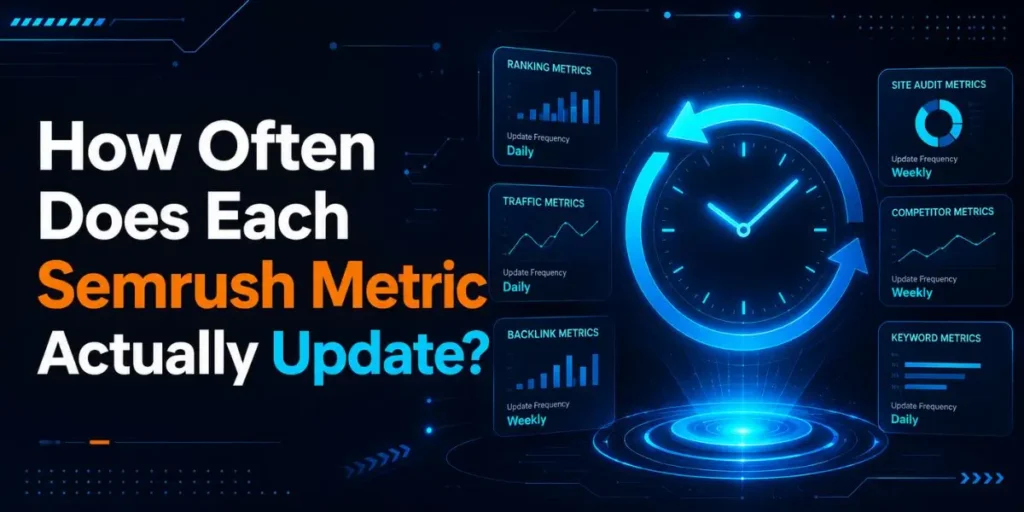
Each Semrush metric updates on a fixed cycle that ranges from every 24 hours to once a month. Knowing the real cycle tells you whether your data is late or simply not due yet.
| Metric | Normal Update Cycle | Why It Can Lag |
|---|---|---|
| Position Tracking | Every 24 hours | New campaign still gathering data |
| Backlinks | New links in 24 to 48 hours | Referring page not re-crawled yet |
| Keyword Database | Daily to monthly | Low-volume keywords refresh slowest |
| Authority Score | Daily, big recalcs every few weeks | Not enough new link signals |
| Semrush Sensor | Every 24 hours | Almost always current |
| Competitor Lists | Every few weeks | Ranking overlap changes slowly |
When I dug into why some of my tracked keywords updated daily while others sat untouched for weeks, the pattern came down to search demand.
Popular keywords get refreshed far more often than niche ones, because Semrush prioritizes high-volume terms. A keyword with 50,000 monthly searches might refresh daily. One with 40 searches might sit for a month before its turn comes up.
If you track mostly long-tail or local keywords, this matters because your slow updates are often working exactly as designed. You are not seeing a fault. You are seeing the queue.
What Actually Slows Down Each Metric Type?
The biggest delays come from three sources: crawl timing, SERP re-scrape schedules, and recalculation thresholds. Each one affects a different group of metrics.
Backlinks lag when the referring page has not been re-crawled yet. A link from a high-traffic site shows up fast because Semrush crawls those pages often. A link buried on a low-traffic, deep page can take days because the crawler reaches it less frequently.
Rankings and keyword difficulty lag when the SERP itself has not been re-scraped for that keyword.
And Authority Score barely moves at all unless you gain or lose meaningful link signals, because the score only recalculates in a big way every few weeks.
What Is the Difference Between Automatic Updates and the Manual “Update Metrics” Button?
The difference is that automatic updates run on Semrush’s own schedule, while the manual “Update metrics” button forces a fresh pull on demand in about five minutes.
This one distinction explains most of the frustration people have with slow data. Here is the part competitors rarely spell out. In Keyword Overview, Semrush shows you a blue Update metrics button.
When you click it, the tool re-pulls SERP-related data, including keyword difficulty, intent, SERP features, results, and SERP analysis in roughly five minutes. You do not have to wait for the background cycle at all.
But that button has monthly limits tied to your plan:
| Plan | Manual “Update Metrics” Per Month |
|---|---|
| SEO Pro | 250 |
| SEO Guru | 1,000 |
| SEO Business | 5,000 |
When I was auditing a client’s keyword list, I burned through a chunk of these refreshes in a single afternoon without realizing the cap even existed.
So if your manual updates suddenly stop working mid-month, check whether you have hit the ceiling before assuming something is broken. Honestly, I expected the limit to reset the moment I upgraded a plan. It does not.
The limits renew on the monthly billing cycle, not the second you change tiers. So plan your heavy refresh days around that reset if you run large keyword lists.
How Do You Force Semrush to Update Metrics Faster?

- Open Keyword Overview and search for the exact keyword you want refreshed. This is where the manual refresh lives, not in Position Tracking.
- Click the blue “Update metrics” button in the top-right corner or inside the SERP Analysis section. This tells Semrush to pull live SERP data right now instead of waiting for the queue.
- Wait about five minutes. The tool re-scrapes the current SERP and recalculates difficulty, intent, and results. The timestamp changes once it finishes.
- For rankings, open Position Tracking and trigger a manual refresh. Background tracking already runs every 24 hours, so use this only when you need same-day confirmation.
- Confirm your plan limit first. If the button is greyed out, you have likely used your monthly manual updates.
Each step matters because skipping straight to the refresh button without checking the Keyword Overview is exactly why so many users think the feature is missing. It is there. It is just not where most people look first.
In My Experience
After using Semrush daily across a stretch of client work, the thing that surprised me most was how often a “slow update” was really me looking in the wrong place.
I kept waiting on Position Tracking to refresh a keyword difficulty score, but that score lives in Keyword Overview, and the manual button there fixed it in five minutes flat.
One specific scenario stuck with me. A brand-new tracking campaign showed no rankings for nearly an hour, and I almost opened a support ticket over it.
Turns out new campaigns need up to an hour just to gather their first data pull. Nothing was broken. I had simply checked far too early.
The hidden limitation worth knowing is that the manual refresh is capped. On an SEO Pro plan, 250 monthly updates sounds like plenty until you are refreshing a 200-keyword list in one sitting.
After that, you are stuck waiting on the automatic cycle, whether you like it or not, so I learned to refresh in batches instead of all at once.
Why Do Keyword Metrics Show “n/a” or “SERP Not Found”?
Keyword metrics show “n/a” or “SERP not found” when a keyword exists in Semrush’s keyword database but not in its smaller Domain Analytics database. The two databases are of different sizes, and SERP analysis only works for the smaller one.
This trips up a lot of users. You can see search volume and difficulty just fine, but the SERP section sits empty. That is not a delay, and it is not a bug. The keyword simply has not been pulled into the database that powers SERP analysis yet.
The fix is the same manual refresh. Click Update metrics, wait five minutes, and the SERP data populates in real time.
If you are filtering a huge keyword list to find low-competition terms, this is the exact step that turns blank rows into usable data you can act on.
When Is Slow Updating Normal vs. When Is It a Real Problem?
Slow updating is normal in most cases, and it only signals a real problem when your settings are wrong or your subscription has lapsed. Knowing the difference saves you from chasing errors that do not exist.
It is normal when:
- You are tracking low-volume or seasonal keywords.
- A new campaign was created in the last hour.
- You are waiting on a background cycle you have not manually triggered.
- A major Google update is causing heavy SERP volatility.
It is a real problem when:
- Your subscription is paused or expired, which halts all refreshes.
- Your domain scope is set to a subfolder while your root domain holds the rankings.
- Your target location or device is misconfigured.
- You have exceeded your plan’s keyword tracking limit.
If you are seeing zero movement across every single metric for days, check your account status first, because an expired plan freezes everything at once.
A single stuck metric point to a normal cycle. A fully frozen dashboard points to settings or billing.
Does Semrush Update AI Overview and AI Search Data Too?
Yes, Semrush updates AI search data in 2026 through its AI Visibility Toolkit, which refreshes brand sentiment and share of voice weekly, and prompt-level performance daily. This data is newer than the classic SEO metrics, so it runs on a different rhythm.
If you are optimizing for Google AI Overviews and AI assistants, this matters because traditional ranking data and AI visibility data do not move together.
Semrush collects weekly data on brand sentiment, narratives, and share of voice, and it provides daily prompt tracking for a custom set of prompts you define.
Compared to the older SEO metrics I have leaned on for years, the AI visibility numbers update on a slower, more deliberate weekly cadence. So if your AI Overview share of voice has not budged since yesterday, that is expected.
It was built to refresh weekly, not hourly, and treating it like a daily ranking metric will only frustrate you.
How Can You Check When Semrush Last Updated a Metric?
You can check when Semrush last updated a metric by reading the “Last Update” timestamp shown directly above the data in tools like Position Tracking.
This timestamp tells you whether your data is genuinely stale or just recently refreshed.
In Position Tracking, the last update is noted right above the section tabs, beside your domain name. So before you assume a metric is stuck, glance at that timestamp first.
I have caught myself “troubleshooting” data that had actually refreshed two hours earlier, just because I never checked the date.
There is another verified detail worth knowing here. Semrush automatically drops Notes onto your graphs on days with major Google updates and major Semrush database updates.
These appear across Domain Overview, Organic Rankings, Backlinks reports, Position Tracking, and Site Audit.
If you are doing it right, this matters because those Notes give you context for sudden swings. When a metric jumps or stalls, a Note on that date often explains it.
A Google algorithm update or a scheduled Semrush database update can move your numbers in ways that look random until you spot the marker on the timeline.
One more timing fact that catches people out: Position Tracking keeps daily data points for 60 days, then switches to weekly points stored on Wednesdays for long-term history.
So if your older data looks like it only updates once a week, that is by design, not a slowdown.
Common Pitfalls
These are the mistakes I see most often, plus why each one happens:
- Looking for the refresh button in the wrong tool. The manual “Update metrics” button lives in Keyword Overview, not Position Tracking. People assume it is missing when it is just somewhere else.
- Checking a brand-new campaign too early. New campaigns need up to an hour for the first data pull. Refreshing every two minutes will not speed it up.
- Ignoring the monthly manual refresh cap. SEO Pro gives 250 updates a month. Once you hit it, you wait on the automatic cycle. Most users never know the limit exists until it stops them mid-task.
- Tracking a subfolder while the root domain ranks. A wrong domain scope shows empty rankings that look like a slow update, but are actually a settings error.
- Assuming an expired plan still updates. A paused or lapsed subscription halts all refreshes quietly, with no loud warning. Always check the account status before digging into deeper troubleshooting.
Workflow Example: Refreshing a Stuck Keyword Metric
Here is the full flow I use when a metric looks frozen, start to finish:
Input: A keyword difficulty score in Keyword Overview that has not changed in two weeks, and I need current data for a client report due today.
Process: I open Keyword Overview, type the exact keyword, and confirm the data is stale by checking the last-updated timestamp.
I click the blue Update metrics button in the top-right corner. Then I wait while Semrush re-scrapes the live SERP for that term.
Output: After about five minutes, the difficulty score, intent, SERP features, and results all refresh with current data. The timestamp updates to today’s date.
Result: I get accurate, same-day metrics without waiting on the background cycle, and the client report goes out with verified numbers. Total time spent is under ten minutes, including the wait.
That is the difference between knowing the system and fighting it. The automatic background cycle could have taken days for that low-volume keyword. The manual pull took five minutes.
Pro Tips
Here is something most guides skip entirely: bookmark your most refreshed keywords inside a single Keyword Strategy Builder list.
You can refresh metrics for the whole organized list instead of hunting them down one keyword at a time, which stretches your monthly manual updates a lot further.
Worth trying if you run client reports on a deadline: trigger your manual refreshes the day before the report is due, not the morning of.
The five-minute pull is reliable, but a major Google update can occasionally slow the SERP re-scrape, and you do not want that surprise at the last minute.
And keep one eye on Semrush Sensor whenever your rankings look unstable. If volatility is reading high, your jumpy or “slow” position data is probably real movement inside Google, not a Semrush lag at all.
Frequently Asked Questions
Keyword difficulty updates on a background cycle that can take weeks for low-volume keywords. To refresh it now, open Keyword Overview and click the “Update metrics” button. Fresh data loads in about five minutes.
New backlinks usually appear within 24 to 48 hours after Semrush crawls the referring page. Lost backlinks can take a few days longer, depending on when that page is re-crawled.
No. Position Tracking updates every 24 hours by default. You can trigger a manual refresh for same-day data, but there is no continuous real-time rank tracking.
The keyword is in Semrush’s keyword database but not its smaller Domain Analytics database. Click “Update metrics” to pull live SERP data in real time, which takes about five minutes.
Yes. Use the “Update metrics” button in Keyword Overview for a five-minute refresh, or trigger a manual refresh inside Position Tracking. Both bypass the slower automatic background cycle.

Is an SEO Specialist and AI Tools Researcher with over 4 years of hands-on experience in search engine optimization. As the founder of Smart AI Helper Pro, he tests and reviews AI writing, SEO, and marketing tools to help creators and business owners grow faster with practical, research-backed strategies.
