
Why Semrush Says There’s a Broken Link If It Works (2026 Guide)
By SM Mehedi Hasan

Semrush often flags a working link as broken because of a false positive, not a real error. Its crawler gets blocked by robots.txt, a firewall, or DDoS protection, hits a temporary server error, reads stale cached data, or fails DNS at crawl time. The link still works for visitors.
You open the Site Audit report, see a “broken link” flagged in red, click it to check, and the page loads perfectly fine.
Annoying, right? This happens more than most people realize, and the cause usually has nothing to do with your actual link.
When Semrush says a link is broken, but it works in your browser, you are almost always looking at a crawler issue, not a website issue.
Let’s break down exactly why this happens, how to tell a false positive from a real problem, and the precise steps to fix it so your audit stops crying wolf.
Table Of Contents
ToggleWhy does Semrush say a link is broken when it works fine?
Because Semrush and your browser are not the same visitor. When you click a link, you load it as a human using Chrome or Safari.
When Semrush checks it, the SiteAuditBot loads it as an automated crawler from a fixed range of IP addresses. If anything stops that bot, even for a second, Semrush records the link as broken.
Most people assume a “broken link” error always means a dead page.
But Semrush’s own documentation lists several situations where a perfectly live page gets reported as broken, all tied to the crawler being blocked or getting a bad response at the moment it is checked.
So the link is not broken for your readers. It is “broken” only from the bot’s point of view, during that one crawl, under those specific conditions.
What’s the difference between a real broken link and a false positive?
A real broken link returns an error for everyone, every time. A false positive returns an error only to the crawler, while real visitors load the page without trouble.
Telling them apart is the whole game here, and the quickest signal is whether the link fails in your own browser too.
| Signal | Real broken link | False positive |
|---|---|---|
| Opens in your browser | No, shows 404 or error page | Yes, loads normally |
| HTTP status when you test it | 404, 410, or a real 5xx | 200 OK |
| Who sees the error | Visitors, Google, and bots | Only the Semrush crawler |
| Behaviour on re-crawl | Stays broken until fixed | Often clears on its own |
If the page loads for you and returns a 200 status, you are dealing with a false positive. If it genuinely returns a 404 or similar, the link is really broken and needs fixing. Simple test, big time saver.
What causes Semrush to flag a working link as broken?
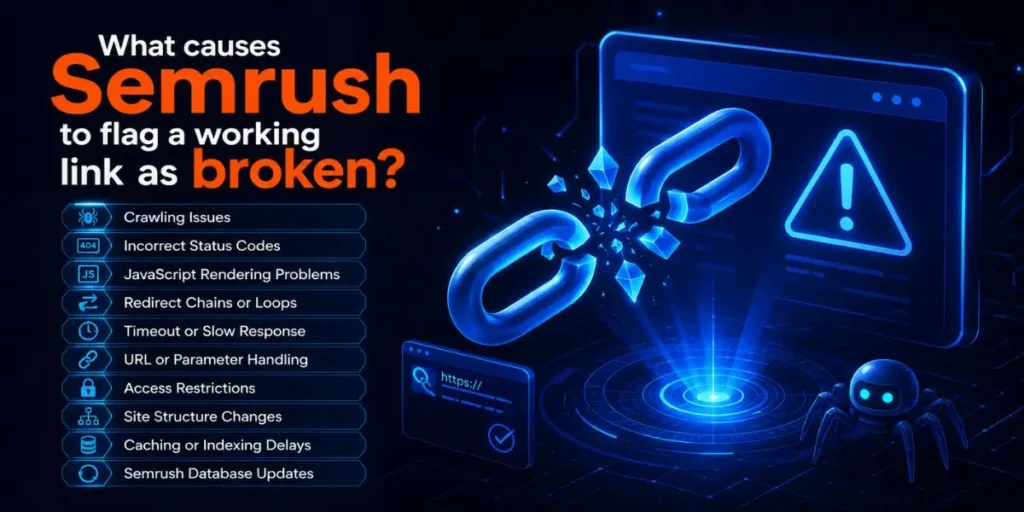
Semrush lists four main false-positive triggers, and field experience adds a few more that show up constantly. Here are the real causes, grouped by what is actually happening behind the scenes.
1. The crawler is blocked by robots.txt or noindex tags
If your robots.txt disallows the SiteAuditBot, or a page carries a noindex or nofollow directive, the bot cannot read that page and records it as inaccessible. The page works for visitors, but the crawler was told to stay out.
2. Your host blocks the bot, thinking it’s an attack
This one trips up a lot of people. When the SiteAuditBot hits many pages quickly, some hosting providers read that burst of requests as a DDoS attack and block the bot’s IP range. Your server is fine, your pages are fine, but the bot got shut out mid-crawl and logged those links as broken.
3. A CDN or firewall is filtering the bot
Security layers sit in front of many sites now, and they do not always recognize the Semrush crawler. Cloudflare, Sucuri, Imperva, and ModSecurity are common culprits that quietly drop bot requests. The result looks identical to a broken link, except the page is live the whole time.
4. DNS could not be resolved at crawl time
If the domain failed to resolve through DNS the moment the bot tried, Semrush marked pages as broken. This often comes from a root versus www mismatch, where you entered example.com in setup, but only www.example.com actually responds.
5. Server cache served old data
Caching is great for speed and terrible for audits when it goes stale. If your server cache hands the crawler an outdated version of a page, including a version from before you fixed something, Semrush reports based on that stale copy rather than the live one.
6. The page is heavier than the crawler can process
Semrush has a hard limit here. If a landing page, or its combined JavaScript and CSS files, exceeds 2MB, the crawler cannot fully process it and may report it as broken. The page still renders for humans because browsers are far more patient than crawlers.
7. Links are buried inside JavaScript
When your internal links live inside JavaScript elements rather than plain HTML, the bot may not see them correctly unless JavaScript rendering is enabled. A link that only appears after a script runs can be read as broken or missing by a crawler that did not execute that script.
8. A temporary 4xx or 5xx during the crawl
Servers hiccup. If your server was overloaded or briefly misconfigured at the exact second the bot checked a URL, it might have returned a 503 or a 429 for that single request. By the time you click, the server has recovered, and the page loads fine.
9. The crawl speed was simply too aggressive
Closely tied to the DDoS issue, a high crawl speed can overwhelm a small server. The early pages crawl fine, then the server starts throttling or refusing connections, and the rest of the batch gets logged as broken even though every page is healthy.
Why does Semrush mark external links as broken when they open fine?
External links break for the same reason, except the block is happening on someone else’s server.
When Semrush checks an outbound link to another site, that site’s firewall or bot protection may refuse the crawler while letting your browser through.
Honestly, external false positives are even more common than internal ones. Big platforms like LinkedIn, Twitter/X, Facebook, and many news sites aggressively block automated crawlers.
So your link to a live article gets flagged, not because the article is gone, but because the destination site told the bot to get lost.
Before you remove an external link that Semrush flagged, open it yourself. If it loads, the link is fine, and you can safely ignore or whitelist the error inside the report.
Why does Semrush show “broken redirect” if the redirect still works?
A redirect gets flagged as broken when any single hop in the redirect chain fails during the crawl.
Redirect chains pass through several URLs before landing on the final page, and if even one of those intermediate URLs returned a 4xx or 5xx at crawl time, the whole chain is logged as broken.
The chain may work perfectly when you test it because the failure was momentary, or because one URL in the chain blocks bots while serving humans normally.
Long redirect chains make this worse, since every extra hop is another place where the crawler can get a bad response.
Pro Tip: Keep redirects to a single hop wherever you can. A clean 301 from old URL straight to final URL gives the crawler nothing to trip over, and it also passes link equity more reliably than a chain of three or four redirects.
How do you confirm it’s a false positive and not a real broken link?
Run this quick check before changing anything on your site. It takes about two minutes and saves you from “fixing” links that were never broken.
- Open the flagged URL directly in your browser. Copy the exact target URL from the Semrush report and paste it into a fresh tab. If it loads, that is your first sign of a false positive.
- Check the live HTTP status code. Use a free header checker or your browser’s developer tools (Network tab) to confirm the page returns 200 OK rather than a 4xx or 5xx.
- Read the status code Semrush recorded. In the broken links report, look at the HTTP status column. A 429 or 503 points to throttling or a temporary block, which screams false positives.
- Test from a different network or device. If it works everywhere for you but fails only in Semrush, the problem is bot access, not the page.
- Re-run the audit once. If the same links clear on a second crawl with no changes made, they were almost certainly false positives caused by a temporary block.
Once you confirm the page is genuinely live, you can move on to fixing the crawler access instead of the link itself.
In My Experience
The thing that surprised me most was how often a single setting fixed dozens of “broken” links at once.
I had a client site on shared hosting throwing around forty broken internal links in Site Audit, and every one was loading fine in the browser.
The status column showed 503s across the board, which pointed straight at the host throttling the bot. Lowering the crawl speed to minimum and re-running cleared all forty in one pass. No link was ever actually broken.
The lesson stuck with me: when the broken count is suspiciously high and the pages all work, suspect the crawler before you touch a single URL.
How to fix Semrush false-positive broken links (step by step)

Work through these in order. Start with the lightest fixes, since crawl speed and a re-run solve a large share of cases without any technical changes.
- Lower the crawl speed. In your Site Audit settings, reduce crawl speed to the minimum. This stops the bot from overwhelming your server and triggering DDoS-style blocks. Re-run the audit and recheck.
- Clear your server cache, then re-crawl. Flush any caching plugin or server cache so the bot receives the current version of every page instead of stale data.
Allow SiteAuditBot in robots.txt. Make sure your robots.txt is not disallowing the bot. Add this directive so the crawler is explicitly permitted:
User-agent: SiteAuditBot
- Disallow:
- Leave a blank space after Disallow: so nothing is blocked for that bot.
- Remove restrictive meta tags. Check the flagged pages for noindex, nofollow, or none in the robots meta tag. Remove them if those pages should be crawlable.
- Whitelist the Semrush bot IP. Ask your host to allow the SiteAuditBot IP subnet 85.208.98.128/25, which connects over standard ports 80 (HTTP) and 443 (HTTPS). Whitelist it in your firewall, security plugins, and CDN too, not just at the server level.
- Whitelist inside your CDN. If you use Cloudflare, Sucuri, Imperva, or ModSecurity, add the same bot IP to that platform’s allow list. The CDN often blocks the bot before your server ever sees the request.
- Switch the user agent to GoogleBot. In your Project settings under User Agent, change SemrushBot to GoogleBot. Many servers that block unknown bots will happily allow Google’s user agent, letting the crawl complete.
- Enable JavaScript rendering. If your links live inside JavaScript, turn on JS rendering (available on Guru and Business plans). You can also switch the crawl source from website to sitemap so the bot does not miss hard-to-find pages.
- Fix the root versus www DNS issue. If pages fail with a DNS error, confirm you entered the version of the domain that actually resolves. Add a redirect between the root and www versions so both point to the live one.
- Add a Web Bot Auth signature for strict platforms. Platforms like Shopify block unknown bots by default. Adding a Web Bot Auth signature lets the Semrush crawler prove it is authorized, and the tool will prompt you to fix this if it detects the restriction.
- Trim oversized pages. If a page or its JS and CSS bundle tops 2MB, reduce that weight so the crawler can process it. This helps real users, too, since lighter pages load faster.
After applying the relevant fixes, run the audit one more time. Genuine false positives disappear, and anything still flagged is worth a closer manual look.
Pro Tip: Whitelisting the bot in your CDN is the step people skip most. They allow the IP on the server, see no change, and give up. The block was at the Cloudflare layer the whole time, sitting in front of the server, where the server-level allow list never applies.
Does a false-positive broken link hurt your SEO?
No, a false positive does not hurt your rankings, because the link works for Google and your visitors.
Google crawls your site with Googlebot, not the SiteAuditBot, so a block that affects only Semrush has zero impact on how Google sees or ranks the page.
That said, do not get lazy about it. A pile of false positives buries the real broken links in your report, and that clutter is where genuine problems hide.
Clean audits make it far easier to catch the 404 that actually matters before Google does.
Common pitfalls to avoid
These are the mistakes I see beginners make again and again when a “broken” link works fine.
- Deleting links that were never broken. Removing a healthy external link because Semrush flagged it costs you a useful reference and, if it was earning trust signals, a small SEO loss. Always open the link first.
- Trusting one crawl as final. A single audit can be skewed by a momentary server hiccup. One bad crawl is not proof; re-run before you act.
- Fixing the server level only. Allowing the bot on the server but forgetting the CDN or security plugin leaves the block exactly where it started.
- Ignoring the HTTP status column. A 429 or 503 in the report is a giant clue that the bot was throttled. Skipping that column means missing the fastest route to the real cause.
- Cranking crawl speed to maximum. Faster feels better until your small host reads it as an attack and blocks the bot halfway through, flooding your report with fake broken links.
Workflow example: fixing a batch of fake broken links
Here is a realistic flow you can copy when your report lights up with broken links that all seem to work.
Input: Site Audit shows 25 internal links marked broken. Spot-checking five of them in a browser, every page loads with a 200 status.
Process: Open the report’s HTTP status column and notice that most flagged links show 503. That points to server throttling.
Lower the crawl speed to minimum, clear the caching plugin, confirm robots.txt allows SiteAuditBot, and re-run the audit.
Output: The new crawl returns with 23 of the 25 links cleared. The remaining 2 still show 404, and testing them in a browser confirms they are genuinely dead.
Result: 23 were false positives caused by throttling, now resolved with zero link changes. The 2 real broken links get a 301 redirect to the closest live page. The report is finally clean and trustworthy.
In My Experience
I ran into an issue once where a Cloudflare-protected site kept reporting the same handful of pages as broken, no matter how low I set the crawl speed.
Nothing on the server side moved the needle. Switching the user agent to GoogleBot got me a partial improvement, but the real fix was adding the Semrush bot IP to the Cloudflare allow list specifically.
The moment that went in, the broken count dropped to zero on the next crawl. If a site sits behind a security layer, that layer is usually the one quietly saying no.
Frequently Asked Questions
Because the crawler gets blocked or hits a temporary error, while your browser does not. Common causes are firewall blocks, DDoS protection, stale cache, or a server hiccup during the crawl. The page is live; only the bot was refused.
Only after you confirm it is genuinely dead. Open the URL in your browser first. If it loads with a 200 status, it is a false positive, so leave the link in place and fix the crawler access instead.
Lower the crawl speed, clear your cache, allow SiteAuditBot in robots.txt, and whitelist its IP in your firewall and CDN. Switching the user agent to GoogleBot also helps on servers that block unknown bots.
No. Semrush uses its own SiteAuditBot, while Google uses Googlebot. A block that affects Semrush will not affect how Google crawls or ranks your page, which is why false positives do not hurt your SEO.
It means the server throttled or temporarily refused the crawler, not that the page is gone. These codes are strong signs of a false positive caused by crawl speed or DDoS protection rather than a real broken link.
The bottom line
When Semrush says a link is broken, but it works, treat it as a crawler access problem until proven otherwise. Open the link, check the status code, and look for throttling signals before you change anything.
Most of these flags clear with a slower crawl, a cache flush, and a proper bot whitelist.
Fix the access, re-run the audit, and let the genuinely broken links rise to the surface. That is where your real SEO work begins, and a clean report makes spotting them effortless.

Is an SEO Specialist and AI Tools Researcher with over 4 years of hands-on experience in search engine optimization. As the founder of Smart AI Helper Pro, he tests and reviews AI writing, SEO, and marketing tools to help creators and business owners grow faster with practical, research-backed strategies.
