
Will Architects Be Replaced by AI? The 2026 Reality
By SM Mehedi Hasan

No, architects will not be replaced by AI in 2026, and the latest U.S. Bureau of Labor Statistics data backs it up: architect employment is projected to grow 4% through 2034, with 123,600 working today. AI automates drafting and rendering, not judgment, licensure, or client trust.
Every design studio is asking the same thing this year. Students ask it before they commit to a five-year degree. Principals ask it before they hire.
And honestly, the fear is reasonable, because AI already drafts floor plans, spins up photorealistic renders in seconds, and reads building codes faster than any junior architect.
But the honest answer is more interesting than a yes or a no. So let’s walk through what’s actually happening, using real 2026 numbers instead of hype.
Table Of Contents
ToggleWill architects be replaced by AI in 2026?
No. Architects will not be replaced by AI in 2026, and there is no credible evidence that it will happen this decade. The question of whether architects will be replaced by AI keeps coming up because generative tools now handle tasks that used to eat weeks of a firm’s time.
What they cannot handle is the part that actually makes someone an architect: sealing a set of drawings and standing behind them legally. Most people assume the threat is the whole job. It isn’t. The threat is to a slice of tasks inside the job, mostly the repetitive production work.
According to a 2025 American Institute of Architects study, only 6% of architects use AI tools regularly, while 53% have experimented with them. That gap tells you where we really are: early days, lots of testing, very little full replacement of anything.
Here is the line the whole industry keeps repeating, and it holds up: AI won’t replace architects, but architects who use AI will replace those who don’t.
What can AI actually do in architecture right now?
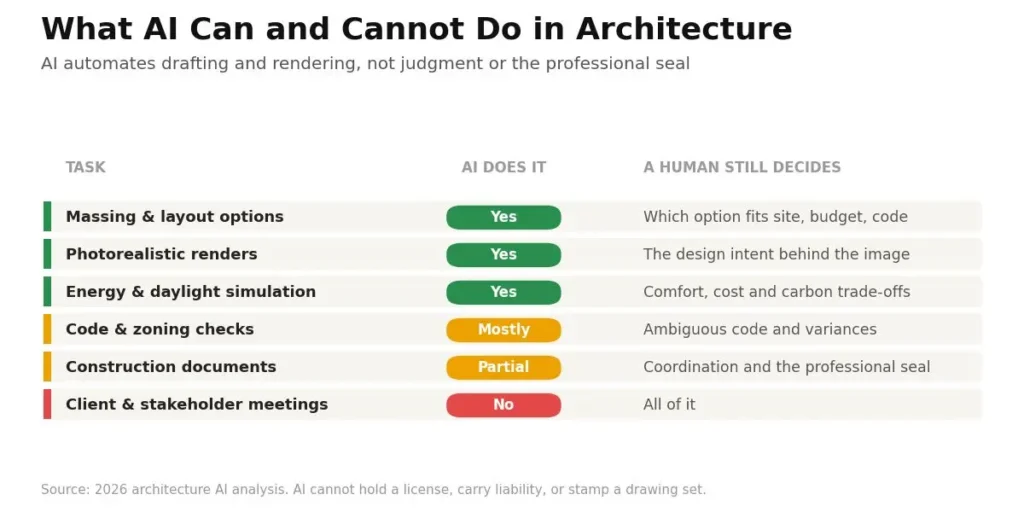
AI can generate design options, produce renders, run performance simulations, check code compliance, and automate documentation. It cannot make final design decisions, read a client’s unspoken needs, or take legal responsibility for a building. That split is the whole story.
Let me be specific, because vague answers help no one. When I’ve tested generative image tools on architectural prompts, they produce something usable in under a minute. The catch is that “usable” and “buildable” are different words.
Here’s the honest breakdown of where the tools land in 2026:
| Task | Can AI do it well? |
What still needs a human |
|---|---|---|
| Generate massing and layout options | Yes, fast | Choosing the option that fits site, budget, and code |
| Photorealistic renders | Yes, in seconds | Design intent behind the image |
| Early code and zoning checks | Mostly | Interpreting ambiguous code language and variances |
| Energy and daylight simulation | Yes | Deciding trade-offs between comfort, cost, and carbon |
| Construction documents | Partial | Coordination, accountability, and the professional seal |
| Client meetings and stakeholder conflict | No | All of it |
Where AI genuinely saves architects time
If you spend hours producing early renderings for client pitches, this is where the time savings show up first.
A recent Chaos and Architizer survey of roughly 800 architects (their fourth global one, run in early 2026) found that 85% of AI users report efficiency gains, concentrated in concept design and image-based work.
That matches what firms report on the ground. Site planning that took days now takes minutes. Feasibility studies that once tied up a junior architect for a week get a first draft in an afternoon.
Where AI still hits a wall
This works well, except when precision matters. AI renders are, to put it bluntly, confident guesses. They look polished but often ignore real constraints, such as structural spans, egress requirements, or ADA clearances.
The same 2026 survey found that 48% of architects name inconsistent or poor output quality as their single biggest frustration, and most say results still need checking and refining. So the tool speeds up the start of the work. It rarely finishes it.
Which architecture jobs are most at risk from AI?
Junior production roles face the biggest shift, not senior design or licensed roles. Drafters, renderers, and entry-level staff who spend most of their day on repetitive documentation are the ones whose daily tasks overlap most with what AI automates well.
But “shift” is not the same as “gone.” Compared to how this played out with CAD in the 1990s, the pattern looks familiar. CAD wiped out armies of hand-drafters, and the profession still grew, because the work moved up the value chain instead of disappearing.
Here’s how the risk actually stacks up in 2026:
- Higher exposure:
pure drafting, basic 3D rendering, first-pass code checks, and template documentation. These are the tasks AI replicates fastest. - Lower exposure:
schematic design, client relationships, permitting and variance negotiation, construction administration, and anything requiring the professional seal. - Firm-size wrinkle:
larger firms with tech teams and data are adopting fastest, which means a junior at a big firm may feel the change sooner than one at a small practice.
If you’re an entry-level architect reading this, the takeaway matters: your value can no longer be “I can produce drawings.” It has to be “I can direct AI to produce drawings and then judge what’s wrong with them.”
Pro tip: Don’t try to out-draft the machine. Learn to review AI output critically instead. The architect who can spot the code violation an AI missed is worth far more in 2026 than the one who draws the cleanest line.
Why can’t AI legally replace a licensed architect?
Because AI cannot hold a license, carry liability, or stamp a drawing set. Every building permit, professional insurance policy, and contract in the United States names a licensed human as the responsible party, not a software platform. That legal wall is the hardest thing standing in the way of AI’s full replacement.
This is the part most articles skip, and it’s the most important one. When a building fails, someone is legally accountable. A licensed architect can face disciplinary action, lose their license, and be sued. An algorithm cannot be any of those things.
Phil Bernstein, an architect and Yale professor, put it plainly at NCARB’s Futures Symposium: AI can accelerate and augment the work, but it will be a long time before AI can design a building completely. The architect of record stays responsible for the output, no matter which tools produced it.
And that responsibility isn’t a formality. Interpreting ambiguous code, negotiating a variance with a building official, weighing life-safety trade-offs- these are judgment calls with public-safety consequences. Automation changes the technique. It cannot take on the accountability.
What do the numbers really say about architect jobs?
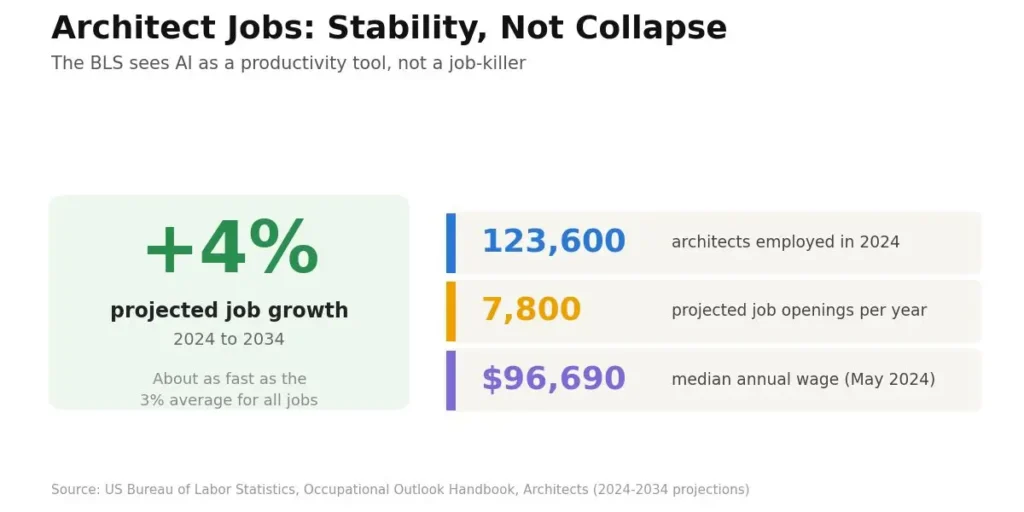
The data points to stability, not collapse. Despite years of “AI will kill architecture” headlines, the most authoritative U.S. source projects steady growth. Here are the latest verified figures from the U.S. Bureau of Labor Statistics, based on the 2024 to 2034 projections cycle.
| Metric | Figure (latest BLS data) |
|---|---|
| Architects employed (2024) | About 123,600 |
| Projected job growth, 2024 to 2034 | 4% (about as fast as average) |
| Average annual openings | About 7,800 per year |
| Median annual wage (May 2024) | $96,690 |
| Lowest 10% earn below | $60,510 |
| Highest 10% earn above | $159,800 |
Source: U.S. Bureau of Labor Statistics, Occupational Outlook Handbook, Architects. Now here’s the detail almost every competing article gets wrong. Many still quote older employment figures or an outdated 2033 projection window.
The current BLS cycle runs through 2034 and puts the count at 123,600 architects with 4% projected growth. If you’re comparing sources, the 2024 to 2034 numbers are the ones to trust right now. What surprised me most was that the BLS itself addresses AI directly.
Its outlook notes that design work is becoming more efficient thanks to BIM software and AI integration, but adds that these productivity gains enable architects to take on new roles and become more involved throughout the full building process.
In other words, the government’s own labor forecasters see AI as a productivity tool, not a job-killer. Pay tells a similar story. Licensed architects typically earn 15% to 20% more than unlicensed staff doing similar work, because they can sign construction documents and carry professional liability. That premium is precisely the human-accountability piece AI can’t touch.
Which AI tools are architects actually using in 2026?
Architects in 2026 lean on a mix of generative design platforms, rendering tools, and code-analysis assistants. Most firms use several, not one. This is another area where many articles stay shallow, naming one or two tools and stopping there.
Here’s a fuller picture of the real 2026 landscape and what each type is for.
- Generative site planning (TestFit, Hypar, ARCHITEChTURES):
feed in zoning rules, setbacks, and parking needs, and they generate compliant layout options in minutes. - AI-assisted design and analysis (Autodesk Forma):
analyzes site constraints, sun, wind, and noise early in the process to guide smarter decisions. - Rendering and concept imagery (Midjourney, Veras, Adobe Firefly):
turn sketches or rough models into presentation-ready visuals fast. - BIM plugins and chatbots (Revit AI plugins, internal LLM assistants):
catch clashes, summarize codes, and surface project knowledge.
Adoption is uneven by design. The Chaos and Architizer 2026 survey found that while 64% of architects have experimented with AI, only about 20% have fully folded it into their workflow, and 74% expect to use it more soon. So the direction is clear even if the finish line isn’t.
In My Experience
Honestly, when I first ran architectural prompts through generative image tools, the results looked stunning and were completely unbuildable. The tool gave me a glass atrium with floating structural columns, cantilevers with no visible support, and a staircase that led into a wall.
That’s the thing nobody tells you upfront. These tools are trained to produce something that looks right, not something that stands up.
When I was refining a single concept image, it took roughly a dozen re-prompts to get lighting and proportion where I wanted, and even then it needed manual cleanup in an editor. One limitation caught me off guard: consistency.
Ask for the same building from a slightly different angle, and you often get a different building. For moodboards and early ideation, that randomness is fine, even useful. For anything a client might mistake for a real proposal, it’s a trap.
My honest read after months of testing is that AI is a brilliant intern with infinite energy and zero accountability, which is exactly why a human still has to sign off.
How should architects actually start using AI?
- Start with the messiest, most repetitive task you have.
Pick the one workflow that drains hours weekly, usually early renders or feasibility studies. Targeting your biggest time-sink first means the payoff is obvious and fast, which builds buy-in from the rest of the team. - Choose one tool, not five.
Sign up for a single platform that fits that task and learn it deeply. Spreading across many tools at once creates confusion, so mastering one first gives you a real benchmark before you expand. - Run it in parallel, not in production.
For the first few projects, use AI alongside your normal process rather than replacing it. This lets you measure actual time saved and catch quality gaps before anything reaches a client. - Build a review checklist.
Write down the things AI gets wrong: code clearances, structural logic, ADA, egress. Checking every AI output against a fixed list turns “confident guess” into “verified draft” and protects you legally. - Measure, then scale.
Track hours saved on one project type before rolling AI out firm-wide. Concrete numbers tell you whether the tool earns its cost or just adds a subscription.
Worth doing: Give your team dedicated, protected time to experiment. Firms that treat AI learning as a side task during crunch never actually adopt it. An hour a week beats a rushed all-day workshop.
Common Pitfalls to Avoid
A few mistakes keep popping up when firms bring AI into the studio. Most stem from treating the tool like a finished product rather than a starting point.
- Trusting the render as reality.
AI images look authoritative, so people forget to check them against code and structure.
Fix: never present AI output to a client without a human review pass. - Adopting AI on top of chaos.
Adding tools to a firm that already can’t track its projects just creates expensive chaos.
Fix: stabilize your basic workflow first, then layer AI on. - Chasing tools because competitors have them.
Buying a platform with no specific problem to solve wastes money and morale.
Fix: identify the exact bottleneck before you subscribe. - Skipping the legal review.
Assuming AI-checked code complies with the final version is dangerous.
Fix: a licensed architect verifies every compliance output, always. - Letting juniors lose the fundamentals.
If entry-level staff only ever prompt AI, they never learn to judge good design.
Fix: pair AI use with mentorship on why a design works.
A Real Workflow Example
Here’s how AI actually fits into a single early-stage task, start to finish.
Input: A small firm gets a request for a mixed-use concept on a tight urban lot. Constraints: zoning setbacks, a parking minimum, and a 55-foot height cap.
Process: The architect feeds the lot dimensions and rules into a generative site-planning tool, which returns eight compliant massing options in minutes. She discards five immediately (poor light, awkward circulation), keeps three, and runs a quick sun-and-wind analysis on each. She then uses a rendering tool to turn the strongest option into a presentation image, re-prompting a few times for proportion.
Output: Three viable massing schemes and one polished concept render, produced in about half a day instead of the usual two to three days.
Result: The client sees thoughtful, vetted options faster, the architect spends her saved time on design refinement rather than grunt work, and the firm wins the pitch for responsiveness. The AI did the heavy lifting on iteration. The human did the deciding.
What will architecture look like by 2030?
Expect AI-augmented practice to become the default, not the exception. The tools will become more architecture-specific, adoption will climb well past today’s minority level, and the job description will shift toward judgment, coordination, and client work. The core role stays human.
If current trends hold, a few things look likely by 2030:
- Adoption normalizes.
RIBA’s 2026 reporting already shows 59% of surveyed practices using AI, up from 41% a year earlier. That curve points upward across the profession. - Entry-level roles change shape.
Fewer pure production jobs, more roles that expect design judgment and AI fluency from day one. Architecture schools are already adjusting curricula toward this. - New specializations emerge.
Climate-responsive design, retrofit and resilience work, and AI-workflow leadership become distinct career paths. - The seal stays human.
No serious forecast, including the BLS outlook, predicts that AI takes over legal responsibility for buildings within this window.
If you’re planning a career or a hire around this, the safe bet is skills that complement AI rather than compete with it. Prompting, critical review, negotiation, and design vision age well. Speed at drafting does not.
Frequently Asked Questions
No. AI automates repetitive drafting, rendering, and code-checking tasks, but it cannot hold a license, take legal responsibility for a building, or replace client trust and design judgment. Those remain human by law and by nature.
Junior and production-focused roles face the most change, especially pure drafting and basic rendering. Licensed architects, designers, and anyone handling client relationships or permitting are far less exposed, since those tasks are less amenable to automation.
Yes. BLS projects 4% job growth through 2034, with about 7,800 openings per year and a median wage of $96,690. Demand stays steady, especially for architects who can work fluently with AI tools.
Common 2026 tools include TestFit and Hypar for site planning, Autodesk Forma for site analysis, and Midjourney or Veras for renders. Most firms combine several, using AI for early ideation and production.
Absolutely. Students who learn to direct and critically review AI output will have an edge, since firms increasingly expect AI fluency alongside design fundamentals. Focus on judgment and prompting, not just tool mechanics.
The bottom line
AI is reshaping how architects work, not whether they work at all. The tools handle the tedious middle of the process beautifully, and they fail exactly where the profession has always earned its keep: judgment, responsibility, and human connection.
So the smart move isn’t to fear the technology or to ignore it. Learn it, direct it, and let it clear the busywork off your desk. The architect who does that in 2026 isn’t being replaced. They’re getting a head start.

Is an SEO Specialist and AI Tools Researcher with over 4 years of hands-on experience in search engine optimization. As the founder of Smart AI Helper Pro, he tests and reviews AI writing, SEO, and marketing tools to help creators and business owners grow faster with practical, research-backed strategies.